Deliveries in depth
Every control and text of Webhooks > Deliveries and a delivery's drawer.
Every control and text this screen shows, in screen order. The list is read from the demo by a crawl, and CI fails when the screen changes without its entry here.
Webhooks > Deliveries lists every request SendMock sent to your endpoints, with what each answered, and replays any of them.
The screen as a whole: Deliveries.
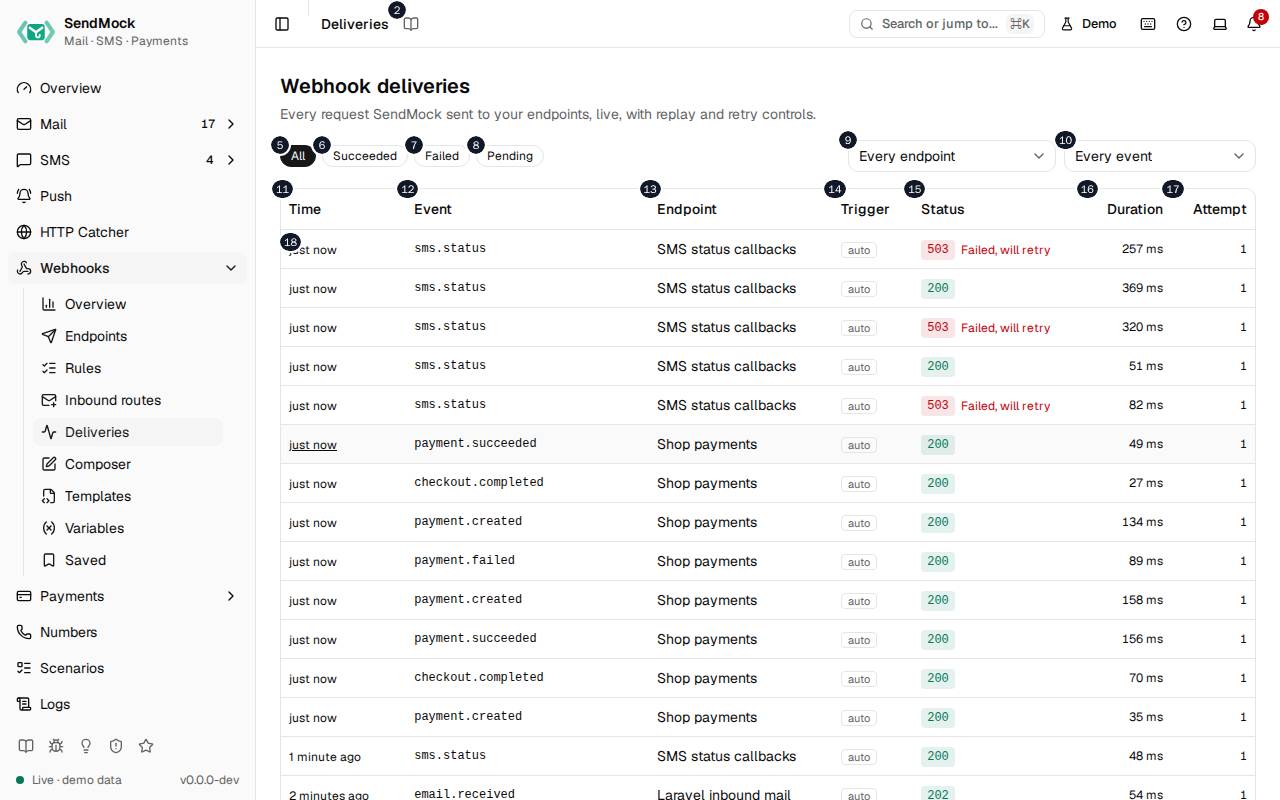
The numbers match the entries below. The picture shows the first screenful; controls further down, and texts, have no marker.
On the screen
1. Deliveries
Heading.
- What it does: Names the open screen in the header.
2. Read the Deliveries guide
Link.
- What it does: Opens this screen's page in the user guide, in a new tab.
- Links to: Deliveries.
3. Webhook deliveries
Heading.
- What it does: Every request SendMock sent to your endpoints, newest first, updated live.
- Same action elsewhere: REST
GET /api/v1/webhooks/deliveries, CLIsendmock webhook deliveries list, MCPsendmock_webhook_delivery_list
4. Every request SendMock sent to your endpoints, live, with replay and retry controls.
Text.
- What it does: Explains the screen.
5. All
Button.
- What it does: Shows every delivery.
6. Succeeded
Button.
- What it does: Shows deliveries your endpoint answered 2xx.
7. Failed
Button.
- What it does: Shows deliveries that failed every attempt, or could not be rendered.
8. Pending
Button.
- What it does: Shows deliveries waiting for their first try or a retry.
9. Endpoint filter
Drop-down.
- What it does: Shows one endpoint's deliveries, or all.
10. Event filter
Drop-down.
- What it does: Shows deliveries of one event type, or all.
11. Time
Column.
- What it does: When the delivery was made.
12. Event
Column.
- What it does: The event it carried, such as
email.received.
13. Endpoint
Column.
- What it does: Where it went.
14. Trigger
Column.
- What it does: What started it: a rule, a test, a manual send, a replay, a saved delivery, or an endpoint chosen for one simulation.
15. Status
Column.
- What it does: Succeeded, failed, retrying, pending, canceled, exhausted or render failed, with the HTTP status.
16. Duration
Column.
- What it does: How long the endpoint took to answer.
17. Attempt
Column.
- What it does: Which attempt this is, of the endpoint's maximum.
18. …
Link, in each row.
- What it does: Opens the delivery: its request, its answer and every attempt.
- Same action elsewhere: REST
GET /api/v1/webhooks/deliveries/{deliveryId}, CLIsendmock webhook deliveries show, MCPsendmock_webhook_delivery_get
19. Load more
Button.
- What it does: Loads the next page of older deliveries.
A delivery is open
20. Delivery
Heading.
- What it does: The delivery drawer.
21. The request SendMock sent and what your endpoint answered.
Text.
- What it does: Explains the drawer.
22. Your Acme verification code is #. It expires in # minutes.
Link.
- What it does: The message the delivery is about (here an SMS); opens it.
23. Copy as cURL
Button.
- What it does: Copies the request as a curl command, to run it yourself.
24. Replay
Button.
- What it does: Sends the same request again, as it was, as a new delivery.
- What it changes: Records a replay delivery, linked to this one.
- Same action elsewhere: REST
POST /api/v1/webhooks/deliveries/{deliveryId}/replay, CLIsendmock webhook deliveries replay, MCPsendmock_webhook_delivery_replay
25. Edit and replay
Button.
- What it does: Opens the request in an editor, then sends your changed copy as a new delivery.
- Same action elsewhere: REST
POST /api/v1/webhooks/deliveries/{deliveryId}/replay, CLIsendmock webhook deliveries replay, MCPsendmock_webhook_delivery_replay
26. Save
Button.
- What it does: Keeps the request as a saved delivery, which survives pruning and reset.
- Links to: Saved.
- Same action elsewhere: REST
POST /api/v1/webhooks/saved, CLIsendmock webhook saved create, MCPsendmock_webhook_saved_create
27. Request POST
Heading.
- What it does: The request's method and URL.
28. Request headers
Heading.
- What it does: The headers sent, signature included.
29. Request body
Heading.
- What it does: The body sent.
30. Copy request body
Button.
- What it does: Copies the request body.
31. Response
Heading.
- What it does: Your endpoint's HTTP status and how long it took.
32. Response headers
Heading.
- What it does: The headers your endpoint answered with.
33. Response body
Heading.
- What it does: What your endpoint answered.
34. Copy response body
Button.
- What it does: Copies the response body.
35. Close
Button.
- What it does: Closes the drawer.
With no data yet
36. No deliveries yet
Text.
- What it does: Shown when no webhook has been delivered yet.
37. Deliveries appear here when a rule sends an event to an endpoint, or when you send a test from Endpoints.
Text.
When the data cannot load
38. Could not load the deliveries. Try again
Message.
- What it does: Shown when the deliveries could not be loaded.
- Errors: Check SendMock is running, then press Try again.
39. Could not load the deliveries.
Text.
- What it does: The message inside the alert.
40. Try again
Button.
- What it does: Loads the deliveries again.
- Same action elsewhere: REST
GET /api/v1/webhooks/deliveries, CLIsendmock webhook deliveries list, MCPsendmock_webhook_delivery_list