Templates in depth
Every control and text of Webhooks > Templates, a template and its dialogs.
Every control and text this screen shows, in screen order. The list is read from the demo by a crawl, and CI fails when the screen changes without its entry here.
Webhooks > Templates holds every payload format an endpoint can send, built in or your own.
The screen as a whole: Templates.
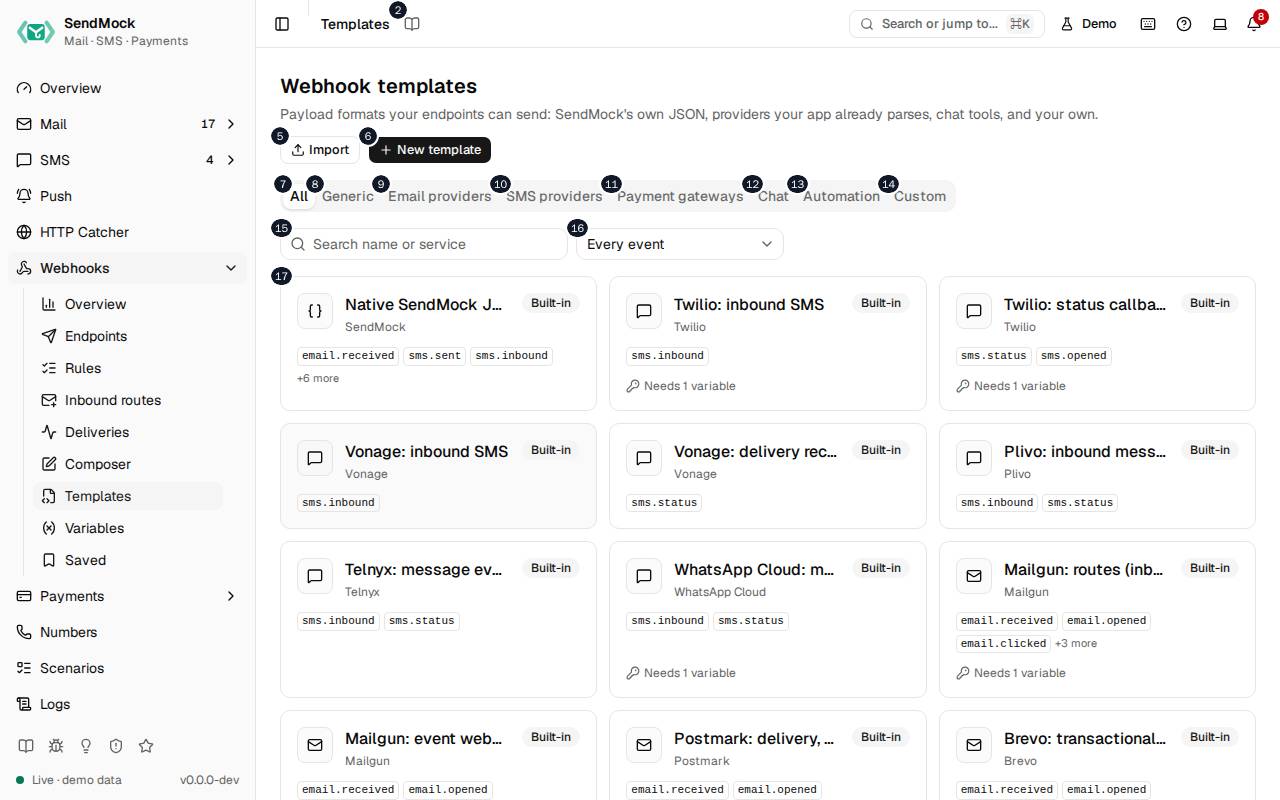
The numbers match the entries below. The picture shows the first screenful; controls further down, and texts, have no marker.
On the screen
1. Templates
Heading.
- What it does: Names the open screen in the header.
2. Read the Templates guide
Link.
- What it does: Opens this screen's page in the user guide, in a new tab.
- Links to: Templates.
3. Webhook templates
Heading.
- What it does: Every payload format an endpoint can send.
- Same action elsewhere: REST
GET /api/v1/webhooks/templates, CLIsendmock webhook template list, MCPsendmock_webhook_template_list
4. Payload formats your endpoints can send: SendMock's own JSON, providers your app already parses, chat tools, and your own.
Text.
- What it does: Explains the screen.
- Links to: Built-in webhook templates.
5. Import
Button.
- What it does: Opens Import a template; in the dialog, imports it.
- Same action elsewhere: REST
POST /api/v1/webhooks/templates/import, CLIsendmock webhook template import, MCPsendmock_webhook_template_import
6. New template
Button.
- What it does: Opens New template.
7. All
Tab.
- What it does: Every template.
8. Generic
Tab.
- What it does: SendMock's native JSON.
9. Email providers
Tab.
- What it does: Templates that act like an email provider's webhooks.
10. SMS providers
Tab.
- What it does: Templates that act like an SMS provider's callbacks.
11. Payment gateways
Tab.
- What it does: Templates that act like a payment gateway's notifications.
12. Chat
Tab.
- What it does: Slack, Discord, Teams, Google Chat and Telegram messages.
13. Automation
Tab.
- What it does: A flat JSON format for n8n, Zapier and Make.
14. Custom
Tab.
- What it does: Your own templates and those loaded from a templates folder.
15. Search templates
Field.
- What it does: Filters by name or service.
16. Event filter
Drop-down.
- What it does: Shows only templates that fit an event.
17. …
Link, in each row.
- What it does: A template card: its service, name and events, with Modified or From file badges; opens it.
- Same action elsewhere: REST
GET /api/v1/webhooks/templates/{templateId}, CLIsendmock webhook template show, MCPsendmock_webhook_template_get
A template is open
18. Native SendMock JSON
Heading.
- What it does: The template open in the drawer (here SendMock's native JSON).
19. SendMock · Built-in · revision
Text.
- What it does: Its service, whether it is built in, modified or yours, and its revision.
20. Use in new endpoint
Link.
- What it does: Opens the new endpoint editor with this template chosen.
- Links to: Endpoints.
21. Edit
Button.
- What it does: Opens the template editor; a built-in becomes Modified, and Reset to default brings it back.
- Same action elsewhere: REST
PATCH /api/v1/webhooks/templates/{templateId}, CLIsendmock webhook template update, MCPsendmock_webhook_template_update
22. Clone
Button.
- What it does: Makes your own copy of the template.
- Same action elsewhere: REST
POST /api/v1/webhooks/templates/{templateId}/clone, CLIsendmock webhook template clone, MCPsendmock_webhook_template_clone
23. Export
Button.
- What it does: Downloads the template as a
.sendmock-template.tomlfile. - Same action elsewhere: REST
GET /api/v1/webhooks/templates/{templateId}/export, CLIsendmock webhook template export, MCPsendmock_webhook_template_export
24. Native SendMock JSON payload, matching the provider's documented format.
Text.
- What it does: The template's description.
25. Body template
Heading.
- What it does: The template's body, in the template language.
26. Preview with
Drop-down.
- What it does: The event the preview renders: a sample, or a recent real message.
- Same action elsewhere: REST
POST /api/v1/webhooks/templates/{templateId}/render, CLIsendmock webhook template render, MCPsendmock_webhook_template_render
27. Rendered headers
Heading.
- What it does: The headers it renders, signature included.
28. Rendered body
Heading.
- What it does: The body it renders.
29. Copy rendered body
Button.
- What it does: Copies the rendered body.
30. Close
Button.
- What it does: Closes the drawer or dialog.
Import a template dialog
31. Import a template
Heading.
- What it does: The Import a template dialog.
32. A .sendmock-template.toml or JSON file exported from SendMock, or its text.
Text.
- What it does: Explains what can be imported.
33. File
Button.
- What it does: Reads a template file from your computer.
34. Template text
Field.
- What it does: The template file's text, pasted.
35. Cancel
Button.
- What it does: Closes the dialog without doing anything.
36. Import
Button.
- What it does: Opens Import a template; in the dialog, imports it.
- Same action elsewhere: REST
POST /api/v1/webhooks/templates/import, CLIsendmock webhook template import, MCPsendmock_webhook_template_import
37. Close
Button.
- What it does: Closes the drawer or dialog.
New template editor
38. New template
Heading.
- What it does: The New template dialog.
39. It starts as SendMock's native JSON; change it in the editor that opens next.
Text.
- What it does: Explains where a new template starts.
40. Name
Field.
- What it does: The name.
41. Cancel
Button.
- What it does: Closes the dialog without doing anything.
42. Create
Button.
- What it does: Creates the template and opens its editor.
- Same action elsewhere: REST
POST /api/v1/webhooks/templates, CLIsendmock webhook template create, MCPsendmock_webhook_template_create
43. Close
Button.
- What it does: Closes the drawer or dialog.
When the data cannot load
44. Could not load the templates. Try again
Message.
- What it does: Shown when the templates could not be loaded.
- Errors: Check SendMock is running, then press Try again.
45. Could not load the templates.
Text.
- What it does: The message inside the alert.
46. Try again
Button.
- What it does: Loads them again.
- Same action elsewhere: REST
GET /api/v1/webhooks/templates, CLIsendmock webhook template list, MCPsendmock_webhook_template_list