Scenarios
Write a multi-step test once, check it and run it step by step, in the app, from the CLI, in CI or from an AI agent.
Try it in the demo.
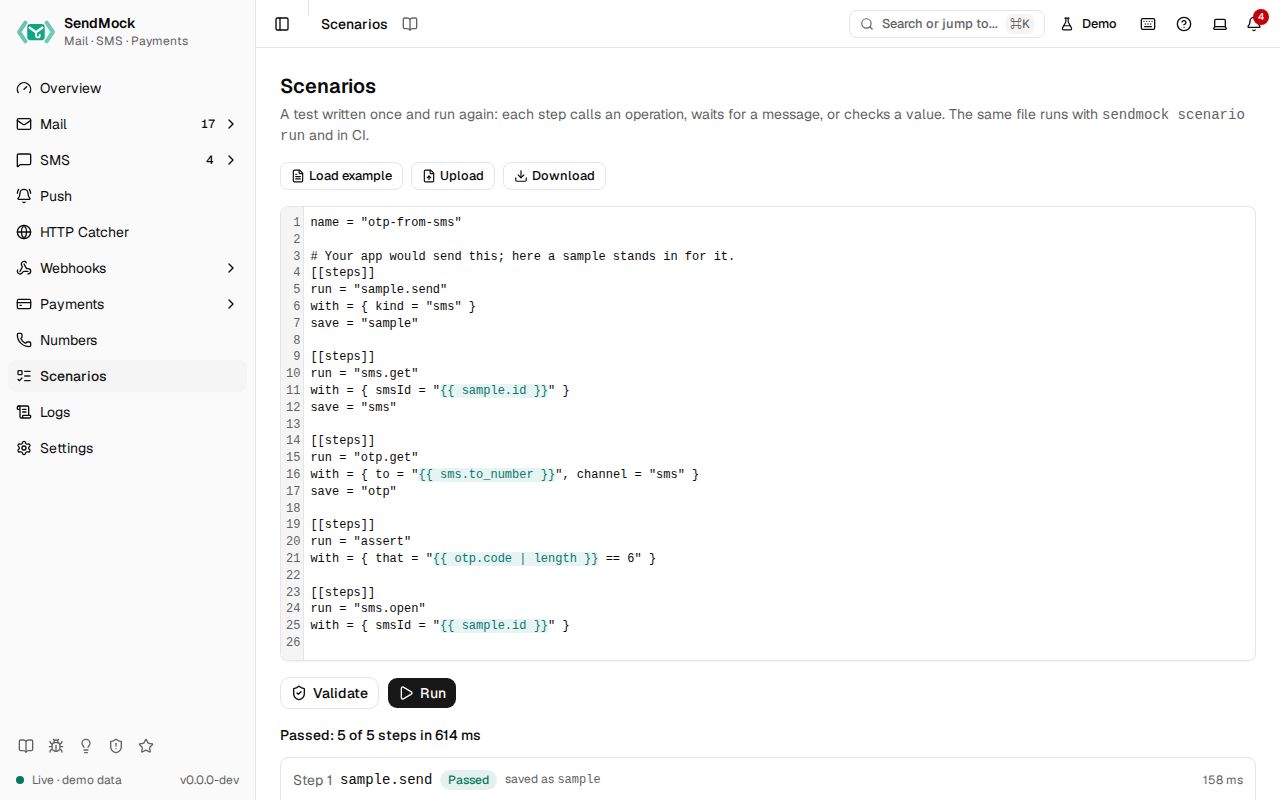
A scenario is a short TOML file: set things up, make your app do something, wait for the message, check a value, simulate what happens next. The Scenarios screen writes, checks and runs one, and shows every step's input and answer.
What it solves
- A flow you test by hand every time (sign up with a code, reply to a ticket, pay a checkout) becomes one file you run again.
- The same test in CI: the file you run here runs with
sendmock scenario runin your pipeline. - An AI agent's work, kept: after an agent sets something up, it can write a scenario that proves it works.
How it connects
| Gets from | Sends to |
|---|---|
| a scenario file: typed, loaded from an example, or uploaded | each step calls the same operation as the REST API, CLI and MCP tool of that name |
the values earlier steps saved (save = "otp", then {{ otp.code }}) | everything those operations do: emails in Mail, SMS in SMS, payments in Payments, deliveries in Deliveries |
Use it
- Open Scenarios (
G C). - Press Load example and pick Read the code of an SMS.
- Press Validate: "Valid: 5 steps".
- Press Run. Each step shows Passed, its input and answer, and what it saved. The summary says "Passed: 5 of 5 steps".
Everything on this screen
The editor
The scenario's text, with Load example (read the code of an SMS, reply to an email as its recipient, pay a Stripe checkout with a test card), Upload a .toml file and Download the current text.
Steps
Each [[steps]] table has:
run: an operation, named after its MCP tool without thesendmock_prefix and with dots:sendmock_sms_getissms.get,sendmock_payment_create_checkoutispayment.create.checkout. Alsohttp(call your app),assert(check a value) andsleep.with: the operation's input. Path parameters by name (smsId,emailId), the rest as the query or body. Values may use{{ saved.value }}and{{ saved.list | length }}.save: a name for the step's answer, for later steps.
Validate and Run
Validate lists problems with their step number (an unknown operation, a missing run). Run runs the steps in order and stops at the first failure; later steps show Skipped. In Demo mode, http steps that call your app are skipped.
The report
The summary ("Passed: 5 of 5 steps in 120 ms", or "Failed at step 2: ..."), then each step with its status, time, the value it saved, and Input and answer to open. Nothing is stored: the report stays until the next run.
Every control and text, one by one: Scenarios in depth.
Customize
The full file format and a CI example: Advanced: scenarios.
From your code
Run a scenario from a test and check every step passed.
The examples call SendMock's REST API with each language's usual HTTP client and test framework. JavaScript, Go, Java, Rust, Ruby and C# use the small call helper shown under Test helper on their page in Connect your app.
report=$(sendmock scenario run 'name = "sample-sms"

[[steps]]
run = "sample.send"
with = { kind = "sms" }' --json)

jq -e '.is_passed == true' <<<"$report" >/dev/null
From the CLI, API and AI
| Do this | CLI | API | MCP tool |
|---|---|---|---|
| check a scenario file | sendmock scenario validate <file> | POST /api/v1/scenarios/validate | sendmock_scenario_validate |
| run it | sendmock scenario run <file> | POST /api/v1/scenarios/run | sendmock_scenario_run |