Inbox
Catch every email your app sends over SMTP or a provider API, read it, check it, and simulate what happens next.
Try it in the demo.
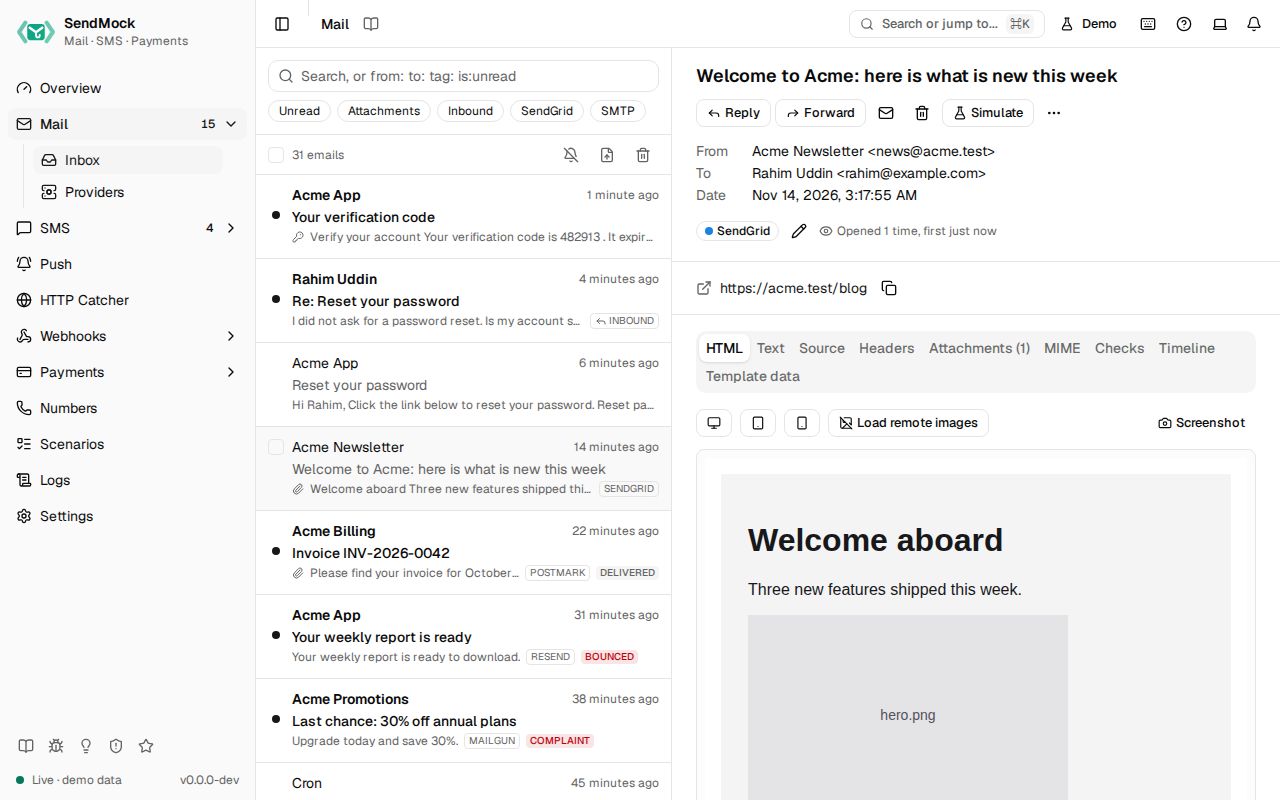
Every email your app sends lands in Mail > Inbox, whatever the recipient, and nothing is delivered to a real inbox. Mail opens the inbox; Mail > Providers lists the email APIs SendMock answers.
What it solves
- Testing email without real inboxes. Sign-up, password reset, invoices and alerts can be sent to any address, including real customers' addresses copied from production data, and none of them leave your machine. See Recipe: password reset.
- Reading codes and links in tests. One-time codes and links are pulled out of every email, ready to copy or read from the CLI. See Recipe: read a code.
- Checking the email looks right on phones and in common clients, with broken links and spam score flagged. See Reading and checks.
- Handling what happens after sending: bounces, spam complaints, unsubscribes and replies. See Outcomes and Replies and forwards.
How it connects
| Gets from | Sends to |
|---|---|
your app over SMTP (port 1025), the SendGrid, Mailgun, Postmark, Resend, SES and Brevo APIs, or POST /api/v1/send | email.received and the other email.* events to Webhooks > Rules |
| Reply as recipient and Forward as recipient on an email | an incoming email (email.inbound) for Inbound routes |
| Settings > Email: outcome addresses, delivery profile, inbound domains, relay | the SMTP session to Logs > SMTP, the API request to Logs > API requests |
| Settings > OTP patterns: what counts as a code | Release to a real SMTP relay, only to allowlisted addresses (Release) |
| Send to webhook: one email to any endpoint, by hand (Composer and Saved) |
Use it
- Open Mail > Inbox (
G M). - Point your app's mail settings at
127.0.0.1:1025(any username and password, no TLS needed), or press Send a sample email on the empty screen. - Trigger an email in your app. It appears at the top of the list within a second.
- Open it. Read the HTML tab, switch to the phone width, and copy the code or link from the extracted panel.
- Press Simulate and pick Hard bounce. The email shows the outcome, its Timeline gets an entry, and any rule on
email.bouncedsends a delivery.
Everything on this screen
Sending to SendMock
- SMTP on
127.0.0.1:1025. Any username and password are accepted; every recipient is accepted. - Provider APIs at their real paths on port
8026: SendGrid, Mailgun, Postmark, Resend, Amazon SES and Brevo. Your app keeps its SDK and only changes the base URL. - Native send:
POST /api/v1/sendwith JSON (from,to,subject,html,text, optionalcc,bcc,tags,headersand base64attachments).
The list
Newest first, with sender, subject, snippet, time, an unread dot, an attachment icon, tags, the source (SMTP, SendGrid, ...) and any outcome badge (bounced, complained). It loads more as you scroll.
- Search with plain words or prefixes:
from:,to:,tag:,source:,has:attachment,is:unread,is:inbound. - Chips toggle unread, attachments, inbound and each source.
- Import .eml: upload or paste a whole message and store it as Sent by your app (like the
sendmailshim) or Incoming to your app (inbound routes deliver it). - Bulk select and Delete all (asks first).
- The bell button in the list header turns on browser notifications for new email.
- Keys:
JandKmove,Enteropens,Ddeletes,/searches.
The open email
- Header: subject, from, to, cc, time, tags, the source badge (it links to the SMTP session in Logs), and "Opened N times" once opened.
- Extracted panel: one-time codes and links, each with copy and open buttons.
- Tabs: HTML, Text, Source, Headers, Attachments, MIME, Checks, Timeline and Template data. Each is explained in Reading and checks.
- Actions: mark read or unread, Simulate (Delivered, Hard bounce, Soft bounce, Spam complaint, Unsubscribe; see Outcomes), Reply, Reply all, Forward (see Replies and forwards), tag, download
.eml, Send to webhook, Release to real SMTP (see Release) and delete.
Every control and text, one by one: Inbox in depth.
Customize
- Make your own addresses bounce, defer or be rejected: Advanced: email outcome addresses.
- Teach SendMock your code format: Advanced: OTP patterns.
- Choose what happens to every email by default (nothing, always delivered, or realistic bounce rates): Settings > Email.
- Test what happens when the mail server misbehaves: Advanced: chaos.
From your code
Wait for the email your app just sent, the way most tests use Mail.
The examples call SendMock's REST API with each language's usual HTTP client and test framework. JavaScript, Go, Java, Rust, Ruby and C# use the small call helper shown under Test helper on their page in Connect your app.
# In your app: sign up as [email protected]

email=$(sendmock email wait --to [email protected] --subject Welcome --timeout 10s --json)

jq -e '.is_read == false' <<<"$email" >/dev/null
From the CLI, API and AI
Related
- Logs: the SMTP session behind each email.
- Webhooks: send email events to your app.
- Recipe: inbound email
- Read the mail over POP3: a mail client or a mailbox-polling feature reads what SendMock caught.
- Coming from Mailpit: SendMock answers Mailpit's API, so tools written for it keep working.