Inbound routes
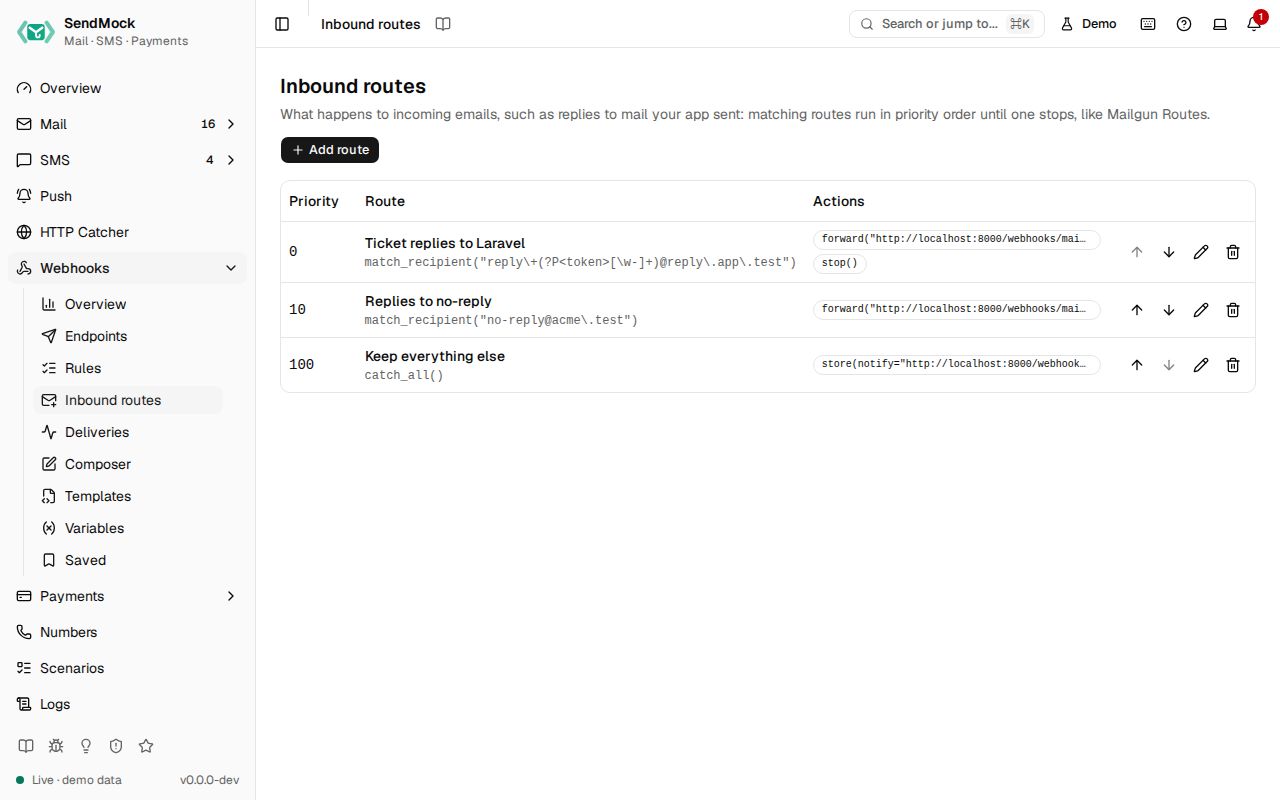
Decide where incoming email goes, the way Mailgun Routes do. Match a recipient or header, then forward, store or stop.
Try it in the demo.
Incoming email (a reply or forward you simulated in Mail, or mail to an inbound domain) is delivered by routes. They follow Mailgun's model exactly, so a route copied from the Mailgun dashboard, or created by your app through Mailgun's Routes API, behaves the same.
What it solves
- Your "reply to this email" feature needs the reply posted to your app, with only the new text.
- Each reply should reach the right ticket:
reply+<ticket>@reply.app.testcarries the ticket id. - Your app creates its Mailgun routes on boot; they should work locally too.
How it connects
| Gets from | Sends to |
|---|---|
incoming email from Mail (email.inbound) | your app, in Mailgun's format (or SendGrid Inbound Parse or Postmark inbound), as deliveries in Deliveries |
your app, through the Mailgun Routes API (/v3/routes) on port 8026 | a real address, only through the Release allowlist |
| the email's Timeline: "Forwarded by route ... to ..." |
Use it
- Press Add route and give it a description, for example "Ticket replies".
- Choose Match recipient and type the pattern
reply\+(?P<ticket>.+)@reply.app.test. The expression shows as Mailgun writes it, and the preview lists the incoming emails it matches with theticketeach one captured. - A new route starts with a Forward to URL action: set its target to
http://localhost:8000/webhooks/mail?ticket=\g<ticket>. Then Add action > Stop to skip lower routes. - Press Add route. Reply to an email in Mail: the reply is posted to your app.
Everything on this screen
The list
Routes by priority (lower runs first) with move up and down, description, the expression in Mailgun syntax (match_recipient(...), match_header(...), catch_all()), the actions as chips (forward(...), store(...), stop()), and edit and delete.
The route sheet
- Priority and Description.
- Filter: Match recipient (a regex on each recipient), Match header (a header name and a regex) or Catch all. Invalid regexes are flagged under the field.
- Actions, in order: Forward to URL, Forward to email, Store and notify (keeps the message and posts a notification with a
message-urlyour app can fetch), Stop. Named groups like(?P<token>...)can be used in actions as\g<token>. - Preview: "Matches N of the last 50 incoming emails", with each match and the groups it captured, updated as you type.
How routes run
Matching routes run by priority until one calls Stop. The forward is Mailgun's multipart/form-data with recipient, sender, subject, body-plain, stripped-text (the new text without the quoted original), stripped-signature, body-html, attachments, message-headers, and timestamp, token and signature (signed with the webhook signing key). Your app answering 406 rejects the message without retries; other errors are retried.
Before an email arrives
The Reply and Forward composers in Mail show Delivers to: the routes (and webhook rules on email.inbound) the email would run, with each URL, checked by the same matcher a real incoming email goes through. When nothing matches, Send replies to your app there creates a route to your app's URL in one step. Each route in that row opens here with its editor.
Every control and text, one by one: Inbound routes in depth.
Customize
Ticket routing with named groups, store and notify, and other providers' formats: Advanced: inbound routes.