Numbers
Your fake phone numbers and Messaging Services, set up the way you would in a provider's console, for replies and sender pools.
Try it in the demo.
You do not need numbers to send SMS: any From is accepted. Numbers matter when the contact replies: like a Twilio number, each one says where incoming messages go. Messaging Services group numbers into a sender pool.
What it solves
- Two-way SMS: when a contact replies to
+15550001111, which URL of your app gets it, in which format, with which fallback? - Twilio Messaging Services: your app sends with
MessagingServiceSidand Twilio picks the number; SendMock does the same. - Matching your production setup, so replies behave locally as they do on the provider.
How it connects
| Gets from | Sends to |
|---|---|
replies typed in an SMS conversation (sms.inbound) | the number's (or its service's) inbound webhook, shown in the message details; TwiML answers come back into the conversation |
your app's sends with MessagingServiceSid | the number the service picks, shown on the message |
| each number's default status callback for messages it sends |
Use it
- Press Add number (or Add a sample number on the empty screen).
- Enter
+15550001111with the label "Support line", and tick SMS. - Under Inbound messages, set Webhook URL to your app's handler (or a catcher bin such as
http://127.0.0.1:8025/catch/sms-replies) and Format to Twilio. - Save. In SMS, open a conversation with this number and reply as the contact: the request goes to that URL.
Everything on this screen
Two tabs, kept in the URL.
Numbers
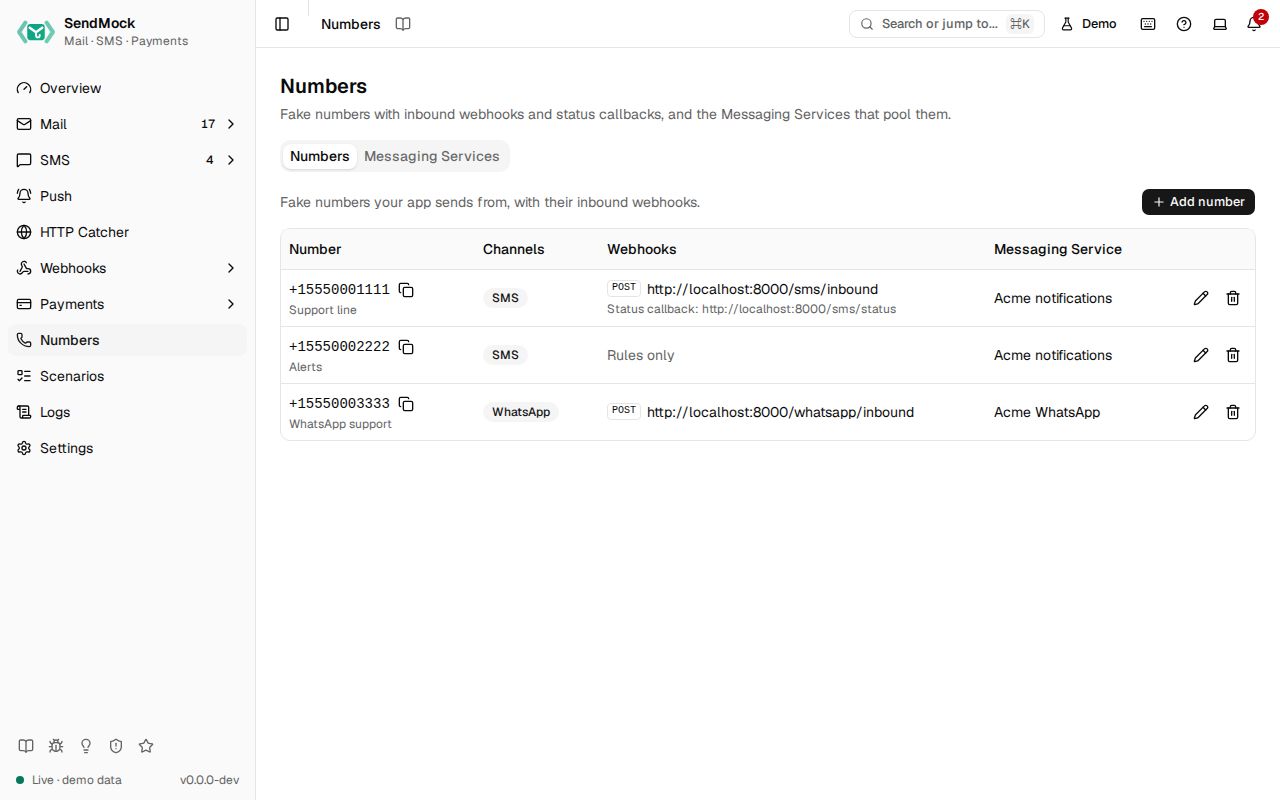
A table: number (E.164, copy), label, channel badges (SMS, WhatsApp), webhooks (the inbound method and URL, or Rules only, with the default status callback below), Messaging Service, and Edit and Delete.
The number sheet:
- Number (E.164, unique) and Label.
- Channels: SMS and/or WhatsApp (at least one).
- Inbound messages: Webhook URL, Method (POST or GET), Fallback URL and Format (Twilio, Vonage, Plivo, ... or native JSON). Leave the URL empty and only webhook rules receive incoming messages; when a rule on
sms.inboundalso exists, both receive them, and the sheet says so. - Default status callback.
- Messaging Service: none or one; a number belongs to at most one.
Delete asks first and removes the number from its service.
Messaging Services
A table: name, SID (copy), sender pool (number chips), inbound handling and actions. New Messaging Service and Edit open a sheet with the name, the Sender pool (a checkbox per number; picking one from another service moves it, and the list says so) and the inbound handling:
| Choice | Incoming messages to the pool's numbers |
|---|---|
| Send a webhook | go to the service's Request URL, with its Fallback URL |
| Defer to sender's webhook | go to each number's own inbound URL |
| Drop the message | are stored but not sent anywhere |
Delete asks first and leaves the numbers unassigned.
Every control and text, one by one: Numbers in depth.
Customize
Two-way SMS and sender pools in depth: Advanced: numbers and Messaging Services. Numbers and services go into the seed file, so your team gets the same ones.
From your code
Register your app's sending number with its reply webhook, as the test setup.
The examples call SendMock's REST API with each language's usual HTTP client and test framework. JavaScript, Go, Java, Rust, Ruby and C# use the small call helper shown under Test helper on their page in Connect your app.
number=$(sendmock numbers add --number +15550001111 --label 'Support line' --channel sms --inbound-url http://localhost:3000/sms/inbound --inbound-method POST --json)

jq -e '.number == "+15550001111"' <<<"$number" >/dev/null