Rules
Send matching events to an endpoint automatically, with a visual filter and a preview against recent messages.
Try it in the demo.
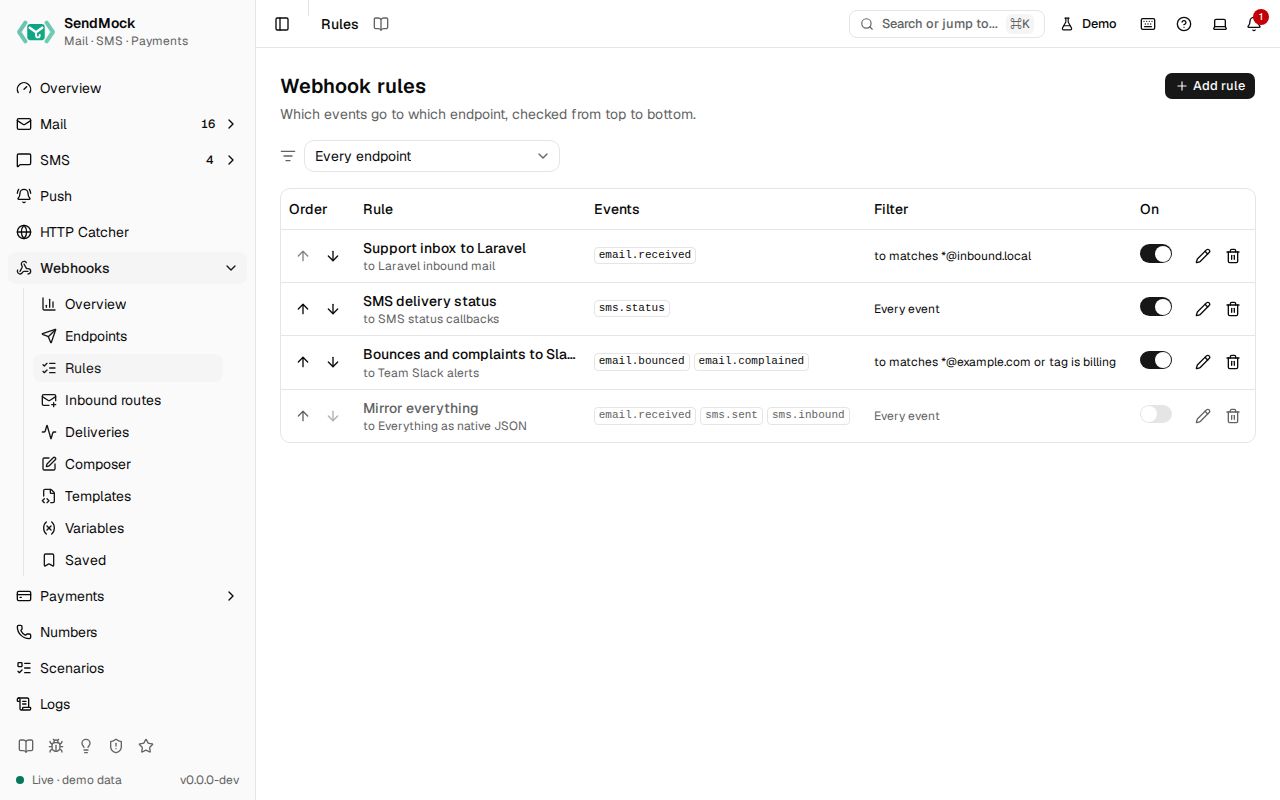
A rule says "when these events happen, and they match this filter, send them to this endpoint". Rules are what make webhooks automatic.
What it solves
- Only some messages should reach a handler: mail to
support@, SMS to one number, bounces only. - One event should reach several handlers (your app and a Slack alert).
- You want to know which messages a filter catches before saving it.
How it connects
| Gets from | Sends to |
|---|---|
| events from every capture menu (Events) | the rule's endpoint, as a delivery in Deliveries |
Use it
- Press Add rule and give it a name, for example "Support inbox to Laravel".
- Pick the endpoint and tick the events, for example
email.received. - Press Add condition: field To, operator matches, value
*@support.local. - Watch the preview: "Matches N of the last 50 messages", with the matching ones listed.
- Press Add rule. The next matching email creates a delivery.
Everything on this screen
The list
Rules in firing order with move up and down, name, endpoint, event chips, a plain-language filter ("to matches *@support.local and subject contains Ticket"), an enabled switch that applies at once, and edit and delete. Disabled rules are dimmed. An endpoint filter at the top narrows the list (also from ?endpoint=).
The rule sheet
- Name, endpoint, and events as checkboxes grouped by area (Email, SMS, Verify, HTTP, Webhooks).
- Filter builder: a group says "Match all / any of these"; each row is field, operator and value, with a not toggle. Add condition adds a row, Add group one nested group. No conditions means every selected event fires.
- Fields follow the events: email fields (from, to, cc, subject, body, header, has attachment, tag) for
email.*, SMS fields (from, to, body, status, API) forsms.*, open fields (open count, first open, source) for opened events. A condition on a field the event does not have never matches. - Operators: equals, contains, starts with, matches (glob, like
*@support.local), regex, exists. All but regex ignore case. - Problems show as you type: a missing value, an invalid regex, a missing header name.
- Preview: "Matches N of the last 50 messages", the messages listed with matches marked, and Show non-matching. Events without filter fields (Verify, HTTP, Webhooks) skip the preview.
How rules fire
Every enabled rule is checked, top to bottom, and each matching rule creates its own delivery. Order matters for reading the list and for the delivery order, not for stopping: a message can match several rules.
Every control and text, one by one: Rules in depth.
On every simulation
Every action that simulates traffic names the webhooks its event will trigger before you run it, so you never have to guess which rules match:
- Mail: each item of the Simulate menu (open, click, delivered, bounces, complaint, unsubscribe), the Reply, Reply all and Forward composers, and Import .eml stored as incoming.
- SMS: Simulate read in a message's menu, Set status in the message details, and Reply as recipient.
- Payments: each item of a payment's Simulate menu.
- Send a sample buttons on empty screens.
Composers show a Webhooks row above their buttons; menu items show the names under their label, or No webhook. Each name opens the endpoint in a new tab, so the form or menu stays as it was.
To send one action somewhere else without changing any rule:
- Press Change in a composer, or Choose beside a menu item.
- Tick the endpoints that should get it. The rule matches start ticked; untick them all to send no webhook.
- Press Use these (a composer then sends to them) or the action's own button (a menu item runs at once).
Each chosen endpoint gets one delivery with its own template and secret, marked chosen in Deliveries. The choice is for that one action only; the link in the picker opens this screen filtered to the event, to change it for every event of that type. An SMS number's own callback URLs and a payment gateway's notification endpoint still get their requests, and traffic your app sends over SMTP or a provider API always follows the rules.
See and edit the payload
Each webhook in a Webhooks row, and each ticked endpoint in the picker, has a Payload button that shows the request it will send: method, URL, headers (secrets masked) and body, rendered with the endpoint's template for the event about to fire.
To send one action with a different body:
- Press Payload beside the webhook.
- Change the body in the editor. The webhook is marked Edited; Reset puts back the rendered body.
- Press Use this payload, then run the action as usual (beside Send a sample, the dialog's own button runs it at once).
The edited body is sent exactly as written, and its signature (Standard Webhooks, or the provider's own such as Razorpay's) is computed over the edited bytes with the endpoint's secret, so your app's verification still passes. The delivery is marked edited in Deliveries. The edit is for that one action only. Without an edit, ids, timestamps and fake.* values are made again when the action runs, so they differ from the ones shown. Picking a menu item directly sends the rendered payloads; open Choose to edit them first.
Customize
Grouped filters, not, header fields and regex: Advanced: rules and filters.
From the CLI, API and AI
The simulating commands and tools take --webhook <endpointId> (repeat it for several) or webhook_endpoint_ids to send that one action to exactly those endpoints, for example sendmock email simulate <emailId> bounced --webhook <endpointId>.
To see the payloads first, ask the match for them with include_requests (sendmock webhook rule match --event-type email.bounced --subject-id <emailId> --include-requests). To send an edited body, the same operations take webhook_requests, a list of { "endpoint_id": ..., "event_type": ..., "body": ..., "headers": {...} } (--webhook-requests '<json>' in the CLI); an edit of an endpoint left out of webhook_endpoint_ids is refused with 422.
Related
- Endpoints
- Inbound routes (rules for incoming email)