Settings
How SendMock behaves. Retention, the seed file, email and SMS outcomes, payments, notifications, chaos, OTP patterns and connection snippets.
Try it in the demo.
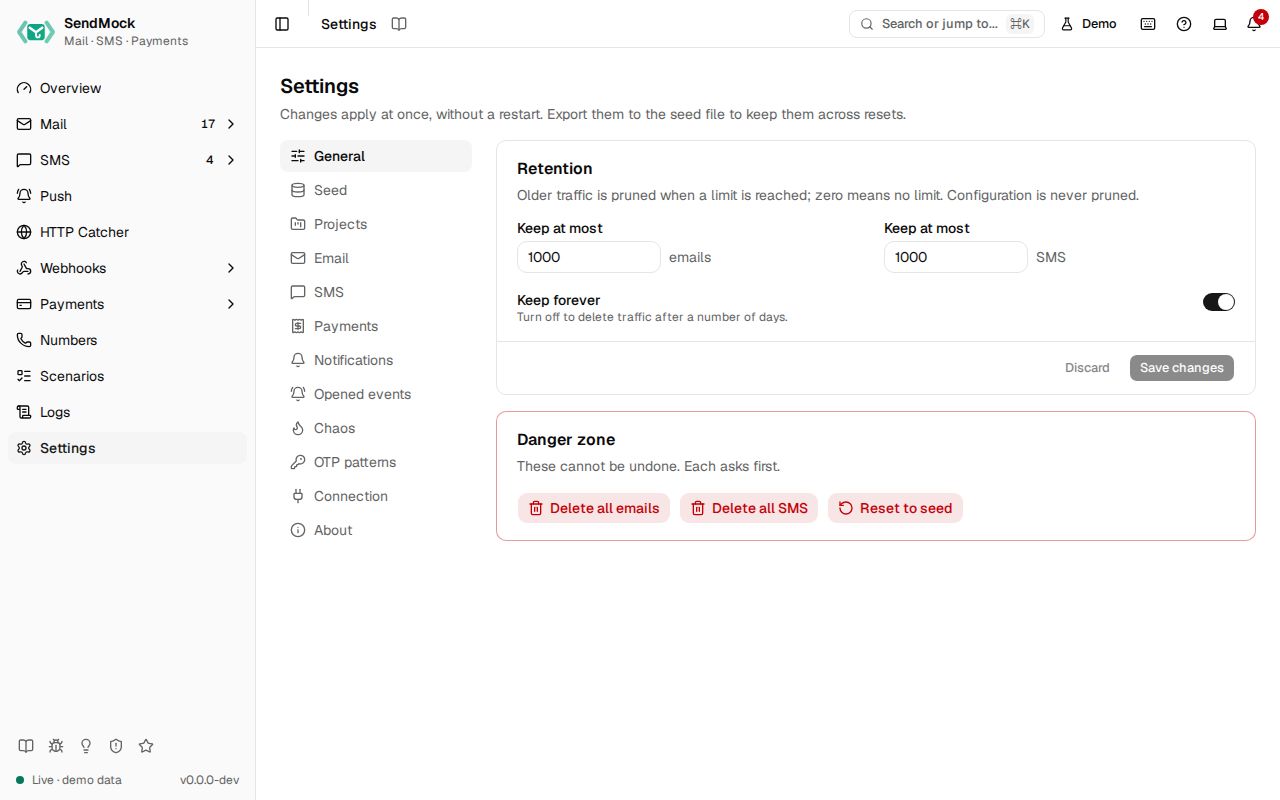
Settings decide how every capture menu behaves. They take effect at once, without a restart.
What it solves
| Section | Solves |
|---|---|
| General | the database growing forever; starting clean |
| Seed | the same setup for every teammate and every CI run |
| Projects | several apps or developers sharing one SendMock without reading each other's mail, SMS and codes |
| bounce and complaint tests, reply domains, safe release to real SMTP | |
| SMS | failure and delay tests, matching Twilio's test credentials |
| Payments | the merchant name, currency, automatic outcomes for automated tests, the test values to type |
| Notifications | pop-ups while you work, or the bell only |
| Opened events | testing read receipts and open tracking |
| Chaos | testing your app when the mail server rejects, is slow or drops the connection |
| OTP patterns | your app's code format is not found by default |
| Connection | the exact settings your app needs, per language and per place it runs |
| About | version, listeners and updates |
How it connects
| Gets from | Sends to |
|---|---|
| your choices, or the seed file | Mail: outcome addresses, delivery profile, inbound domains, relay |
| SMS: simulation profile, failure rate, outcome numbers | |
| Payments: merchant name, currency, automatic outcome | |
| every screen: retention, notifications, opened events, OTP patterns |
Use it
- Press
G ,and pick a section on the left (a picker on phones). The section is kept in the URL, for example/settings?section=sms. - Change a value. Save changes turns on; Discard puts the old values back.
- Press Save changes. Invalid values show a message under the field.
Everything on this screen
General
Retention:
- Keep at most a number of emails and a number of SMS (1,000 each by default). Older traffic is pruned every few seconds once a limit is reached, and open lists, their counts and the sidebar badges update as soon as it is.
- The email count also bounds SMTP sessions, logged API requests, HTTP catcher requests and finished webhook deliveries; the SMS count bounds verifications and push notifications.
- Delete traffic older than a number of days, or Keep forever.
- 0 means no limit. With no age limit either, a warning shows: the database grows until the disk is full, so a fixed limit is recommended. See How much is kept.
- Configuration (endpoints, rules, templates, variables, saved deliveries, numbers, providers), deliveries still waiting to be sent and payments are never pruned, and the database file gives the freed space back.
Danger zone: Delete all emails, Delete all SMS and Reset to seed (deletes all traffic and restores the seed file), each asking first.
Seed
The seed file (sendmock.seed.toml) is the configuration SendMock starts from and resets to, kept in your repository. The card shows its path, when it was applied, and what changed since. Export downloads the current configuration (secrets written as ${ENV_VAR} references, never in plain text). Apply a seed file takes an upload or pasted text; Validate lists errors with line numbers and a summary of the changes before you confirm. See Advanced: seed file.
Projects
A project keeps captured emails, SMS and verifications apart inside one SendMock; settings, providers, webhooks and rules stay shared. Default always exists and holds everything sent to no other project. The table shows each project's name, key and how many emails, SMS and codes it holds, with Rename (the key never changes) and Delete (its traffic goes with it, after asking). New project asks for a key (lowercase letters, digits and dashes) and a name.
Apps send to a project by its key, one of three ways, shown with copy buttons under the table:
- Over SMTP, use the key as the AUTH username (any password). Other usernames go to Default.
- On the REST or provider APIs, add the header
X-SendMock-Project: <key>. - For a provider SDK that takes a base URL but no extra header, put
/projects/<key>after the base URL, such ashttp://127.0.0.1:8026/projects/shop.
A key that is not a project is refused with 404 on the APIs, so a typo shows at once. Once a second project exists, a Project picker appears in the top bar: pick one and Mail, SMS and Verify show only its traffic, and pop-ups only its events. The choice stays in the URL (?project=shop) as you move between screens. Every list in the API, CLI and MCP takes the same project filter, and webhook rules can filter on project.
- Receiving and delivery outcomes: Tag by plus address (
[email protected]gets the taginvoice), the delivery profile (Off, Auto-delivered, Realistic with a Bounce rate and Complaint rate), Inbound domains (mail to them arrives as incoming, for inbound routes) and SpamAssassin address (empty means no spam score). - Magic addresses: the switch, and the reference table of the SES simulator and SendMock addresses (Outcomes).
- Custom outcome addresses: your own rules, with Test an address (Advanced: email outcome addresses).
- Release to real SMTP: Relay SMTP URL (password masked) and Allowed recipients; release stays off until the list has an entry (Release).
- Tag rules: add a tag to arriving emails that match a filter (the webhook rule filter builder, with a preview of the last 50 emails), in order; each can be switched off, moved and deleted.
- Auto-forward rules: release a real copy of matching arriving emails to fixed addresses, through the relay and only to allowed recipients; the email's Timeline says where it went, or why not.
SMS
- Delivery simulation: the profile (Instant, Realistic, Manual), the Failure rate, Strict Twilio test mode (reject
Fromnumbers that are not Twilio test numbers with 21606). - Verify defaults: the Code length and Code lifetime new Verify services start with (including services your app creates through Twilio's API without a
CodeLength), and a Fixed code for every service that has none of its own; empty means random codes. - Magic numbers: the switch, and the reference table of Twilio's test numbers and SendMock's after-send numbers (Delivery and test numbers).
- Custom outcome numbers: your own rules, with Test a number, which says whether a rule, a magic number or the profile applies (Advanced: SMS outcome numbers).
Payments
Checkout: Merchant name (shown on checkout pages and in the {merchant} label), Default currency, and Automatic outcome for new hosted checkouts: Interactive (wait for the checkout page), Always succeed, Always decline, or Random with a Success rate. Test values: every enabled method's test cards, numbers, OTP, PIN or account, with the gateways offering it.
Notifications
Show pop-up toasts for new emails, SMS and failed webhook deliveries, and where they appear (top or bottom; left, center or right), with a preview. Off, the bell still counts and lists everything. Saved in this browser only.
Opened events
Fire opened events when I view messages: opening an email, or scrolling an SMS into view, counts as the recipient reading it and fires email.opened or sms.opened. Choose first open only or every open.
Chaos
Make SMTP fail on purpose: Reject the next N messages With code 421, 450, 550 or 552; Reject recipients matching a pattern with 550; Latency per SMTP command; Drop the connection during DATA. While any is on, the section list shows "Chaos on". SMS failures use the failure rate above. See Advanced: chaos.
OTP patterns
OTP patterns are regular expressions tried in order on every new email and SMS; the first capture group of the first match is the code. Add, remove, Restore defaults, and Try a message to see which pattern matched and the code it found. See Advanced: OTP patterns.
Connection
Connect your app: copy-ready settings for SMTP, the email API, SMS and the HTTP Catcher. Pick a Language (Laravel and PHP, Node.js, Python, Go, Java, Ruby, .NET, cURL) and Where does your app run? (this machine 127.0.0.1, a container talking to the host host.docker.internal, or the same Docker Compose project sendmock). Edit the request headers and the email and SMS bodies; every snippet follows as you type, and a value "{{file:invoice.pdf}}" is read and base64-encoded the way each language does it. Send this request under each body runs that email or SMS call against this SendMock, with your headers, so you see exactly what your app's call will do. The same content is in Connect your app.
AI agents (its own card): pick Claude Code, Codex, Cursor, Gemini CLI or VS Code to see the install command, the MCP configuration and where it goes, and Download the skill. See AI.
About
Version and channel, uptime, listeners (SMTP, HTTP and API, provider port), the database path and size, links to the changelog and docs, the help and feedback links, and Updates:
- Check GitHub Releases for updates has three modes. Off (the default) never calls out. Manual checks only when you press Check for updates. Daily checks on start and once a day, and a new version shows once in the notification bell.
- Stable installs are offered stable releases; beta installs the newer of the newest beta and the newest stable. Edge and development builds are offered nothing.
- A found version shows its release date, its release notes and the upgrade command for how you installed SendMock (Homebrew, Scoop, Docker, the install script or npm), with a copy button. When SendMock does not know how it was installed, use the release page link.
- A check is kept for 24 hours. When GitHub cannot be reached, it says "Could not check for updates" and tries again on the next check.
Every control and text, one by one: Settings in depth.
Customize
Settings are part of the seed file, so a team shares them: Advanced: seed file and Recipe: share your setup. To check a whole flow on every run, write a scenario.
From your code
Change a setting for one test, for example a 10% random SMS failure rate.
The examples call SendMock's REST API with each language's usual HTTP client and test framework. JavaScript, Go, Java, Rust, Ruby and C# use the small call helper shown under Test helper on their page in Connect your app.
settings=$(sendmock settings set --sms-failure-rate-percent 10 --json)

jq -e '.sms_failure_rate_percent == 10' <<<"$settings" >/dev/null