Payments
Test checkouts for Stripe, PayPal, SSLCommerz and bKash with real redirects and notifications, and every payment with its timeline and Simulate menu.
Try it in the demo.
SendMock is a fake payment gateway. Your app creates a payment through the gateway's real API; SendMock answers like the gateway, shows a test checkout page, sends the browser back to your app and posts the gateway's notification (IPN or webhook), signed as the gateway signs it. No real money moves and no real card is accepted.
What it solves
- Checkout without sandbox accounts, internet or a tunnel for the notification URL. See Recipe: Stripe payment.
- Regional gateways (SSLCommerz, bKash) whose sandboxes are limited or slow. See Recipe: SSLCommerz and bKash.
- The paths you rarely see: declines with each reason, 3-D Secure, cancel, a payment that stays pending, refunds (full and partial), captures, disputes.
- Your IPN handler: signature check, order validation, and what happens when the notification arrives twice.
- A gateway SendMock does not ship. See Advanced: create a gateway.
How it connects
| Gets from | Sends to |
|---|---|
your app over a gateway API (Stripe, PayPal, SSLCommerz, bKash) on port 8026, POST /api/v1/payments/checkout, or POST /api/v1/payments with a test card | the test checkout page, which drives the outcome |
| Gateways, which offer Methods, which run Flows | the browser back to your app's success, fail or cancel URL |
| Settings > Payments: merchant name, currency, automatic outcomes | the notification through the gateway's endpoint, logged in Deliveries |
payment.* and checkout.* events to Rules; the API request to Logs |
Gateway (Stripe, SSLCommerz, your own)
  └── offers Methods in order (Card, bKash, Nagad, ...)
        └── each Method runs one Flow (Card form; Account number → OTP → PIN; ...)
              └── a Flow is steps from the step catalogue
Use it
- Open Payments > Gateways, edit Stripe, open the Checkout tab and press Open a test checkout.
- On the checkout page, pay with the test card
4242 4242 4242 4242, any future expiry and any CVC. - The result shows where the browser goes (your success URL with Stripe's fields) and Return to merchant.
- Back in Payments, open the payment: the timeline shows it succeeded and the notification sent. Press Simulate > Refund... and refund part of it; a second notification goes out.
Everything on this screen
The list
Amount in the currency's own format, provider, status, customer and time, newest first, 50 at a time, new and changed payments appearing live. Status chips (All, Succeeded, Pending, Failed, Refunded, Disputed), a provider picker and a currency picker narrow it; filters and the open payment are kept in the URL.
New payment
New payment pays a payment at once with a test card, as your app's server does when it charges without a checkout page (POST /api/v1/payments). Pick the gateway, the amount and currency, a test card from Methods (for example 4000 0000 0000 9995 declines with insufficient funds) and whether to capture at once or only authorize. The card's outcome decides the payment; a card that asks for 3-D Secure fails, as there is no page to approve it on, and a real card number is refused and kept nowhere.
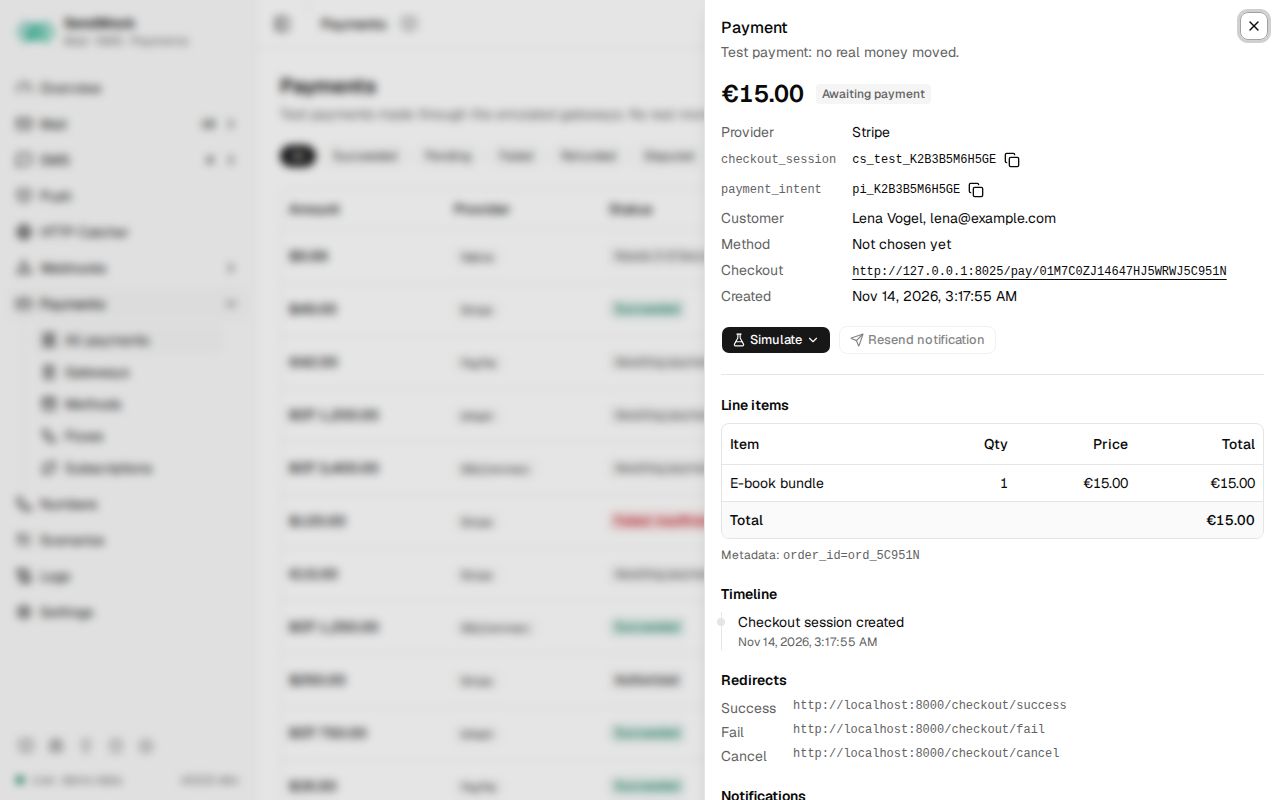
The payment drawer
- Amount, status, provider and the provider's ids (session, intent, order, transaction), the customer, the payment method (card brand, last 4 and expiry, or a masked wallet number; never a full card number), the failure reason, the refunded amount and the dispute state.
- Line items and metadata.
- Timeline: created, 3-D Secure, authorized, captured, succeeded or failed, refunds, disputes, redirects and notifications.
- Redirects: the success, fail and cancel URLs, which one was used, with the method (GET or POST) and the fields sent.
- Notifications: each IPN or webhook sent (the gateway's event name, the native event, status code, time), linking to its delivery.
Simulate
The Simulate menu offers only what the payment's status allows:
| Status | Actions |
|---|---|
| waiting for payment | Succeed, Decline (Insufficient funds, Expired card, Incorrect CVC, Generic decline, Fraud), Expire checkout |
| authorized | Capture, Void authorization |
| paid | Refund... (full by default, never more than what is left), Open dispute |
| disputed | Resolve dispute > Won or Lost |
Resend notification posts the last notification again, to test that your handler copes with duplicates. Every result shows at once in the status, timeline and notifications.
Test values
| Card | Outcome |
|---|---|
4242 4242 4242 4242 | succeeds (Visa) |
5555 5555 5555 4444 | succeeds (Mastercard) |
4000 0000 0000 0002 | declined: generic decline |
4000 0000 0000 9995 | declined: insufficient funds |
4000 0000 0000 0069 | declined: expired card |
4000 0000 0000 0127 | declined: incorrect CVC |
4000 0025 0000 3155 | asks for 3-D Secure |
4000 0000 0000 0259 | succeeds, then a dispute opens |
Wallets (bKash, Nagad, Rocket) use test numbers such as 01770000001 (succeeds) and 01770000002 (insufficient balance), the OTP 123456 and the PIN 12121. Settings > Payments lists the test values of every enabled method. A real card number is refused with "Use a test card" and never stored or logged.
Every control and text, one by one: Payments in depth.
Customize
- Change what a built-in gateway sends, or add your own: Gateways, Advanced: create a gateway.
- Add a wallet or bank: Advanced: payment method.
- Change the checkout steps: Advanced: payment flow.
- Settle payments automatically in automated tests: Automatic outcome in Settings > Payments.
From your code
Create a test checkout, settle it from the test and read the payment.
The examples call SendMock's REST API with each language's usual HTTP client and test framework. JavaScript, Go, Java, Rust, Ruby and C# use the small call helper shown under Test helper on their page in Connect your app.
payment=$(sendmock payments checkout create --provider stripe --amount-minor 1999 --currency USD --json)

paid=$(sendmock payments simulate "$(jq -r '.id' <<<"$payment")" succeed --json)

jq -e '.status == "succeeded"' <<<"$paid" >/dev/null
From the CLI, API and AI
Related
Variables
Values templates read as vars.name. Fixed values, secrets, values from the message, random values, combinations and values asked for at send time.
Checkout page
The hosted test checkout page your customer is sent to, its methods and steps, the test controls, and where it sends the browser after.