Logs
The raw SMTP sessions and API requests behind every message, including the ones SendMock rejected.
Try it in the demo.
Mail, SMS and Payments show what arrived. Logs show how it arrived, and what did not: every SMTP conversation and every API call, including failed and rejected ones.
What it solves
- "My app says it sent the email, but nothing shows in Mail." The SMTP session shows the TLS or AUTH problem, or the command that failed.
- "My SMS call returns 400." The API request shows the body your app sent and SendMock's error, for example a Twilio test number's 21211.
- Checking what credentials, TLS version and EHLO name your mailer uses.
How it connects
| Gets from | Sends to |
|---|---|
| every SMTP session behind Mail | Open email: the email a session stored |
| every API request behind SMS, Verify, Payments and the email APIs | Open message: the SMS or email a request created |
| the SMS drawer's "Open in request log" and the email's source badge link here |
Use it
- Press
G L. - On SMTP sessions, press the Failed chip.
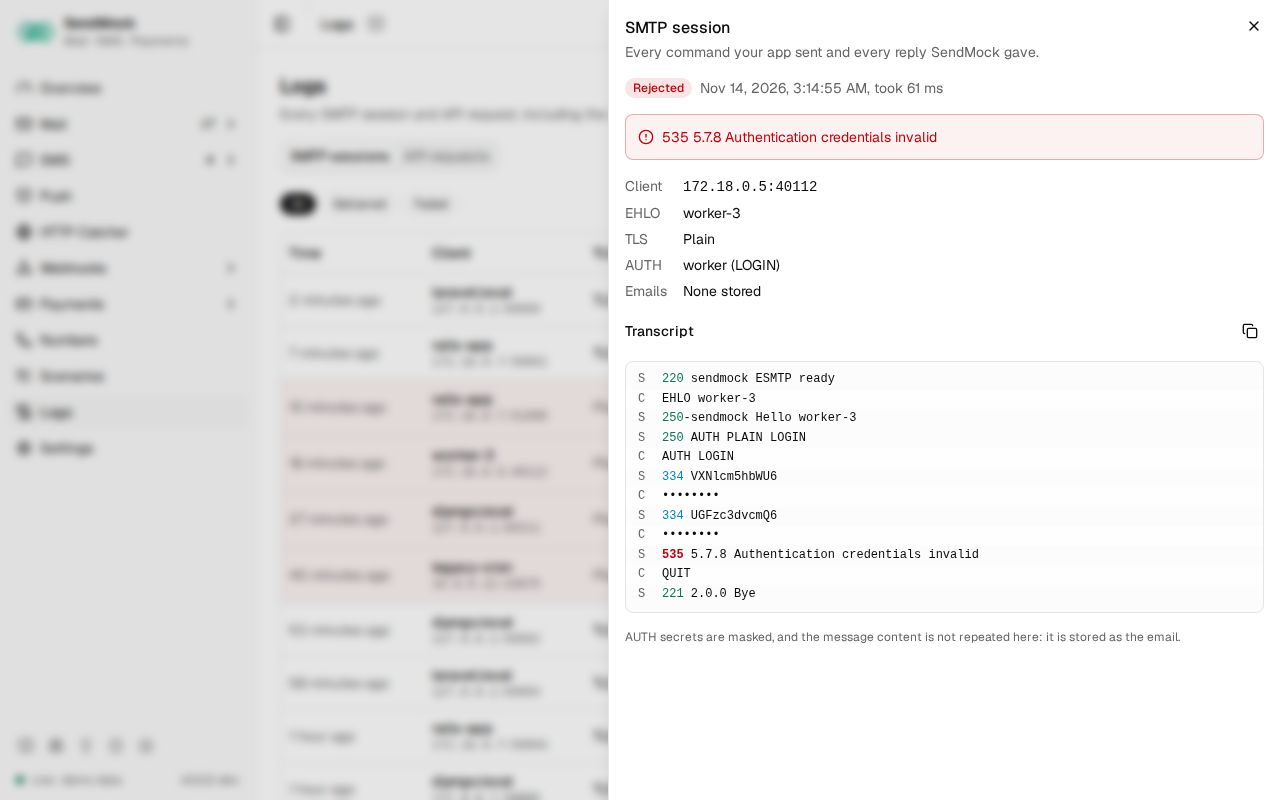
- Open a session and read the transcript: client commands and server replies, colour-coded, with the failure reason on top.
Everything on this screen
Two tabs, kept in the URL. Both load 50 rows at a time, the next page as you scroll ("Showing 50 of 5,021"), and their filters and search run over every row.
SMTP sessions
A table: time, client address, EHLO name, TLS (version or Plain), AUTH (user and mechanism), result (Delivered, Rejected, Aborted), emails stored and duration. Failed sessions are highlighted with their reason. Chips (All, Delivered, Failed) and a search on client, EHLO name and user.
The drawer: the session facts, the failure reason, and the transcript, one line per command or reply, client and server told apart by colour and a C or S marker, reply codes coloured by class (2xx, 3xx, 4xx, 5xx), AUTH secrets masked, and the DATA line linking to the stored email. Copy transcript and Open email.
API requests
A table: time, API (Native, Twilio, Vonage, SendGrid, ...), method, path, status and duration. Rejected requests (4xx and 5xx) are highlighted. Chips by status class (All, 2xx, 4xx, 5xx), an API picker and a path search.
The drawer: method, full path, status, duration and time; request headers (credentials masked); the request body (JSON formatted, forms as a field table) and the response body; Open message for what the request created.
Every control and text, one by one: Logs in depth.
Customize
How long logs are kept follows retention in Settings > General. To make SMTP fail on purpose, see Advanced: chaos.
From your code
List the SMTP sessions that failed, for example after a test that expects your app to retry.
The examples call SendMock's REST API with each language's usual HTTP client and test framework. JavaScript, Go, Java, Rust, Ruby and C# use the small call helper shown under Test helper on their page in Connect your app.
sessions=$(sendmock logs smtp --result failed --json)

session=$(jq '.items[0]' <<<"$sessions")

jq -e '.result == "failed"' <<<"$session" >/dev/null