Logs in depth
Every control and text of Logs, an SMTP session and an API request.
Every control and text this screen shows, in screen order. The list is read from the demo by a crawl, and CI fails when the screen changes without its entry here.
Logs keeps every SMTP session and every API request, failed ones included, to see why a client was refused.
The screen as a whole: Logs.
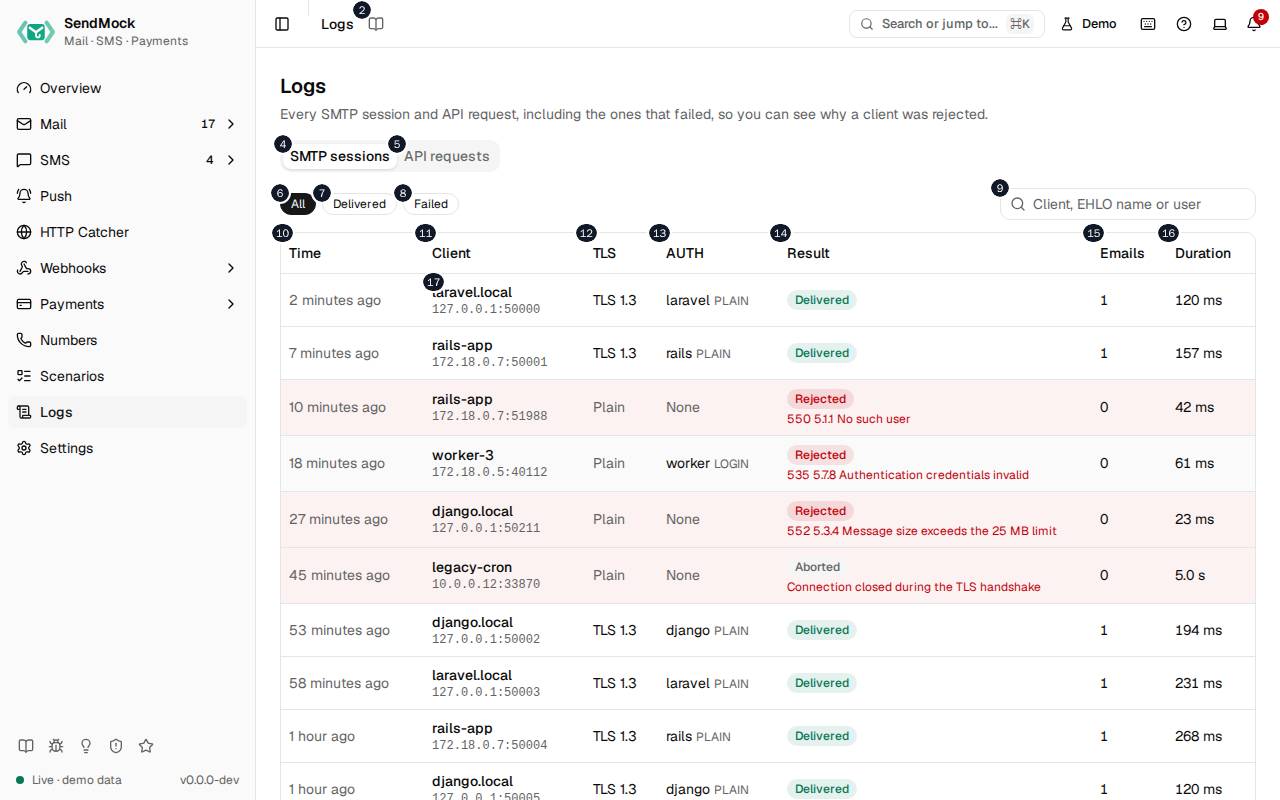
The numbers match the entries below. The picture shows the first screenful; controls further down, and texts, have no marker.
On the screen
1. Logs
Heading.
- What it does: Names the screen, in the header and above the tabs.
2. Read the Logs guide
Link.
- What it does: Opens this screen's page in the user guide, in a new tab.
- Links to: Logs.
3. Every SMTP session and API request, including the ones that failed, so you can see why a client was rejected.
Text.
- What it does: Explains the screen.
4. SMTP sessions
Tab.
- What it does: Every SMTP connection, newest first.
- Same action elsewhere: REST
GET /api/v1/logs/smtp, CLIsendmock logs smtp, MCPsendmock_logs_smtp
5. API requests
Tab.
- What it does: Every request to the native and provider APIs, rejected ones included.
- Same action elsewhere: REST
GET /api/v1/logs/http, CLIsendmock logs http, MCPsendmock_logs_http
6. All
Button.
- What it does: Shows every session.
7. Delivered
Button.
- What it does: Shows sessions that stored at least one email.
8. Failed
Button.
- What it does: Shows sessions that ended with an error, such as a refused login or a message too large.
9. Search SMTP sessions
Field.
- What it does: Filters by client, address or reply.
10. Time
Column.
- What it does: When the session started.
11. Client
Column.
- What it does: The client's address and its
EHLOname.
12. TLS
Column.
- What it does: Whether it used STARTTLS or implicit TLS.
13. AUTH
Column.
- What it does: The login it used, if any.
14. Result
Column.
- What it does: How it ended: delivered, or the error code and reply.
15. Emails
Column.
- What it does: How many emails it stored.
16. Duration
Column.
- What it does: How long it lasted.
17. …
Link, in each row.
- What it does: Opens the session's transcript.
- Same action elsewhere: REST
GET /api/v1/logs/smtp/{sessionId}, CLIsendmock logs smtp show, MCPsendmock_logs_smtp_get
An SMTP session is open
18. SMTP session
Heading.
- What it does: The session drawer.
19. Every command your app sent and every reply SendMock gave.
Text.
- What it does: Explains the drawer.
20. Transcript
Heading.
- What it does: The conversation, line by line.
21. Open email
Link.
- What it does: Opens the email the session delivered.
- Links to: Inbox.
22. Copy transcript
Button.
- What it does: Copies the whole transcript.
23. [message # bytes, stored as email]
Link, in each row.
- What it does: Where the message was sent in the transcript; opens the email it became.
24. AUTH secrets are masked, and the message content is not repeated here: it is stored as the email.
Text.
- What it does: Explains what the transcript leaves out.
25. Close
Button.
- What it does: Closes the drawer.
API requests tab
26. #xx
Button.
- What it does: Shows only rejected requests (4xx answers).
27. Filter by API
Drop-down.
- What it does: Shows one API's requests, such as Twilio or SendGrid, or all.
28. Search request paths
Field.
- What it does: Filters by path.
29. API
Column.
- What it does: The API the request was for.
30. Request
Column.
- What it does: Its method and path.
31. Status
Column.
- What it does: The status SendMock answered.
32. POST …
Link, in each row.
- What it does: Opens the request.
- Same action elsewhere: REST
GET /api/v1/logs/http/{requestId}, CLIsendmock logs http show, MCPsendmock_logs_http_get
An API request is open
33. API request
Heading.
- What it does: The request drawer.
34. Exactly what your app sent and what SendMock answered.
Text.
- What it does: Explains the drawer.
35. POST /#-#-#/Accounts/AC#/Messages.json
Text.
- What it does: The request's method and path (here a Twilio send).
36. Open SMS
Link.
- What it does: Opens the SMS the request created.
- Links to: SMS.
37. Request headers
Heading.
- What it does: The headers received.
38. Request body
Heading.
- What it does: The body received.
39. Copy request body
Button.
- What it does: Copies the request body.
40. Response body
Heading.
- What it does: What SendMock answered, exactly.
41. Copy response body
Button.
- What it does: Copies the response body.
42. Credentials such as API keys and passwords are masked before logging.
Text.
- What it does: Explains the masking.
43. Close
Button.
- What it does: Closes the drawer.
With no data yet
44. No SMTP sessions yet
Text.
- What it does: Shown while no app has connected over SMTP.
45. Point your app's SMTP settings at SendMock; every connection shows up here, even the ones that fail.
Text.
- What it does: Explains how sessions arrive.
46. This machine
Choice.
- What it does: Shows the addresses for an app on the same machine.
- What it changes: Shared with Settings > Connection and remembered in the browser.
- Same action elsewhere: REST
GET /api/v1/info, CLIsendmock status, MCPsendmock_status
47. Docker host
Choice.
- What it does: Shows the addresses for an app in a container reaching SendMock on the host.
48. Compose
Choice.
- What it does: Shows the addresses for an app in the same Docker Compose project.
49. Copy SMTP host
Button.
- What it does: Copies the SMTP host.
50. Copy SMTP port
Button.
- What it does: Copies the SMTP port.
51. More snippets
Link.
- What it does: Opens Settings > Connection.
- Links to: Settings.
52. Send a sample email
Button.
- What it does: Stores a sample email.
- Same action elsewhere: REST
POST /api/v1/samples/{kind}, CLIsendmock sample, MCPsendmock_sample_send
53. Choose webhooks for Send a sample email
Button.
- What it does: Opens Choose webhooks for this one action. Choose webhooks lists every enabled endpoint with a search box, the endpoints your rules would pick already checked, each checked one with Payload to see and edit its request, and says how many are chosen (or that no webhook will be sent). Its confirm button, named after the action, runs it once and sends the event to exactly the checked endpoints; Cancel runs nothing.
- What it changes: The chosen deliveries show
chosenas their Trigger in Webhooks > Deliveries, and an edited payloadedited. Your rules stay as they are; the dialog's rules link opens them in a new tab. - Links to: Webhook rules.
- Same action elsewhere: REST
POST /api/v1/samples/{kind}, CLIsendmock sample, MCPsendmock_sample_send - Same action elsewhere: REST
POST /api/v1/webhooks/rules/match, CLIsendmock webhook rule match, MCPsendmock_webhook_rule_match
When the data cannot load
54. Could not load the SMTP log. Try again
Message.
- What it does: Shown when the log could not be loaded.
- Errors: Check SendMock is running, then press Try again.
55. Could not load the SMTP log.
Text.
- What it does: The message inside the alert.
56. Try again
Button.
- What it does: Loads the log again.
- Same action elsewhere: REST
GET /api/v1/logs/smtp, CLIsendmock logs smtp, MCPsendmock_logs_smtp