Deeper
Scenarios in depth
Every control and text of Scenarios.
Every control and text this screen shows, in screen order. The list is read from the demo by a crawl, and CI fails when the screen changes without its entry here.
Scenarios writes, validates and runs a multi-step check against this SendMock.
The screen as a whole: Scenarios.
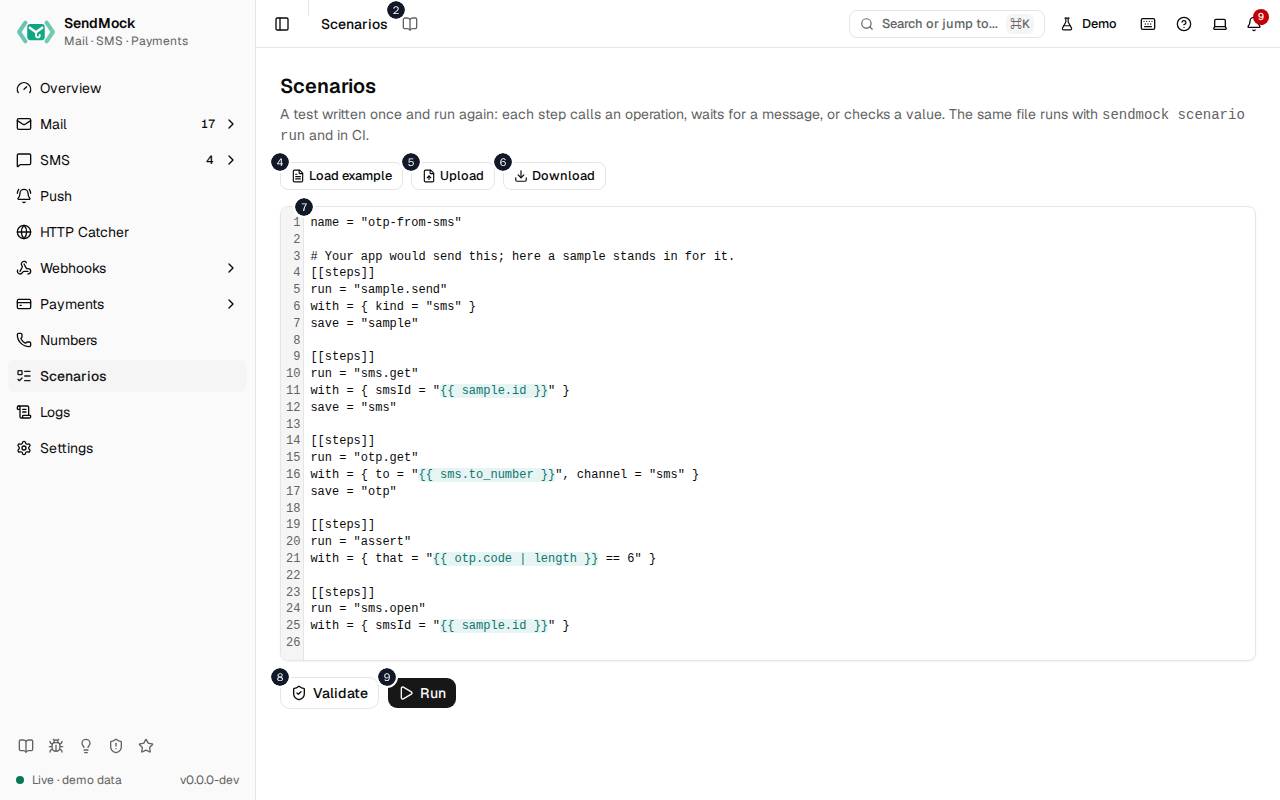
The numbers match the entries below. The picture shows the first screenful; controls further down, and texts, have no marker.
On the screen
1. Scenarios
Heading.
- What it does: Names the screen, in the header and above the editor.
2. Read the Scenarios guide
Link.
- What it does: Opens this screen's page in the user guide, in a new tab.
- Links to: Scenarios.
3. A test written once and run again: each step calls an operation, waits for a message, or checks a value. The same file runs with sendmock scenario run and in CI.
Text.
- What it does: Explains scenarios.
- Links to: Advanced: scenarios.
4. Load example
Button.
- What it does: Puts an example scenario in the editor.
5. Upload
Button.
- What it does: Reads a scenario file from your computer.
6. Download
Link.
- What it does: Saves the scenario in the editor as a file.
7. Scenario
Field.
- What it does: The scenario, in YAML or JSON.
8. Validate
Button.
- What it does: Checks the scenario without running it and lists any errors.
- Same action elsewhere: REST
POST /api/v1/scenarios/validate, CLIsendmock scenario validate, MCPsendmock_scenario_validate
9. Run
Button.
- What it does: Runs the steps in order and shows each one's result; the first failed check stops it.
- What it changes: The steps' own effects: sends, waits and checks against this SendMock.
- Same action elsewhere: REST
POST /api/v1/scenarios/run, CLIsendmock scenario run, MCPsendmock_scenario_run
The example has run
10. Passed: # of # steps in # ms
Status.
- What it does: The run's result: how many steps passed, and how long it took.