API reference in depth
Every control and text of the in-app API reference.
Every control and text this screen shows, in screen order. The list is read from the demo by a crawl, and CI fails when the screen changes without its entry here.
The API reference, opened from Help, lists every REST operation the running SendMock serves.
The screen as a whole: Reference.
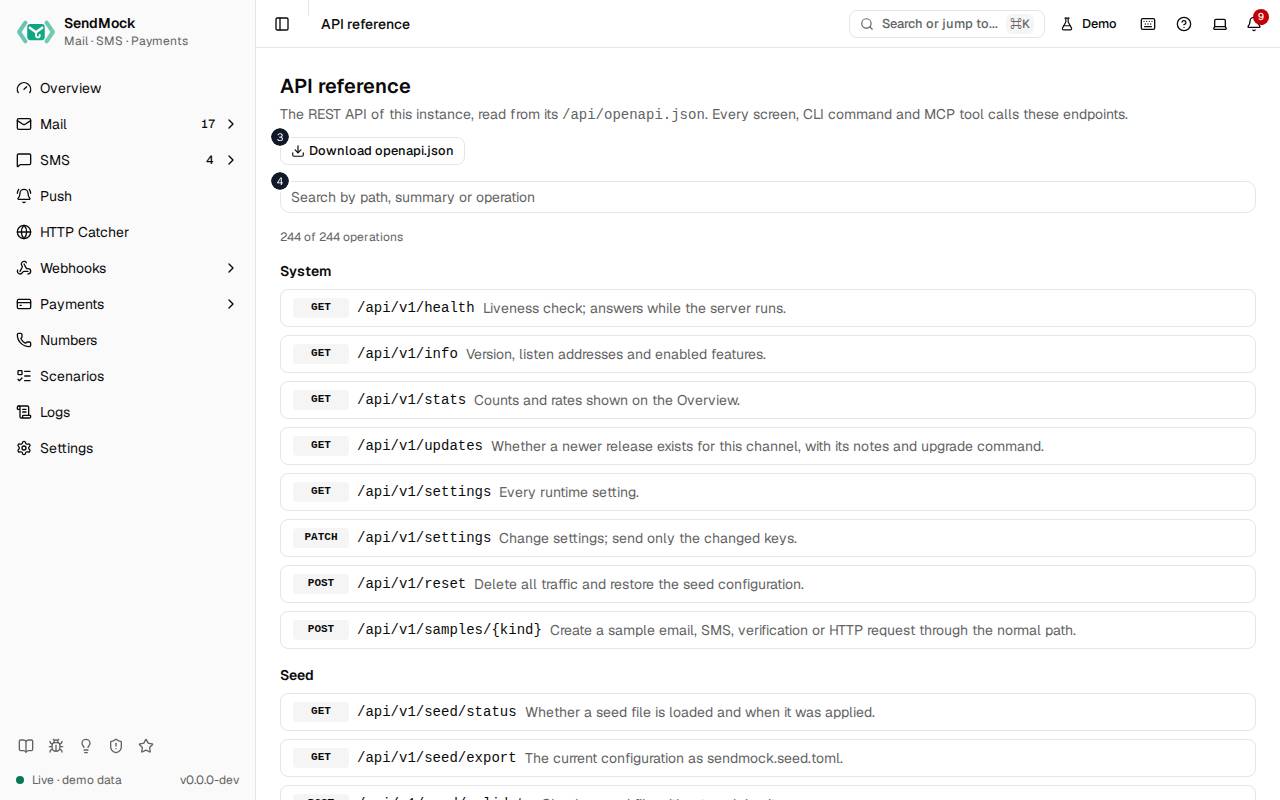
The numbers match the entries below. The picture shows the first screenful; controls further down, and texts, have no marker.
On the screen
1. API reference
Heading.
- What it does: Names the screen, in the header and above the list.
2. The REST API of this instance, read from its /api/openapi.json . Every screen, CLI command and MCP tool calls these endpoints.
Text.
- What it does: Explains the screen: it reads the running instance's own OpenAPI document.
3. Download openapi.json
Link.
- What it does: Downloads the OpenAPI document.
4. Search the API
Search field.
- What it does: Filters operations by path, summary or operation id.
5. # of # operations
Status.
- What it does: How many operations match the search, of all.
6. System
Heading.
- What it does: The System operations; each opens to show its parameters, body, answer and a curl command.
7. Seed
Heading.
- What it does: The Seed operations; each opens to show its parameters, body, answer and a curl command.
8. Logs
Heading.
- What it does: The Logs operations; each opens to show its parameters, body, answer and a curl command.
9. Test helpers
Heading.
- What it does: The Test helpers operations; each opens to show its parameters, body, answer and a curl command.
10. Automation
Heading.
- What it does: The Automation operations; each opens to show its parameters, body, answer and a curl command.
11. Email
Heading.
- What it does: The Email operations; each opens to show its parameters, body, answer and a curl command.
12. Inbound routes
Heading.
- What it does: The Inbound routes operations; each opens to show its parameters, body, answer and a curl command.
13. Tag rules
Heading.
- What it does: The Tag rules operations; each opens to show its parameters, body, answer and a curl command.
14. Forward rules
Heading.
- What it does: The Forward rules operations; each opens to show its parameters, body, answer and a curl command.
15. SMS
Heading.
- What it does: The SMS operations; each opens to show its parameters, body, answer and a curl command.
16. Outcome rules
Heading.
- What it does: The Outcome rules operations; each opens to show its parameters, body, answer and a curl command.
17. Verify
Heading.
- What it does: The Verify operations; each opens to show its parameters, body, answer and a curl command.
18. Numbers
Heading.
- What it does: The Numbers operations; each opens to show its parameters, body, answer and a curl command.
19. Email providers
Heading.
- What it does: The Email providers operations; each opens to show its parameters, body, answer and a curl command.
20. SMS providers
Heading.
- What it does: The SMS providers operations; each opens to show its parameters, body, answer and a curl command.
21. HTTP Catcher
Heading.
- What it does: The HTTP Catcher operations; each opens to show its parameters, body, answer and a curl command.
22. Payments
Heading.
- What it does: The Payments operations; each opens to show its parameters, body, answer and a curl command.
23. Checkout
Heading.
- What it does: The Checkout operations; each opens to show its parameters, body, answer and a curl command.
24. Payment flows
Heading.
- What it does: The Payment flows operations; each opens to show its parameters, body, answer and a curl command.
25. Payment gateways
Heading.
- What it does: The Payment gateways operations; each opens to show its parameters, body, answer and a curl command.
26. Payment methods
Heading.
- What it does: The Payment methods operations; each opens to show its parameters, body, answer and a curl command.
27. Webhook endpoints
Heading.
- What it does: The Webhook endpoints operations; each opens to show its parameters, body, answer and a curl command.
28. Webhook rules
Heading.
- What it does: The Webhook rules operations; each opens to show its parameters, body, answer and a curl command.
29. Webhook deliveries
Heading.
- What it does: The Webhook deliveries operations; each opens to show its parameters, body, answer and a curl command.
30. Saved deliveries
Heading.
- What it does: The Saved deliveries operations; each opens to show its parameters, body, answer and a curl command.
31. Webhook templates
Heading.
- What it does: The Webhook templates operations; each opens to show its parameters, body, answer and a curl command.
32. Webhook variables
Heading.
- What it does: The Webhook variables operations; each opens to show its parameters, body, answer and a curl command.
33. Projects
Heading.
- What it does: The Projects operations; each opens to show its parameters, body, answer and a curl command.
34. Push
Heading.
- What it does: The Push operations; each opens to show its parameters, body, answer and a curl command.
When the data cannot load
35. Could not load the API reference. Try again
Message.
- What it does: Shown when the OpenAPI document could not be loaded.
- Errors: Check SendMock is running, then press Try again.
36. Could not load the API reference.
Text.
- What it does: The message inside the alert.
37. Try again
Button.
- What it does: Loads it again.