Deeper
Overview in depth
Every control and text of the Overview dashboard.
Every control and text this screen shows, in screen order. The list is read from the demo by a crawl, and CI fails when the screen changes without its entry here.
The Overview shows today's traffic across email, SMS, webhooks, HTTP and payments, and how to connect.
The screen as a whole: Overview.
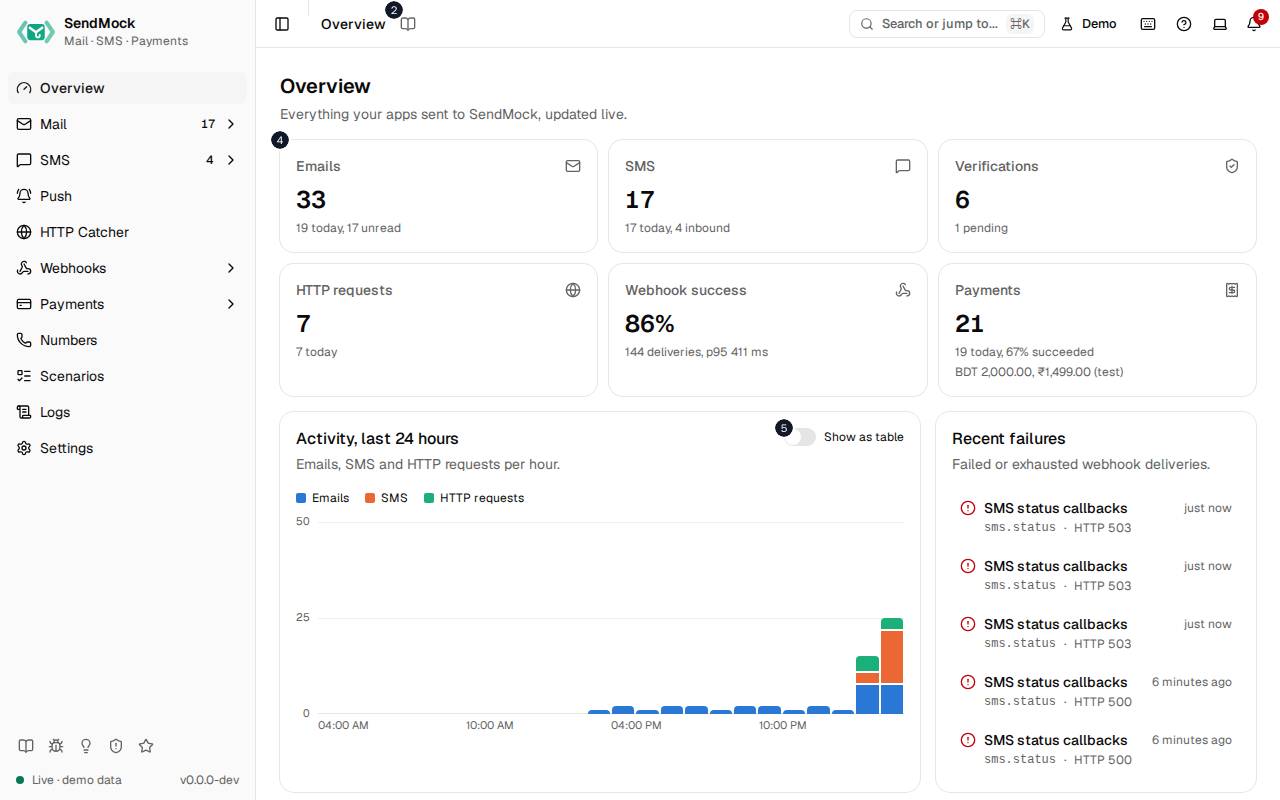
The numbers match the entries below. The picture shows the first screenful; controls further down, and texts, have no marker.
On the screen
1. Overview
Heading.
- What it does: Names the screen, in the header and above the dashboard.
2. Read the Overview guide
Link.
- What it does: Opens this screen's page in the user guide, in a new tab.
- Links to: Overview.
3. Everything your apps sent to SendMock, updated live.
Text.
- What it does: Explains the dashboard.
- Same action elsewhere: REST
GET /api/v1/stats, CLIsendmock stats, MCPsendmock_stats
4. …
Link, in each row.
- What it does: A tile with today's count for emails, SMS, webhook deliveries, HTTP requests or payments, and its trend; opens that screen.
- Where its text comes from:
GET /api/v1/stats, computed from the stored traffic each time.
5. Show as table
Switch.
- What it does: Shows the activity chart as a table, to read exact numbers.
6. Endpoint
Column.
- What it does: A webhook endpoint.
7. Deliveries
Column.
- What it does: Its deliveries today.
8. Success
Column.
- What it does: The share answered 2xx.
9. p# / p#
Column.
- What it does: The median and 95th percentile answer times.
10. Retries
Column.
- What it does: How many attempts were retries.
11. Top failures
Column.
- What it does: The failure codes it got most.
12. …
Badge, in each row.
- What it does: An endpoint's success rate as a meter, or a label when it had no deliveries.
13. This machine
Choice.
- What it does: Shows the addresses for an app on the same machine.
- What it changes: Shared with Settings > Connection and remembered in the browser.
- Same action elsewhere: REST
GET /api/v1/info, CLIsendmock status, MCPsendmock_status
14. Docker host
Choice.
- What it does: Shows the addresses for an app in a container reaching SendMock on the host.
15. Compose
Choice.
- What it does: Shows the addresses for an app in the same Docker Compose project.
16. Copy SMTP address
Button.
- What it does: Copies the SMTP host and port.
17. Copy API base URL
Button.
- What it does: Copies the REST API's base URL.
18. More snippets
Link.
- What it does: Opens Settings > Connection.
- Links to: Settings.
With no data yet
19. No failed deliveries. Every webhook got through.
Text.
- What it does: Shown in Recent failures when no delivery failed.
20. Nothing yet. Send an email or SMS from your app, or try a sample.
Text.
- What it does: Shown when nothing has arrived yet.
21. Send a sample email
Button.
- What it does: Stores a sample email.
- Same action elsewhere: REST
POST /api/v1/samples/{kind}, CLIsendmock sample, MCPsendmock_sample_send
22. Choose webhooks for Send a sample email
Button.
- What it does: Opens Choose webhooks for this one action. Choose webhooks lists every enabled endpoint with a search box, the endpoints your rules would pick already checked, each checked one with Payload to see and edit its request, and says how many are chosen (or that no webhook will be sent). Its confirm button, named after the action, runs it once and sends the event to exactly the checked endpoints; Cancel runs nothing.
- What it changes: The chosen deliveries show
chosenas their Trigger in Webhooks > Deliveries, and an edited payloadedited. Your rules stay as they are; the dialog's rules link opens them in a new tab. - Links to: Webhook rules.
- Same action elsewhere: REST
POST /api/v1/samples/{kind}, CLIsendmock sample, MCPsendmock_sample_send - Same action elsewhere: REST
POST /api/v1/webhooks/rules/match, CLIsendmock webhook rule match, MCPsendmock_webhook_rule_match
23. Send a sample SMS
Button.
- What it does: Stores a sample SMS.
- Same action elsewhere: REST
POST /api/v1/samples/{kind}, CLIsendmock sample, MCPsendmock_sample_send
24. Choose webhooks for Send a sample SMS
Button.
- What it does: Opens Choose webhooks for this one action. Choose webhooks lists every enabled endpoint with a search box, the endpoints your rules would pick already checked, each checked one with Payload to see and edit its request, and says how many are chosen (or that no webhook will be sent). Its confirm button, named after the action, runs it once and sends the event to exactly the checked endpoints; Cancel runs nothing.
- What it changes: The chosen deliveries show
chosenas their Trigger in Webhooks > Deliveries, and an edited payloadedited. Your rules stay as they are; the dialog's rules link opens them in a new tab. - Links to: Webhook rules.
- Same action elsewhere: REST
POST /api/v1/samples/{kind}, CLIsendmock sample, MCPsendmock_sample_send - Same action elsewhere: REST
POST /api/v1/webhooks/rules/match, CLIsendmock webhook rule match, MCPsendmock_webhook_rule_match
When the data cannot load
25. Could not load the overview. Check that SendMock is running. Try again
Message.
- What it does: Shown when the dashboard could not be loaded.
- Errors: Check SendMock is running, then press Try again.
26. Could not load the overview. Check that SendMock is running.
Text.
- What it does: The message inside the alert.
27. Try again
Button.
- What it does: Loads the dashboard again.
- Same action elsewhere: REST
GET /api/v1/stats, CLIsendmock stats, MCPsendmock_stats