Numbers in depth
Every control and text of Numbers, Messaging Services and the number editor.
Every control and text this screen shows, in screen order. The list is read from the demo by a crawl, and CI fails when the screen changes without its entry here.
Numbers holds the fake phone numbers your app owns, with their webhooks, and the Messaging Services that pool them.
The screen as a whole: Numbers.
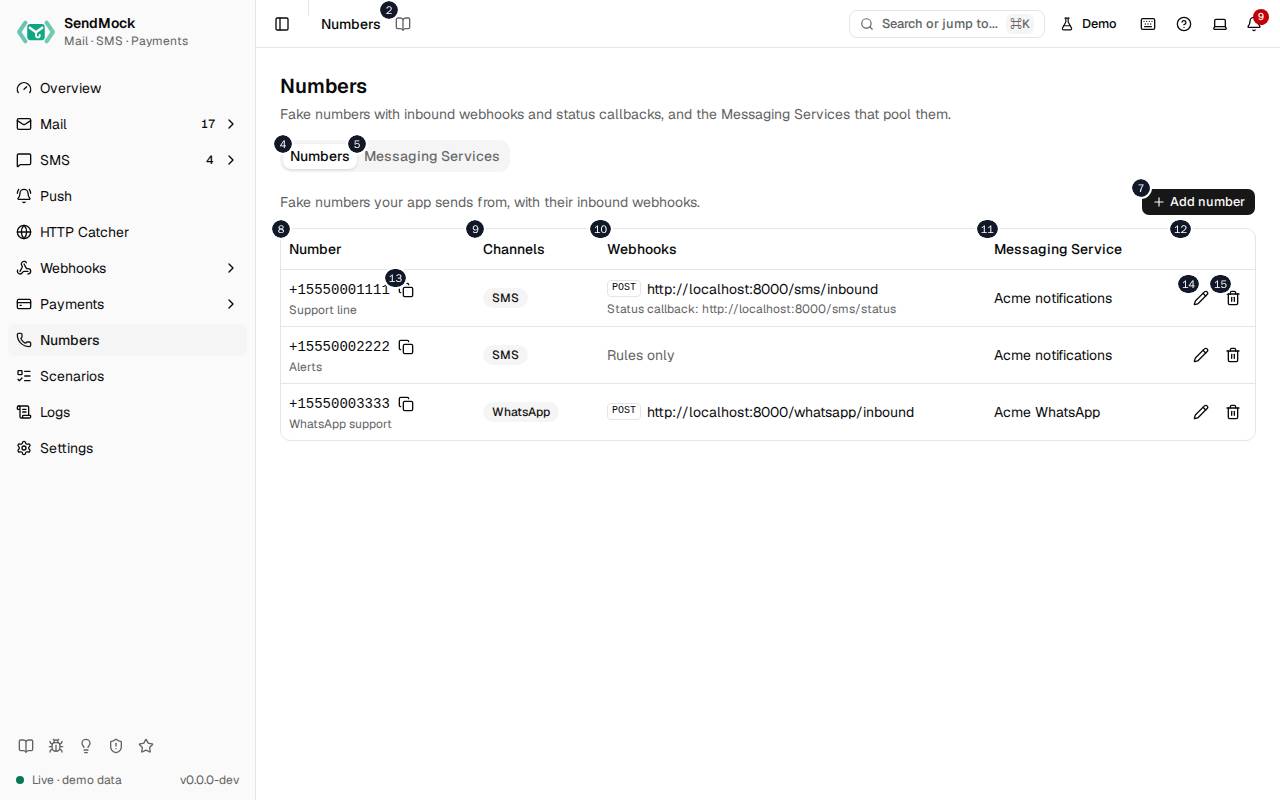
The numbers match the entries below. The picture shows the first screenful; controls further down, and texts, have no marker.
On the screen
1. Numbers
Heading.
- What it does: Names the screen, in the header and above the tabs.
2. Read the Numbers guide
Link.
- What it does: Opens this screen's page in the user guide, in a new tab.
- Links to: Numbers.
3. Fake numbers with inbound webhooks and status callbacks, and the Messaging Services that pool them.
Text.
- What it does: Explains the screen.
4. Numbers
Tab.
- What it does: Your app's fake phone numbers.
- Same action elsewhere: REST
GET /api/v1/numbers, CLIsendmock numbers list, MCPsendmock_number_list
5. Messaging Services
Tab.
- What it does: Sender pools, as Twilio's Messaging Services.
- Same action elsewhere: REST
GET /api/v1/messaging-services, CLIsendmock sms services list, MCPsendmock_messaging_service_list
6. Fake numbers your app sends from, with their inbound webhooks.
Text.
- What it does: Explains numbers.
7. Add number
Button.
- What it does: Opens the number editor; in it, adds the number.
- Same action elsewhere: REST
POST /api/v1/numbers, CLIsendmock numbers add, MCPsendmock_number_upsert
8. Number
Column.
- What it does: The number and its label.
9. Channels
Column.
- What it does: SMS, WhatsApp or both.
10. Webhooks
Column.
- What it does: Its inbound webhook URL and fallback.
11. Messaging Service
Column.
- What it does: The pool it belongs to.
12. Actions
Column.
- What it does: Copy, Edit and Delete.
13. Copy +#
Button, in each row.
- What it does: Copies the number.
14. Edit +#
Button, in each row.
- What it does: Opens the number's editor.
15. Delete +#
Button, in each row.
- What it does: Deletes the number after you confirm.
- Same action elsewhere: REST
DELETE /api/v1/numbers/{numberId}, CLIsendmock numbers remove, MCPsendmock_number_delete
Messaging Services tab
16. Sender pools for sends with MessagingServiceSid.
Text.
- What it does: Explains Messaging Services: a send with
MessagingServiceSidpicks a sender from the pool.
17. New service
Button.
- What it does: Adds a Messaging Service.
- Same action elsewhere: REST
POST /api/v1/messaging-services, CLIsendmock sms services create, MCPsendmock_messaging_service_create
18. Name
Column.
- What it does: The service's name.
19. Senders
Column.
- What it does: The numbers in its pool.
20. Inbound messages
Column.
- What it does: Where its inbound messages go: its own URL, or each number's.
21. Copy SID of Acme …
Button, in each row.
- What it does: Copies the service's
MG...SID.
22. Edit Acme …
Button, in each row.
- What it does: Opens the service's settings.
- Same action elsewhere: REST
PATCH /api/v1/messaging-services/{serviceSid}, CLIsendmock sms services update, MCPsendmock_messaging_service_update
23. Delete Acme …
Button, in each row.
- What it does: Deletes the service after you confirm.
- Same action elsewhere: REST
DELETE /api/v1/messaging-services/{serviceSid}, CLIsendmock sms services delete, MCPsendmock_messaging_service_delete
New number editor
24. Add a number
Heading.
- What it does: The number editor, for a new number.
25. A fake number your app owns, set up like a provider console.
Text.
- What it does: Explains the editor.
26. Number
Field.
- What it does: The number in E.164 form, such as
+15550001111.
27. Label
Field.
- What it does: A name for it.
28. SMS
Checkbox.
- What it does: It sends and receives SMS.
29. WhatsApp
Checkbox.
- What it does: It sends and receives WhatsApp messages.
30. Webhook URL
Field.
- What it does: Where an inbound message to the number is posted, as Twilio's reply webhook; the TwiML answer is read.
31. Leave empty to deliver inbound messages through webhook rules only.
Text.
- What it does: Explains an empty webhook URL.
32. Method
Drop-down.
- What it does: POST or GET for the webhook.
33. Format
Drop-down.
- What it does: The webhook's format, Twilio's by default.
34. Fallback URL
Field.
- What it does: Called when the webhook URL fails.
35. Called with ErrorCode and ErrorUrl when the webhook URL fails.
Text.
- What it does: Explains the fallback, as Twilio does it.
36. Default status callback
Field.
- What it does: Where status callbacks go for sends that give none.
37. Used when a send from this number has no StatusCallback.
Text.
- What it does: Explains the default status callback.
38. Messaging Service
Drop-down.
- What it does: The pool the number belongs to, if any.
39. Cancel
Button.
- What it does: Closes the editor without saving.
40. Add number
Button.
- What it does: Adds the number.
- Same action elsewhere: REST
POST /api/v1/numbers, CLIsendmock numbers add, MCPsendmock_number_upsert
41. Close
Button.
- What it does: Closes the editor without saving.
Number editor
42. Edit number
Heading.
- What it does: The number editor, for an existing number.
43. A fake number your app owns, set up like a provider console.
Text.
- What it does: Explains the editor.
44. Number
Field.
- What it does: The number in E.164 form, such as
+15550001111.
45. Label
Field.
- What it does: A name for it.
46. SMS
Checkbox.
- What it does: It sends and receives SMS.
47. WhatsApp
Checkbox.
- What it does: It sends and receives WhatsApp messages.
48. Webhook URL
Field.
- What it does: Where an inbound message to the number is posted, as Twilio's reply webhook; the TwiML answer is read.
49. Leave empty to deliver inbound messages through webhook rules only.
Text.
- What it does: Explains an empty webhook URL.
50. Method
Drop-down.
- What it does: POST or GET for the webhook.
51. Format
Drop-down.
- What it does: The webhook's format, Twilio's by default.
52. Fallback URL
Field.
- What it does: Called when the webhook URL fails.
53. Called with ErrorCode and ErrorUrl when the webhook URL fails.
Text.
- What it does: Explains the fallback, as Twilio does it.
54. Default status callback
Field.
- What it does: Where status callbacks go for sends that give none.
55. Used when a send from this number has no StatusCallback.
Text.
- What it does: Explains the default status callback.
56. Messaging Service
Drop-down.
- What it does: The pool the number belongs to, if any.
57. Cancel
Button.
- What it does: Closes the editor without saving.
58. Save changes
Button.
- What it does: Saves the number.
- Same action elsewhere: REST
PATCH /api/v1/numbers/{numberId}, CLIsendmock numbers update, MCPsendmock_number_upsert
59. Close
Button.
- What it does: Closes the editor without saving.
When the data cannot load
60. Could not load the numbers. Try again
Message.
- What it does: Shown when the numbers could not be loaded.
- Errors: Check SendMock is running, then press Try again.
61. Could not load the numbers.
Text.
- What it does: The message inside the alert.
62. Try again
Button.
- What it does: Loads them again.
- Same action elsewhere: REST
GET /api/v1/numbers, CLIsendmock numbers list, MCPsendmock_number_list