HTTP Catcher in depth
Every control and text of the HTTP Catcher, a bin and a request.
Every control and text this screen shows, in screen order. The list is read from the demo by a crawl, and CI fails when the screen changes without its entry here.
The HTTP Catcher keeps every request your app sends to a bin's catch URL, and answers as the service it stands in for.
The screen as a whole: HTTP Catcher.
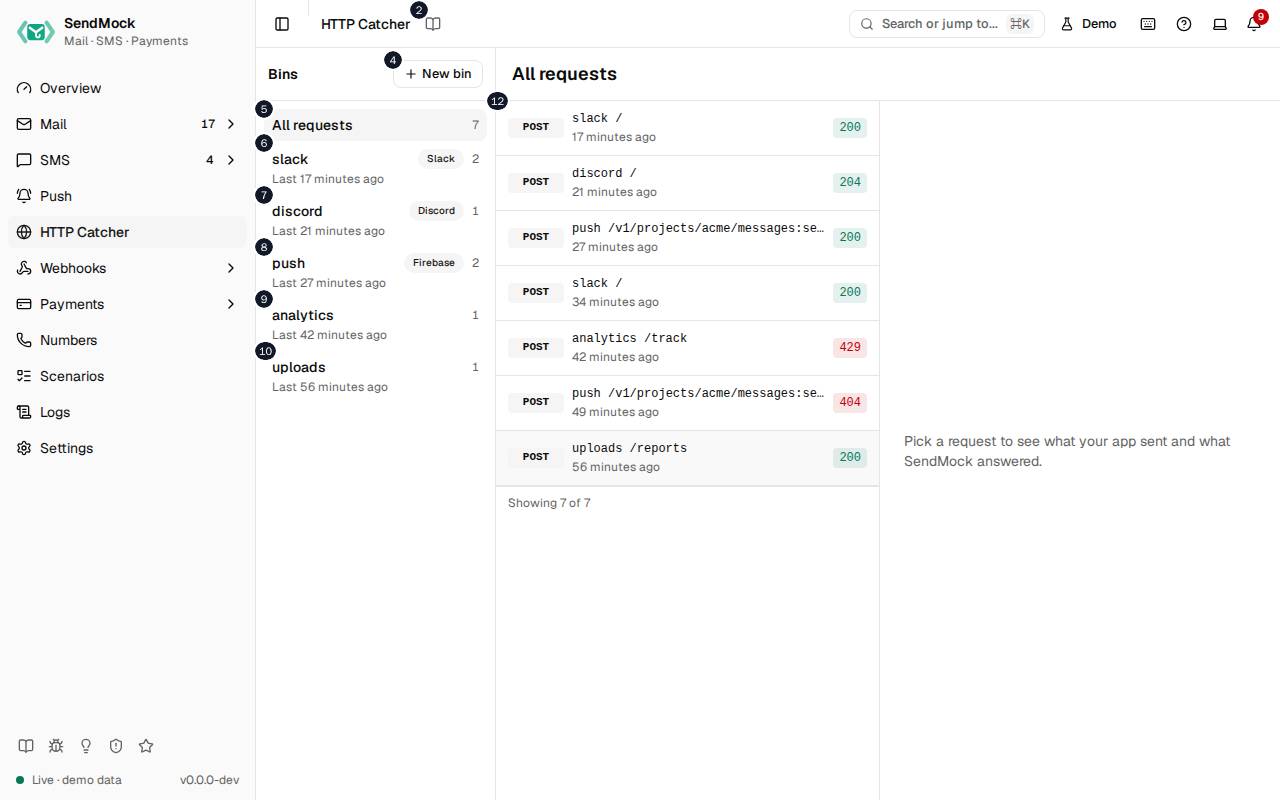
The numbers match the entries below. The picture shows the first screenful; controls further down, and texts, have no marker.
On the screen
1. HTTP Catcher
Heading.
- What it does: Names the open screen in the header.
2. Read the HTTP Catcher guide
Link.
- What it does: Opens this screen's page in the user guide, in a new tab.
- Links to: HTTP Catcher.
3. Bins
Heading.
- What it does: The bins: each has a catch URL that keeps every request sent to it.
- Same action elsewhere: REST
GET /api/v1/http/bins, CLIsendmock http bin list, MCPsendmock_http_bin_list
4. New bin
Button.
- What it does: Opens New bin.
5. All requests
Button.
- What it does: Shows the requests of every bin, with their count.
- Same action elsewhere: REST
GET /api/v1/http/requests, CLIsendmock http list, MCPsendmock_http_list
6. slack Slack # Last # minutes ago
Button.
- What it does: A bin (here the demo's
slackbin with the Slack preset): its name, preset, request count and last request. Shows its requests.
7. discord Discord # Last # minutes ago
Button.
- What it does: The demo's
discordbin, answering as Discord does.
8. push Firebase # Last # minutes ago
Button.
- What it does: The demo's
pushbin, answering as Firebase Cloud Messaging does.
9. analytics # Last # minutes ago
Button.
- What it does: The demo's
analyticsbin, with no preset.
10. uploads # Last # minutes ago
Button.
- What it does: The demo's
uploadsbin, with no preset.
11. All requests
Heading.
- What it does: The requests of the chosen bin, newest first.
12. POST … # minutes ago
Button, in each row.
- What it does: A captured request: its method, path, when it came and the status SendMock answered; shows it.
- Same action elsewhere: REST
GET /api/v1/http/requests/{requestId}, CLIsendmock http show, MCPsendmock_http_get
13. Pick a request to see what your app sent and what SendMock answered.
Text.
- What it does: Shown until a request is open.
A bin is open
14. slack
Heading.
- What it does: The open bin's name (here
slack).
15. Requests
Tab.
- What it does: The bin's captured requests.
16. Responses
Tab.
- What it does: What the bin answers: its default reply and the rules that answer some requests differently, with delays and failure rates.
- Links to: Advanced: catcher responses.
- Same action elsewhere: REST
GET /api/v1/http/bins/{binId}/responses, CLIsendmock http response list, MCPsendmock_http_response_list
17. Copy catch URL
Button.
- What it does: Copies the bin's catch URL,
/catch/<bin>/..., to point your app at.
18. Clear requests
Button.
- What it does: Deletes the bin's captured requests.
- Same action elsewhere: REST
DELETE /api/v1/http/requests, CLIsendmock http clear, MCPsendmock_http_clear
19. Delete bin
Button.
- What it does: Deletes the bin and its requests, after you confirm.
- Same action elsewhere: REST
DELETE /api/v1/http/bins/{binId}, CLIsendmock http bin delete, MCPsendmock_http_bin_delete
20. POST / # minutes ago
Button, in each row.
- What it does: A request in this bin; shows it.
A request is open
21. Copy URL
Button.
- What it does: Copies the full URL the request was sent to.
22. Month #, #, #:# from #.#.#.#, answered in # ms
Text.
- What it does: When the request came, from which address, and how long SendMock took to answer.
23. Copy as cURL
Button.
- What it does: Copies the request as a curl command.
24. Forward to URL
Button.
- What it does: Sends the same request on to another URL, such as your local handler, and shows its answer.
- Same action elsewhere: REST
POST /api/v1/http/requests/{requestId}/forward, CLIsendmock http forward, MCPsendmock_http_forward
25. Send to webhook
Button.
- What it does: Sends the request's
http.capturedevent to a webhook endpoint now. - Same action elsewhere: REST
POST /api/v1/webhooks/endpoints/{endpointId}/send, CLIsendmock webhook send, MCPsendmock_webhook_send
26. Preview
Tab.
- What it does: How the message would look in the service the preset copies (here Slack).
27. Body
Tab.
- What it does: The body as received, formatted when it is JSON or a form.
28. Headers
Tab.
- What it does: Every header received.
29. Query
Tab.
- What it does: The query parameters.
30. Response
Tab.
- What it does: What SendMock answered: status, headers and body, and which rule chose it.
31. Incoming webhook APP
Text.
- What it does: In the Slack preview: the sender as Slack would show it.
32. Email bounced
Text.
- What it does: In the Slack preview: the message text (here a bounce alert).
33. [email protected] did not get Your verification code .
Text.
- What it does: In the Slack preview: the message's details.
34. Reason # #.#.# user unknown
Text.
- What it does: In the Slack preview: a field of the message.
35. Provider SendMock
Text.
- What it does: In the Slack preview: a field of the message.
36. Sent by acme-app worker
Text.
- What it does: In the Slack preview: the message's footer.
New bin dialog
37. New bin
Heading.
- What it does: The New bin dialog.
38. Requests to its catch URL are kept here and answered with its reply.
Text.
- What it does: Explains a bin.
39. Name
Field.
- What it does: The bin's name, which is also its catch URL's first path part.
40. http://#.#.#.#:#/catch/<name>
Text.
- What it does: The catch URL the bin will have.
41. Preset
Drop-down.
- What it does: A service to answer as: Slack, Discord, Teams, Google Chat, Telegram, FCM, Expo, OneSignal or generic.
42. Answers # {"ok":true}.
Text.
- What it does: What the chosen preset answers.
43. Cancel
Button.
- What it does: Closes the dialog without doing anything.
44. Add bin
Button.
- What it does: Adds the bin.
- Same action elsewhere: REST
POST /api/v1/http/bins, CLIsendmock http bin create, MCPsendmock_http_bin_create
45. Close
Button.
- What it does: Closes the dialog.
With no data yet
46. slack Slack # No requests yet
Button.
- What it does: A bin with no requests yet.
47. discord Discord # No requests yet
Button.
- What it does: A bin with no requests yet.
48. push Firebase # No requests yet
Button.
- What it does: A bin with no requests yet.
49. analytics # No requests yet
Button.
- What it does: A bin with no requests yet.
50. uploads # No requests yet
Button.
- What it does: A bin with no requests yet.
51. No requests caught yet.
Text.
- What it does: Shown while no request has come.
When the data cannot load
52. Could not load the HTTP bins. Try again
Message.
- What it does: Shown when the bins could not be loaded.
- Errors: Check SendMock is running, then press Try again.
53. Could not load the HTTP bins.
Text.
- What it does: The message inside the alert.
54. Try again
Button.
- What it does: Loads the bins again.
- Same action elsewhere: REST
GET /api/v1/http/bins, CLIsendmock http bin list, MCPsendmock_http_bin_list