HTTP Catcher
A bin for any HTTP call your app makes (Slack, Discord, push, third-party APIs), recorded and answered the way you choose.
Try it in the demo.
Apps send more than email and SMS: Slack alerts, Discord messages, push notifications, analytics pings, calls to partner APIs. Point any of them at a SendMock bin and every request is recorded, shown, and answered with a reply your app accepts.
What it solves
- Alerts reaching real people during development. A Slack or push notification from your laptop lands in a bin instead of the team channel or a customer's phone. See Recipe: Slack and push.
- "What exactly did my app send?" Method, URL, headers, body and uploaded files, for any API call.
- Testing how your app handles slow or failing APIs. A bin can answer 429 or 500, slowly, or a share of the time. See Responses.
- A local target for webhooks. Webhook endpoints can post to a bin, so you can see what SendMock sends before your app is ready.
How it connects
| Gets from | Sends to |
|---|---|
any HTTP call to http://127.0.0.1:8025/catch/<bin>/... | the reply chosen by the bin's response rules |
| Webhooks endpoints pointing at a bin (Add a catcher endpoint) | http.captured events to Webhooks > Rules |
| Forward to URL: the captured request, sent on to a real or local URL | |
Send to webhook: the request as the data of an http.captured event |
Use it
- Press New bin, name it
slack, pick the Slack incoming webhook preset and press Add bin. (A bin is also created the first time something posts to it.) - Copy the catch URL,
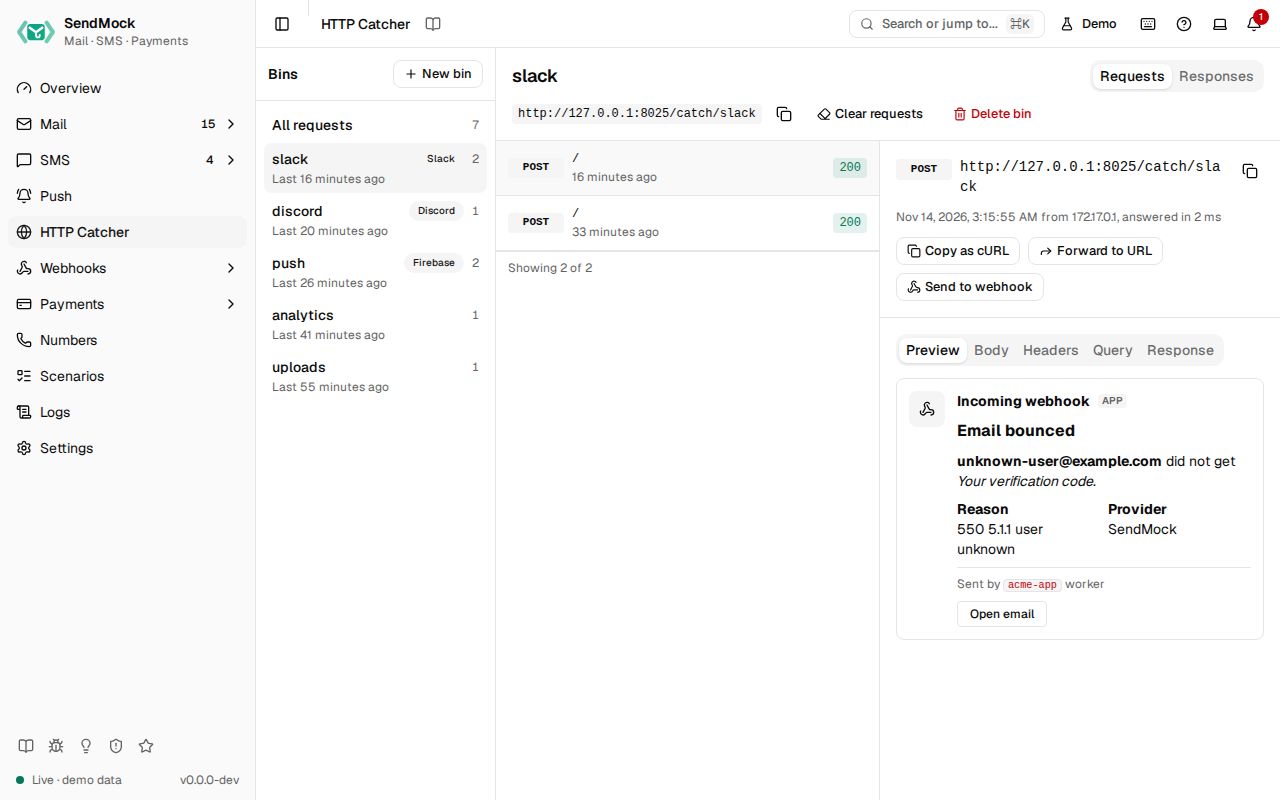
http://127.0.0.1:8025/catch/slack, into your app's Slack webhook setting. - Trigger an alert in your app. The request appears under the bin and its Preview shows it as a Slack message.
- Open the Response tab: SendMock answered
200 ok, as Slack does, so your app carried on.
Everything on this screen
The screen has three columns like Mail (bins, requests, detail), stacked on phones. The bin, tab and request are kept in the URL.
Bins
"All requests", then each bin with its preset badge, request count and last request time. New bin asks for a name (lowercase letters, digits, - and _) and a preset, which sets the bin's default reply:
| Preset | Answers like |
|---|---|
| Slack incoming webhook | 200 ok as plain text |
| Discord webhook | 204, or the message JSON with ?wait=true |
| Microsoft Teams, Google Chat | 200 |
| Telegram Bot API | {"ok": true, "result": {...}} |
| Firebase Cloud Messaging v1 | {"name": "projects/.../messages/<id>"} |
| Expo push | tickets with status: ok |
| OneSignal | {"id": ..., "recipients": 1} |
| Generic JSON API | an echo with a generated id |
The bin header shows its catch URL with a copy button, Clear requests and Delete bin (both ask first).
Requests
Newest first, 50 at a time, new ones appearing live: method, path, the status code SendMock answered (errors highlighted) and time.
Request detail
Method and full URL, time, client IP and duration, then tabs:
- Preview (when recognised): Slack Block Kit as a Slack message, Discord content and embeds as a Discord message, FCM, Expo and OneSignal pushes as phone notification cards.
- Body: pretty (JSON indented, form and multipart fields as rows) or raw, with uploaded files to download.
- Headers and Query.
- Response: the status, headers and body SendMock answered with, and what produced it ("Rule: ...", "Default reply" or "Simulated failure").
- Actions: Copy as cURL, Forward to URL (remembers the last URL; shows the status and time it got) and Send to webhook.
Responses tab
The bin's response rules and default reply. See Responses.
Every control and text, one by one: HTTP Catcher in depth.
Customize
- Rules per path and method, templated bodies that echo the request, delays and failure rates: Advanced: catcher responses.
- A new preset (a service whose reply shape SendMock does not know yet) needs code; ask for it with a provider request issue.
Catch every path on its own port
Some apps let you change only the host of the service they call, not the path. Start SendMock with a catch-all port and point the app's host at it; every request it gets is captured, at any method and path.
-
Start SendMock with the port on:
sendmock --catcher-addr 127.0.0.1:8030 -
Point the app's host at
http://127.0.0.1:8030. The first part of the path names the bin, soPOST http://127.0.0.1:8030/orders/42lands in the binorders, and a request to/lands indefault.
The bin's rules, presets, delays and failure rates work as on /catch/<bin>/.... The flag is also SENDMOCK_CATCHER_ADDR and catcher_addr in sendmock.toml; in Docker use 0.0.0.0:8030 and publish port 8030. When it is on, each bin shows both catch URLs.
From your code
Create a bin that answers like Firebase Cloud Messaging, then point your app's push base URL at its catch URL.
The examples call SendMock's REST API with each language's usual HTTP client and test framework. JavaScript, Go, Java, Rust, Ruby and C# use the small call helper shown under Test helper on their page in Connect your app.
bin=$(sendmock http bin create --name push --preset fcm --json)

jq -e '.name == "push"' <<<"$bin" >/dev/null