Push
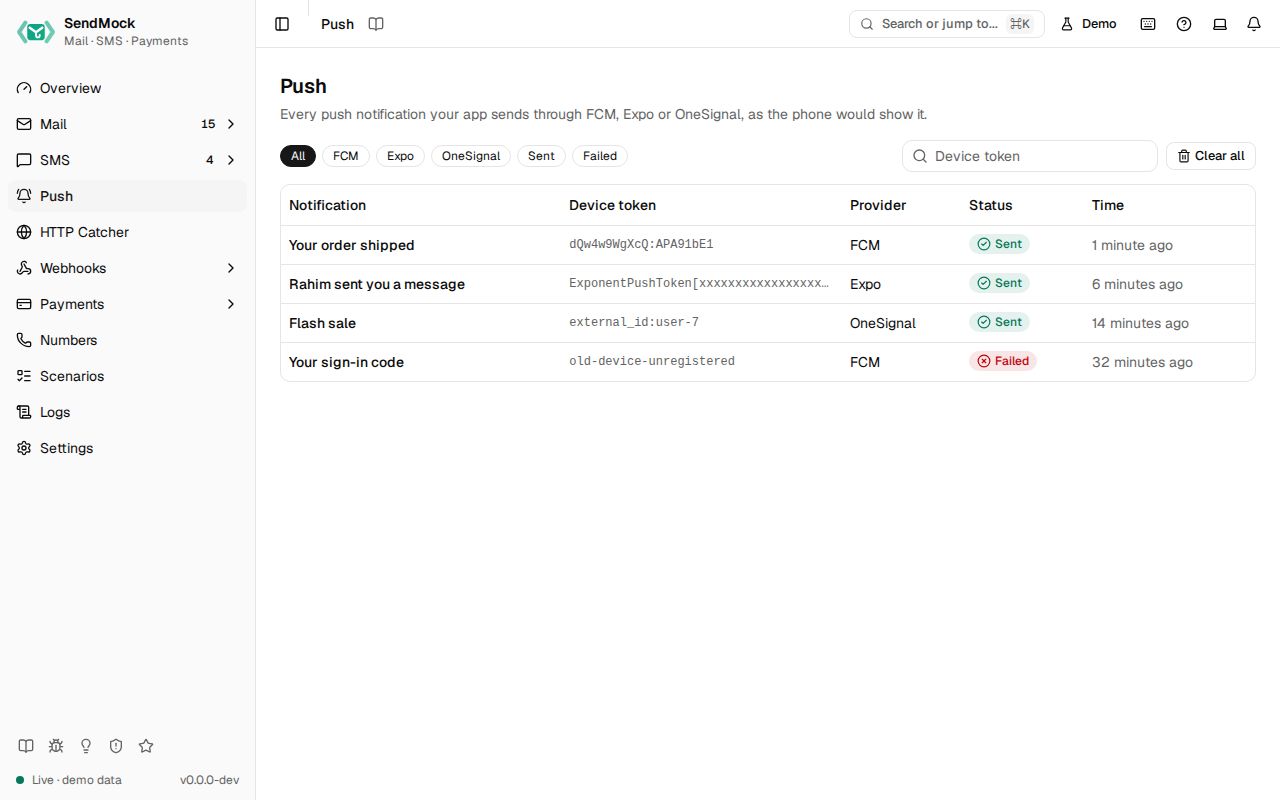
Push notifications your app sends through Firebase Cloud Messaging, Expo or OneSignal, caught and shown as the phone would show them.
Try it in the demo.
Your app sends push notifications through FCM, Expo or OneSignal with their own SDKs. Point the SDK at SendMock instead and Push shows every notification as a lock screen card, with its data payload, the request and what SendMock answered, in the provider's own shape.
What it solves
- Seeing the notification without a phone, a Firebase project or an Expo account: the title, body, image and data exactly as your app built them.
- Automated tests: wait for "the push to this device" and assert on its title or data, instead of mocking the SDK.
- The answers your code handles: FCM's message name, Expo's tickets and receipts, OneSignal's notification id, all in the provider's format.
How it connects
| Gets from | Sends to |
|---|---|
your app's FCM HTTP v1 send (POST /v1/projects/{project}/messages:send) at http://127.0.0.1:8026 or http://127.0.0.1:8025/providers/fcm | this screen, one row per message |
your app's Expo sends (POST /--/api/v2/push/send, one message or a batch) and receipt checks (POST /--/api/v2/push/getReceipts) | this screen, one row per recipient |
your app's OneSignal sends (POST /notifications) | this screen, one row per subscription or alias |
the X-SendMock-Project header or a /projects/<key>/ prefix | the notification's project |
push.sent and push.failed events to Webhooks > Rules, which can filter on token, title, body, provider and project | |
| the API request to Logs > API requests |
Use it
- Point your SDK at SendMock:
-
Expo: set the environment variable before your server starts.
EXPO_BASE_URL=http://127.0.0.1:8026 -
OneSignal (Node): give the client SendMock as its server.
const configuration = OneSignal.createConfiguration({ restApiKey: "any", baseServer: new OneSignal.ServerConfiguration("http://127.0.0.1:8026", {}), }); -
FCM: send to
http://127.0.0.1:8026/v1/projects/<your-project>/messages:send;firebase-adminhas no base URL option, so route its requests to that address in development.
-
- Send a notification from your app (an order shipped, a chat message). A row appears with its title, device token, provider and status.
- Click the row. The drawer shows the lock screen card (switch between iOS and Android), the data payload, the request and the answer.
Test failures with magic tokens
A device token (or Expo push token, OneSignal subscription or alias id) that contains one of these words fails the way the provider fails, so you can test how your app handles a dead or bad token. The notification is still listed, as Failed, with the reason and the error your app got.
| Token contains | FCM | Expo | OneSignal |
|---|---|---|---|
unregistered | 404 NOT_FOUND, UNREGISTERED (messaging/registration-token-not-registered in firebase-admin) | the recipient's ticket: DeviceNotRegistered | the id under errors.invalid_player_ids (or errors.invalid_aliases) |
invalid | 400 INVALID_ARGUMENT (messaging/invalid-argument) | the recipient's ticket: DeviceNotRegistered, not a valid Expo push token | as unregistered |
throttled | 429 RESOURCE_EXHAUSTED, QUOTA_EXCEEDED (messaging/message-rate-exceeded) | the recipient's ticket: MessageRateExceeded | the whole request: 429, "API rate limit exceeded" |
When every OneSignal recipient is refused, the answer is { "id": "", "errors": ["All included players are not subscribed"] }, as OneSignal answers it.
Everything on this screen
- Filters: a chip per provider (All, FCM, Expo, OneSignal), Sent and Failed, and a device token filter (exact match).
- The table: the notification's title (or its body when it has none), the device token, the provider, the status and the time. FCM topic and condition sends show as
topic:<name>andcondition:<expression>, OneSignal aliases as<label>:<id>and segment sends assegment:<names>. - Clear all: deletes every notification the filters show, after asking.
The notification drawer
Click a row (or open ?push=<id>; Esc closes): the phone preview in the style of the message's platform (iOS puts the image beside the text, Android below it), the status and the reason when it failed, the provider, the device token, the provider's message id, the project and the time, the Data payload as key and value rows, the Request and the Answer as JSON with copy buttons, and Delete.
Every control and text, one by one: Push in depth.
Customize
- Projects: send with
X-SendMock-Project: <key>, or put/projects/<key>/before the provider's path in the base URL, to keep each app's notifications apart (Projects). - One address per provider: without the provider port, use
http://127.0.0.1:8025/providers/fcm,/providers/expoor/providers/onesignalas the base URL.