Settings in depth
Every control and text of every Settings section.
Every control and text this screen shows, in screen order. The list is read from the demo by a crawl, and CI fails when the screen changes without its entry here.
Settings changes how SendMock behaves, section by section; every change applies at once.
The screen as a whole: Settings.
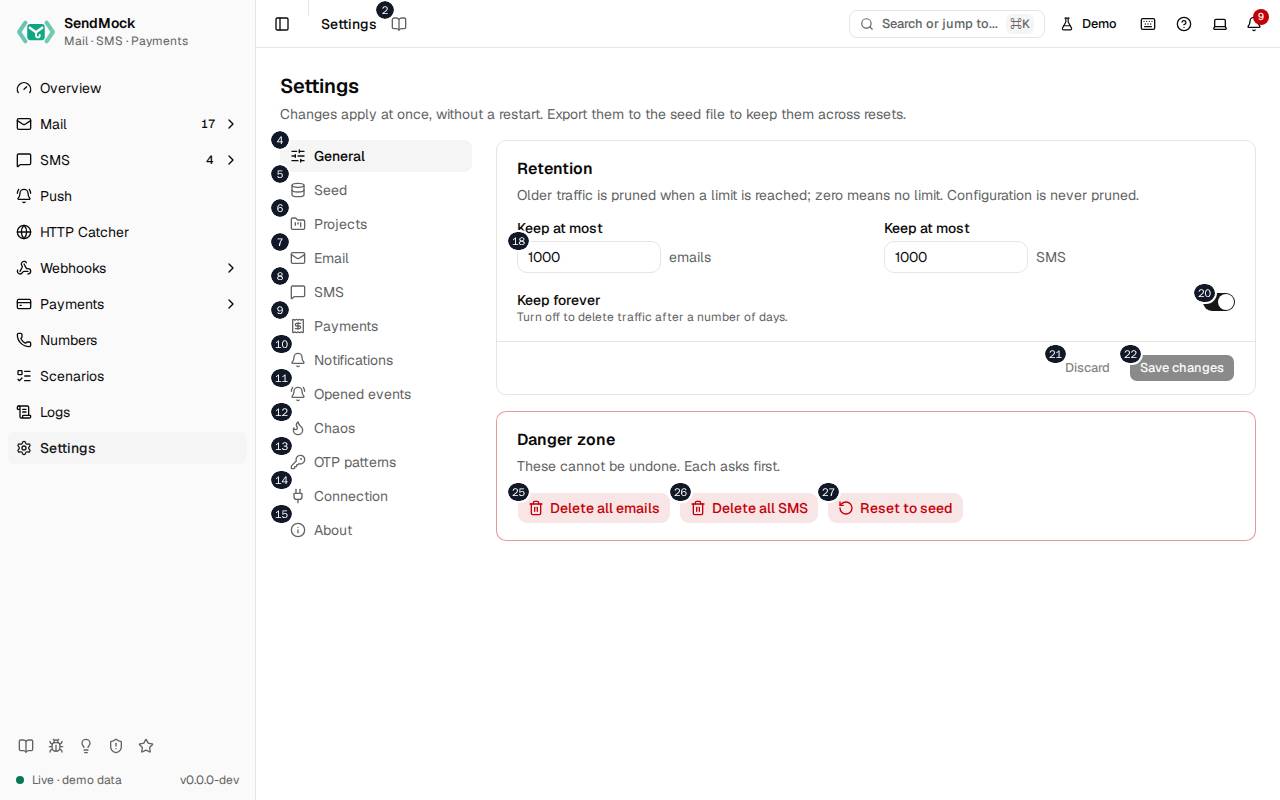
The numbers match the entries below. The picture shows the first screenful; controls further down, and texts, have no marker.
On the screen
1. Settings
Heading.
- What it does: Names the screen, in the header and above the sections.
2. Read the Settings guide
Link.
- What it does: Opens this screen's page in the user guide, in a new tab.
- Links to: Settings.
3. Changes apply at once, without a restart. Export them to the seed file to keep them across resets.
Text.
- What it does: Explains how settings apply and how to keep them.
- Same action elsewhere: REST
GET /api/v1/settings, CLIsendmock settings get, MCPsendmock_settings_get
4. General
Link.
- What it does: Opens the General section: retention and the danger zone.
5. Seed
Link.
- What it does: Opens the Seed section: the seed file: export, validate and apply.
6. Projects
Link.
- What it does: Opens the Projects section: projects that keep apps' or developers' traffic apart.
7. Email
Link.
- What it does: Opens the Email section: receiving, delivery outcomes, release, tag and forward rules, outcome addresses.
8. SMS
Link.
- What it does: Opens the SMS section: delivery simulation, Verify defaults, outcome numbers and magic numbers.
9. Payments
Link.
- What it does: Opens the Payments section: the hosted checkout and the test values.
10. Notifications
Link.
- What it does: Opens the Notifications section: pop-up toasts for new traffic.
11. Opened events
Link.
- What it does: Opens the Opened events section: when
email.openedandsms.openedfire.
12. Chaos
Link.
- What it does: Opens the Chaos section: sMTP failures on purpose.
13. OTP patterns
Link.
- What it does: Opens the OTP patterns section: how one-time codes are found.
14. Connection
Link.
- What it does: Opens the Connection section: snippets for every language, provider base URLs and AI agents.
15. About
Link.
- What it does: Opens the About section: help links and the update check.
16. Retention
Heading.
- What it does: How much traffic is kept.
17. Older traffic is pruned when a limit is reached; zero means no limit. Configuration is never pruned.
Text.
- What it does: Explains retention: emails, SMS, requests and deliveries are pruned; endpoints, rules and other configuration never.
18. Keep at most
Number field.
- What it does: The most emails kept, which also bounds SMTP sessions, API requests, HTTP requests and finished deliveries; the second field is the most SMS, which also bounds verifications and push notifications. 0 keeps everything, with a warning when no age limit is set.
19. Turn off to delete traffic after a number of days.
Text.
- What it does: Explains Keep forever.
20. Keep forever
Switch.
- What it does: When off, traffic older than the number of days you set is deleted too.
21. Discard
Button.
- What it does: Throws away the changes not saved yet.
22. Save changes
Button.
- What it does: Saves the section's changes; they apply at once.
- Same action elsewhere: REST
PATCH /api/v1/settings, CLIsendmock settings set, MCPsendmock_settings_update
23. Danger zone
Heading.
- What it does: Actions that delete data.
24. These cannot be undone. Each asks first.
Text.
- What it does: Warns that these cannot be undone.
25. Delete all emails
Button.
- What it does: Asks first, then deletes every email.
- Same action elsewhere: REST
DELETE /api/v1/emails, CLIsendmock email delete-all, MCPsendmock_email_delete_all
26. Delete all SMS
Button.
- What it does: Asks first, then deletes every SMS.
- Same action elsewhere: REST
DELETE /api/v1/sms, CLIsendmock sms delete-all, MCPsendmock_sms_delete_all
27. Reset to seed
Button.
- What it does: Asks first, then wipes all traffic and puts the configuration back to the seed file.
- Same action elsewhere: REST
POST /api/v1/reset, CLIsendmock reset, MCPsendmock_reset
Seed section
28. Seed file
Heading.
- What it does: The seed file SendMock starts from and resets to.
- Same action elsewhere: REST
GET /api/v1/seed/status, CLIsendmock seed status, MCPsendmock_seed_status
29. The configuration SendMock starts from and resets to, kept in your repository.
Text.
- What it does: Explains the seed file.
- Links to: Advanced: seed file.
30. ./sendmock.seed.toml applied Month #, #, #:#
Text.
- What it does: Which seed file was applied, and when.
31. # items are not in the seed file yet. Export to keep them after a reset.
Text.
- What it does: How much configuration a reset would lose.
32. Export sendmock.seed.toml
Button.
- What it does: Downloads the current configuration as a seed file; secrets are written as
${ENV}references. - Same action elsewhere: REST
GET /api/v1/seed/export, CLIsendmock seed export, MCPsendmock_seed_export
33. Apply a seed file
Heading.
- What it does: Loads a seed file into the running SendMock.
34. Validate first; applying upserts every item in the file by name or SID.
Text.
- What it does: Explains applying.
35. Upload file
Button.
- What it does: Reads a seed file from your computer.
36. Seed file (TOML)
Field.
- What it does: The seed file's text.
37. Validate
Button.
- What it does: Checks the file without applying it and lists errors with their line.
- Same action elsewhere: REST
POST /api/v1/seed/validate, CLIsendmock seed validate, MCPsendmock_seed_validate
38. Apply
Button.
- What it does: Applies the file: every item in it is added or updated.
- Same action elsewhere: REST
POST /api/v1/seed/apply, CLIsendmock seed apply, MCPsendmock_seed_apply
Projects section
39. Projects
Heading.
- What it does: The projects that keep traffic apart.
- Same action elsewhere: REST
GET /api/v1/projects, CLIsendmock projects list, MCPsendmock_project_list
40. Keep apps' or developers' mail, SMS and codes apart in one SendMock. Settings, providers and webhooks are shared.
Text.
- What it does: Explains what a project holds and what every project shares.
41. Name
Column.
- What it does: The project's name, shown in the top bar picker.
42. Key
Column.
- What it does: What apps send to pick the project; it never changes.
43. Emails
Column.
- What it does: How many emails the project holds.
44. SMS
Column.
- What it does: How many SMS the project holds.
45. Codes
Column.
- What it does: How many verifications the project holds.
46. Actions
Column.
- What it does: Rename and Delete.
47. Rename Default
Button.
- What it does: Renames a project; its key stays the same, so apps keep sending to it.
- Same action elsewhere: REST
PATCH /api/v1/projects/{projectKey}, CLIsendmock projects update, MCPsendmock_project_update
48. New project
Button.
- What it does: Asks for a key and a name, then adds the project. The key is what apps send.
- Same action elsewhere: REST
POST /api/v1/projects, CLIsendmock projects create, MCPsendmock_project_create
49. Send to shop
Heading.
- What it does: How an app sends to a project, shown for the first project after Default (or
shopuntil one exists).
50. Traffic that names no project goes to Default. A project you have not created is refused, so a typo shows at once.
Text.
- What it does: Explains where traffic without a project goes, and that unknown projects are refused.
51. Copy the SMTP username
Button.
- What it does: Copies the SMTP username that sends mail to the project.
52. Copy the header
Button.
- What it does: Copies the
X-SendMock-Projectheader for the REST and provider APIs.
53. Copy the base URL
Button.
- What it does: Copies the provider port's base URL under
/projects/<key>/, for SDKs that take a base URL.
Email section
54. Receiving and delivery outcomes
Heading.
- What it does: How arriving mail is tagged and what happens to it next.
55. [email protected] gets the tag invoice.
Text.
- What it does: An example of plus-address tagging.
56. Tag by plus address
Switch.
- What it does: Tags an email with the part after
+in its recipient.
57. Off: the SES simulator and SendMock addresses below behave like any other address.
Text.
- What it does: Explains Magic addresses.
58. Magic addresses
Switch.
- What it does: Whether the magic addresses decide an outcome.
- Links to: Magic numbers and addresses.
59. Off No delivery events unless you simulate one or use a magic address.
Choice.
- What it does: No delivery outcome by itself.
60. Auto-delivered Every email gets email.delivered after a short delay.
Choice.
- What it does: Every email is delivered after a short delay.
61. Realistic A delay, plus the bounce and complaint rates below.
Choice.
- What it does: Delivered after a delay, with some bounces and complaints at the rates you set.
62. Remove inbound.app.test
Button.
- What it does: Removes an inbound domain (here the demo's).
63. Remove reply.app.test
Button.
- What it does: Removes an inbound domain (here the demo's reply domain).
64. Inbound domains
Field.
- What it does: A domain whose mail counts as incoming.
65. Add
Button.
- What it does: Adds the inbound domain.
66. Mail for these domains is incoming (replies, support inboxes) and fires email.inbound.
Text.
- What it does: Explains inbound domains.
- Links to: Inbound routes.
67. SpamAssassin address
Field.
- What it does: The
host:portof a runningspamdfor the spam check.
68. host:port of a running spamd. Leave empty to turn the spam check off.
Text.
- What it does: Explains the SpamAssassin address.
69. Release to real SMTP
Heading.
- What it does: The relay that Release and auto-forward send through.
- Links to: Release.
70. Release and auto-forward send through this relay, and only to allowed recipients.
Text.
- What it does: Explains the relay.
71. Relay SMTP URL
Field.
- What it does: The relay, such as
smtp://user:[email protected]:587.
72. The password is stored and shown masked.
Text.
- What it does: Explains the masking.
73. Allowed recipients
Field.
- What it does: Globs of addresses Release may send to, such as
*@yourcompany.com.
74. Release stays off until at least one pattern is added.
Text.
- What it does: Explains the safety rule.
75. Tag rules
Heading.
- What it does: Rules that tag arriving emails.
- Same action elsewhere: REST
GET /api/v1/tag-rules, CLIsendmock email tag-rules list, MCPsendmock_tag_rule_list
76. Add a tag to arriving emails that match a filter, in this order. Tags show in the list and the tag: search.
Text.
- What it does: Explains tag rules.
77. Rule
Column.
- What it does: The rule's name.
78. When
Column.
- What it does: Its filter, in words.
79. Tag
Column.
- What it does: The tag it adds.
80. Enabled
Column.
- What it does: Whether it runs.
81. Actions
Column.
- What it does: Move, Edit and Delete.
82. Billing mail enabled
Switch.
- What it does: Turns the tag rule on or off (here the demo's "Billing mail").
- Same action elsewhere: REST
PATCH /api/v1/tag-rules/{ruleId}, CLIsendmock email tag-rules update, MCPsendmock_tag_rule_update
83. Move Billing mail up
Button.
- What it does: Runs the rule earlier.
- Same action elsewhere: REST
POST /api/v1/tag-rules/{ruleId}/move, CLIsendmock email tag-rules move, MCPsendmock_tag_rule_move
84. Move Billing mail down
Button.
- What it does: Runs the rule later.
- Same action elsewhere: REST
POST /api/v1/tag-rules/{ruleId}/move, CLIsendmock email tag-rules move, MCPsendmock_tag_rule_move
85. Edit Billing mail
Button.
- What it does: Opens the rule's editor: its name, its filter and what it does.
- Same action elsewhere: REST
PATCH /api/v1/tag-rules/{ruleId}, CLIsendmock email tag-rules update, MCPsendmock_tag_rule_update
86. Delete Billing mail
Button.
- What it does: Deletes the rule after you confirm.
- Same action elsewhere: REST
DELETE /api/v1/tag-rules/{ruleId}, CLIsendmock email tag-rules delete, MCPsendmock_tag_rule_delete
87. Add rule
Button.
- What it does: Adds a tag or forward rule.
- Same action elsewhere: REST
POST /api/v1/tag-rules, CLIsendmock email tag-rules create, MCPsendmock_tag_rule_create - Same action elsewhere: REST
POST /api/v1/forward-rules, CLIsendmock email forward-rules create, MCPsendmock_forward_rule_create
88. Auto-forward rules
Heading.
- What it does: Rules that send a real copy of arriving emails.
- Same action elsewhere: REST
GET /api/v1/forward-rules, CLIsendmock email forward-rules list, MCPsendmock_forward_rule_list
89. Release a real copy of arriving emails that match a filter, through the relay above and only to allowed recipients.
Text.
- What it does: Explains auto-forward.
90. Forward to
Column.
- What it does: Where the copy goes.
91. QA inbox to the team enabled
Switch.
- What it does: Turns the forward rule on or off (here the demo's "QA inbox to the team").
- Same action elsewhere: REST
PATCH /api/v1/forward-rules/{ruleId}, CLIsendmock email forward-rules update, MCPsendmock_forward_rule_update
92. Move QA inbox to the team up
Button.
- What it does: Runs the rule earlier.
- Same action elsewhere: REST
POST /api/v1/forward-rules/{ruleId}/move, CLIsendmock email forward-rules move, MCPsendmock_forward_rule_move
93. Move QA inbox to the team down
Button.
- What it does: Runs the rule later.
- Same action elsewhere: REST
POST /api/v1/forward-rules/{ruleId}/move, CLIsendmock email forward-rules move, MCPsendmock_forward_rule_move
94. Edit QA inbox to the team
Button.
- What it does: Opens the rule's editor: its name, its filter and what it does.
- Same action elsewhere: REST
PATCH /api/v1/forward-rules/{ruleId}, CLIsendmock email forward-rules update, MCPsendmock_forward_rule_update
95. Delete QA inbox to the team
Button.
- What it does: Deletes the rule after you confirm.
- Same action elsewhere: REST
DELETE /api/v1/forward-rules/{ruleId}, CLIsendmock email forward-rules delete, MCPsendmock_forward_rule_delete
96. Custom outcome addresses
Heading.
- What it does: Your own addresses with a fixed delivery outcome.
- Same action elsewhere: REST
GET /api/v1/outcome-rules/email, CLIsendmock outcome-rule email list, MCPsendmock_outcome_rule_list
97. Your own test addresses. The first enabled match wins, before the magic addresses and the profile.
Text.
- What it does: Explains the order outcomes are decided in.
- Links to: Advanced: email outcome addresses.
98.
Column.
- What it does: The rule's place.
99. Address
Column.
- What it does: The address or pattern.
100. Outcome
Column.
- What it does: What happens to mail for it.
101. On
Column.
- What it does: Whether it is on.
102. Rule # enabled
Switch.
- What it does: Turns the rule on or off.
- Same action elsewhere: REST
PATCH /api/v1/outcome-rules/email/{ruleId}, CLIsendmock outcome-rule email update, MCPsendmock_outcome_rule_update
103. Move rule # up
Button.
- What it does: Checks the rule earlier.
- Same action elsewhere: REST
POST /api/v1/outcome-rules/email/{ruleId}/move, CLIsendmock outcome-rule email move, MCPsendmock_outcome_rule_move
104. Move rule # down
Button.
- What it does: Checks the rule later.
- Same action elsewhere: REST
POST /api/v1/outcome-rules/email/{ruleId}/move, CLIsendmock outcome-rule email move, MCPsendmock_outcome_rule_move
105. Edit rule
Button.
- What it does: Opens the rule's editor.
- Same action elsewhere: REST
PATCH /api/v1/outcome-rules/email/{ruleId}, CLIsendmock outcome-rule email update, MCPsendmock_outcome_rule_update
106. Delete rule
Button.
- What it does: Deletes the rule after you confirm.
- Same action elsewhere: REST
DELETE /api/v1/outcome-rules/email/{ruleId}, CLIsendmock outcome-rule email delete, MCPsendmock_outcome_rule_delete
107. Add address
Button.
- What it does: Adds an outcome address.
- Same action elsewhere: REST
POST /api/v1/outcome-rules/email, CLIsendmock outcome-rule email create, MCPsendmock_outcome_rule_create
108. Test an address
Field.
- What it does: Shows which rule, magic address or profile decides an address's outcome.
- Same action elsewhere: REST
POST /api/v1/outcome-rules/email/test, CLIsendmock outcome-rule email test, MCPsendmock_outcome_rule_test
109. Magic address: Hard bounce (# #.#.#)
Text.
- What it does: The answer for the address tested (here a magic address that bounces).
110. Magic addresses
Heading.
- What it does: The built-in test addresses.
111. Send to these to get a delivery outcome without touching any setting. Built in and read-only.
Text.
- What it does: Explains magic addresses.
112. Recipients
Heading.
- What it does: The magic addresses and what each does.
113. Recipient
Column.
- What it does: The address.
114. Code
Column.
- What it does: The SMTP code or outcome it gives.
115. Copy [email protected]
Button.
- What it does: Copies the Amazon SES simulator address
[email protected].
116. Copy [email protected]
Button.
- What it does: Copies the Amazon SES simulator address
[email protected].
117. Copy [email protected]
Button.
- What it does: Copies the Amazon SES simulator address
[email protected].
118. Copy [email protected]
Button.
- What it does: Copies the Amazon SES simulator address
[email protected].
119. Copy [email protected]
Button.
- What it does: Copies the Amazon SES simulator address
[email protected].
SMS section
120. Delivery simulation
Heading.
- What it does: How sent SMS move on from
queued.
121. Instant Delivered as soon as it is sent.
Choice.
- What it does: Delivered at once.
122. Realistic Queued, sent after about # ms, delivered after # to # s.
Choice.
- What it does: Queued, then sent, then delivered after a short delay, as a carrier would.
123. Manual Stays sent until you set a status in the message drawer.
Choice.
- What it does: Stays sent until you choose its status by hand.
124. Failure rate
Slider.
- What it does: A share of sends that end undelivered or failed at random.
125. This share of sends ends undelivered or failed at random.
Text.
- What it does: Explains the failure rate.
126. Reject From numbers that are not Twilio magic numbers with #, like real test credentials.
Text.
- What it does: Explains Strict Twilio test mode.
127. Strict Twilio test mode
Switch.
- What it does: Refuses any
Fromthat is not one of Twilio's test numbers, with 21606, as Twilio's test credentials do.
128. Off: the Twilio test numbers and SendMock outcome numbers below behave like any other number.
Text.
- What it does: Explains Magic numbers.
129. Magic numbers
Switch.
- What it does: Whether the magic numbers decide an outcome.
- Links to: Magic numbers and addresses.
130. Verify defaults
Heading.
- What it does: What new Verify services start with.
131. New Verify services start with this code length and lifetime. A fixed code here is sent by every service that has none of its own.
Text.
- What it does: Explains the defaults.
132. Code length
Number field.
- What it does: The default code length, 4 to 10.
133. Code lifetime
Number field.
- What it does: How long codes stay valid by default.
134. Fixed code for every service
Field.
- What it does: A code every service without its own fixed code sends.
135. Leave it empty for random codes.
Text.
- What it does: Explains an empty fixed code.
136. Custom outcome numbers
Heading.
- What it does: Your own numbers with a fixed outcome.
- Same action elsewhere: REST
GET /api/v1/outcome-rules/sms, CLIsendmock outcome-rule sms list, MCPsendmock_outcome_rule_list
137. Your own test numbers. The first enabled match wins, before the magic numbers and the profile.
Text.
- What it does: Explains the order outcomes are decided in.
- Links to: Advanced: SMS outcome numbers.
138.
Column.
- What it does: The rule's place.
139. Number
Column.
- What it does: The number or pattern.
140. Outcome
Column.
- What it does: What happens to mail for it.
141. On
Column.
- What it does: Whether it is on.
142. Actions
Column.
- What it does: Move, Edit and Delete.
143. Rule # enabled
Switch, in each row.
- What it does: Turns the rule on or off.
- Same action elsewhere: REST
PATCH /api/v1/outcome-rules/sms/{ruleId}, CLIsendmock outcome-rule sms update, MCPsendmock_outcome_rule_update
144. Move rule # up
Button, in each row.
- What it does: Checks the rule earlier.
- Same action elsewhere: REST
POST /api/v1/outcome-rules/sms/{ruleId}/move, CLIsendmock outcome-rule sms move, MCPsendmock_outcome_rule_move
145. Move rule # down
Button, in each row.
- What it does: Checks the rule later.
- Same action elsewhere: REST
POST /api/v1/outcome-rules/sms/{ruleId}/move, CLIsendmock outcome-rule sms move, MCPsendmock_outcome_rule_move
146. Edit rule
Button, in each row.
- What it does: Opens the rule's editor.
- Same action elsewhere: REST
PATCH /api/v1/outcome-rules/sms/{ruleId}, CLIsendmock outcome-rule sms update, MCPsendmock_outcome_rule_update
147. Delete rule
Button, in each row.
- What it does: Deletes the rule after you confirm.
- Same action elsewhere: REST
DELETE /api/v1/outcome-rules/sms/{ruleId}, CLIsendmock outcome-rule sms delete, MCPsendmock_outcome_rule_delete
148. Add number
Button.
- What it does: Adds an outcome number.
- Same action elsewhere: REST
POST /api/v1/outcome-rules/sms, CLIsendmock outcome-rule sms create, MCPsendmock_outcome_rule_create
149. Number is the
Drop-down.
- What it does: Whether the number tested is the recipient (
To) or the sender (From).
150. Test a number
Field.
- What it does: Shows which rule, magic number or profile decides a number's outcome.
- Same action elsewhere: REST
POST /api/v1/outcome-rules/sms/test, CLIsendmock outcome-rule sms test, MCPsendmock_outcome_rule_test
151. Magic number: Invalid number (#)
Text.
- What it does: The answer for the number tested (here a magic number refused with 21211).
152. Magic numbers
Heading.
- What it does: The built-in test numbers.
153. Twilio's official test numbers, plus SendMock numbers for outcomes after sending. Built in and read-only.
Text.
- What it does: Explains magic numbers.
154. To numbers (Twilio)
Heading.
- What it does: Twilio's recipient test numbers.
155. To
Column.
- What it does: The number.
156. Code
Column.
- What it does: The SMTP code or outcome it gives.
157. Copy +#
Button, in each row.
- What it does: Copies the number.
158. From numbers (Twilio)
Heading.
- What it does: Twilio's sender test numbers.
159. From
Column.
- What it does: The number.
160. After-send outcomes (SendMock)
Heading.
- What it does: SendMock's numbers that change status after the send.
Payments section
161. Checkout
Heading.
- What it does: The hosted checkout's settings.
162. Applies to the next hosted checkout.
Text.
- What it does: Explains when changes apply.
163. Merchant name
Field.
- What it does: The shop name on checkout pages.
164. Shown on checkout pages and as {merchant} in flow labels.
Text.
- What it does: Explains the merchant name.
165. Default currency
Drop-down.
- What it does: The currency of checkouts made without one.
166. For checkouts created without a currency.
Text.
- What it does: Explains the default currency.
167. Interactive Each checkout waits for you on its checkout page.
Choice.
- What it does: Each checkout waits for you to pay or decline on its page.
168. Always succeed New checkouts are paid at once, with their redirect and notifications.
Choice.
- What it does: Every checkout is paid at once.
169. Always decline New checkouts are declined at once (generic decline).
Choice.
- What it does: Every checkout is declined at once.
170. Random New checkouts succeed at the rate below, else are declined.
Choice.
- What it does: Checkouts succeed at a rate you set.
171. Test values
Heading.
- What it does: What the methods accept.
172. What the enabled methods accept on checkout pages, as each method's flow asks for it. Any future expiry and any CVC work with the test cards.
Text.
- What it does: Explains the test values.
173. Test cards
Heading.
- What it does: The test cards and their outcomes.
- Same action elsewhere: REST
GET /api/v1/payments/test-cards, CLIsendmock payments test-cards, MCPsendmock_payment_test_cards
174. Method
Column.
- What it does: The method.
175. Offered by
Column.
- What it does: The gateways that offer it.
176. Card number
Column.
- What it does: The card number.
177. Outcome
Column.
- What it does: What happens to mail for it.
178. Copy # # #
Button, in each row.
- What it does: Copies the card number.
179. Test numbers and codes
Heading.
- What it does: Wallet numbers and codes.
180. Number or code
Column.
- What it does: The number or code.
181. OTP and PIN
Column.
- What it does: The OTP and PIN that go with it.
182. Copy
Button, in each row.
- What it does: Copies the number or code.
183. Other methods
Heading.
- What it does: Methods with no test value to type.
184. What happens
Column.
- What it does: What the method does on the checkout page.
185. Merchant credentials are set per gateway in Payments > Gateways ; test values are edited in Payments > Methods .
Text.
- What it does: Says where to change them.
186. Payments > Gateways
Link.
- What it does: Opens Payments > Gateways.
- Links to: Gateways.
187. Payments > Methods
Link.
- What it does: Opens Payments > Methods.
- Links to: Methods.
Notifications section
188. Notifications
Heading.
- What it does: Pop-up toasts for new traffic.
189. New emails, SMS and failed webhook deliveries. Saved in this browser only, and applied at once.
Text.
- What it does: Explains what notifies and where it is saved.
190. Off: no pop-ups; the bell at the top right still counts and lists every notification.
Text.
- What it does: Explains turning toasts off.
191. Show pop-up toasts
Switch.
- What it does: Shows a toast for each new email, SMS and failed delivery.
192. Top right Under the bell.
Choice.
- What it does: Shows toasts at the top right, under the bell.
193. Top center Above the page title.
Choice.
- What it does: Shows toasts at the top center.
194. Top left Over the sidebar.
Choice.
- What it does: Shows toasts at the top left.
195. Bottom right The default, out of the way of the header.
Choice.
- What it does: Shows toasts at the bottom right, the default.
196. Bottom center Above the page bottom.
Choice.
- What it does: Shows toasts at the bottom center.
197. Bottom left Over the sidebar footer.
Choice.
- What it does: Shows toasts at the bottom left.
Opened events section
198. Opened events
Heading.
- What it does: When opens are recorded.
199. email.opened and sms.opened stand in for the recipient reading the message.
Text.
- What it does: Explains opened events.
200. Opening an email or scrolling an SMS into view counts as the recipient reading it.
Text.
- What it does: Explains what counts as an open.
201. Fire opened events when I view messages
Switch.
- What it does: Fires
email.openedandsms.openedwhen you look at a message in SendMock. - Same action elsewhere: REST
PATCH /api/v1/settings, CLIsendmock settings set, MCPsendmock_settings_update
202. First open only One event per message, like most providers report.
Choice.
- What it does: One opened event per message.
203. Every open An event each time, for testing open counters.
Choice.
- What it does: An opened event each time.
Chaos section
204. Chaos
Heading.
- What it does: SMTP failures on purpose.
205. Make SMTP fail on purpose to test retries and error handling. SMS failures use the failure rate in SMS settings.
Text.
- What it does: Explains chaos.
206. Reject the next
Number field.
- What it does: How many of the next messages are refused.
207. Counts down as messages arrive. # turns it off.
Text.
- What it does: Explains the countdown.
208. With code
Drop-down.
- What it does: The SMTP code they are refused with, such as 421 or 554.
209. Reject recipients matching
Field.
- What it does: A glob of recipients refused with 550.
210. Glob; matching recipients get # No such user. Leave empty to turn it off.
Text.
- What it does: Explains the recipient glob.
211. Latency per SMTP command
Number field.
- What it does: A delay before each SMTP reply.
212. The client sees the connection close mid-message and nothing is stored.
Text.
- What it does: Explains dropping the connection.
213. Drop the connection during DATA
Switch.
- What it does: Closes the connection in the middle of the message.
OTP patterns section
214. OTP patterns
Heading.
- What it does: How one-time codes are found.
- Links to: Advanced: OTP patterns.
215. Tried in order on every new email and SMS; the first capture group of the first match is the code.
Text.
- What it does: Explains the patterns.
216. Pattern
Field, in each row.
- What it does: A regular expression; its first capture group is the code.
217. Remove pattern
Button, in each row.
- What it does: Removes the pattern.
218. Add pattern
Button.
- What it does: Adds a pattern.
219. Restore defaults
Button.
- What it does: Brings back the built-in patterns.
220. Try a message
Field.
- What it does: Text to try the patterns on.
221. Pattern # found
Text.
- What it does: Which pattern matched the message and the code it found.
Connection section
222. Connect your app
Heading.
- What it does: Snippets for pointing your app at SendMock.
223. Point your app at SendMock. Provider SDKs are below, under Provider APIs; recipes are in the docs.
Text.
- What it does: Explains the section.
- Links to: Connect your app.
224. Language
Drop-down.
- What it does: The language or framework of the snippets.
225. Where does your app run?
Drop-down.
- What it does: This machine, a container reaching the host, or the same Compose project; shared with the empty states.
- Same action elsewhere: REST
GET /api/v1/info, CLIsendmock status, MCPsendmock_status
226. SMTP
Heading.
- What it does: The SMTP snippet for the chosen language.
227. Copy SMTP snippet
Button.
- What it does: Copies the snippet.
228. Email API
Heading.
- What it does: The Email API snippet for the chosen language.
229. Copy Email API snippet
Button.
- What it does: Copies the snippet.
230. SMS API
Heading.
- What it does: The SMS API snippet for the chosen language.
231. Copy SMS API snippet
Button.
- What it does: Copies the snippet.
232. HTTP Catcher (point Slack, push or other webhooks here)
Heading.
- What it does: The HTTP Catcher (point Slack, push or other webhooks here) snippet for the chosen language.
233. Copy HTTP Catcher (point Slack, push or other webhooks here) snippet
Button.
- What it does: Copies the snippet.
234. Provider APIs
Heading.
- What it does: Base URLs to give the providers' SDKs.
235. Point a provider's SDK at SendMock: use this base URL, or the real path on the provider port (#.#.#.#:#). Change, remove or add providers in Mail > Providers and SMS > Providers.
Text.
- What it does: Explains the base URLs and the provider port.
236. Email
Heading.
- What it does: The email providers' base URLs.
237. …
Link, in each row.
- What it does: A provider's name; opens it in Mail > Providers or SMS > Providers.
238. Copy the … base URL
Button, in each row.
- What it does: Copies the provider's base URL.
239. SMS
Heading.
- What it does: The SMS providers' base URLs.
240. AI agents
Heading.
- What it does: Setting up an AI coding agent.
- Links to: AI.
241. Let Claude Code, Codex, Cursor, Gemini CLI or VS Code drive SendMock through MCP and the agent skill.
Text.
- What it does: Explains the section.
242. AI agent
Drop-down.
- What it does: The agent to set up.
- Same action elsewhere: REST
GET /api/v1/ai/agents, CLIsendmock ai install, MCPsendmock_ai_agents
243. Installed
Choice.
- What it does: Shows the commands for an installed SendMock: the agent starts
sendmock mcp.
244. npx (no install)
Choice.
- What it does: Shows the commands for SendMock run through npx with nothing installed: the agent starts
npx -y sendmock mcp, and the install command isnpx sendmock ai install, which writes that form by itself.
245. Install command
Heading.
- What it does: The command that sets the agent up.
246. Copy install command
Button.
- What it does: Copies
sendmock ai installfor the chosen agent.
247. MCP configuration
Heading.
- What it does: The MCP configuration, to add by hand instead.
248. Copy mcp configuration
Button.
- What it does: Copies the MCP configuration.
249. The install command writes the configuration to claude mcp add sendmock -- sendmock mcp and the skill to .claude/skills/sendmock/ , after showing what it will change.
Text.
- What it does: Says what the install command writes for the chosen agent (here Claude Code).
250. Download the skill
Link.
- What it does: Downloads the agent skill.
- Same action elsewhere: REST
GET /api/v1/ai/skill, CLIsendmock ai skill
About section
251. About SendMock
Heading.
- What it does: The version and channel of the running SendMock.
- Same action elsewhere: REST
GET /api/v1/info, CLIsendmock status, MCPsendmock_status
252. Help and feedback
Heading.
- What it does: The help links, as in the Help menu.
253. Issue forms open on GitHub with your version, channel, OS and browser filled in; nothing you captured is sent.
Text.
- What it does: Explains what the issue forms carry.
254. Documentation
Link.
- What it does: Opens the docs in a new tab.
255. Keyboard shortcuts
Button.
- What it does: Opens the list of keyboard shortcuts.
256. What's new
Link.
- What it does: Opens the changelog.
257. Report an issue
Link.
- What it does: Opens GitHub's bug report form, filled in.
258. Request a feature
Link.
- What it does: Opens GitHub's feature request form, filled in.
259. Report a security issue
Link.
- What it does: Opens GitHub's private security report form.
260. Star on GitHub
Link.
- What it does: Opens the repository.
261. Updates
Heading.
- What it does: Whether SendMock looks for new releases.
262. Off by default: SendMock never calls out unless you choose Manual or Daily. Stable installs are offered stable releases; beta installs betas and stables.
Text.
- What it does: Explains the update check.
263. Off SendMock never calls out.
Choice.
- What it does: Never checks.
264. Manual Only when you press Check for updates.
Choice.
- What it does: Checks only when you ask.
265. Daily On start and once a day; a new version shows in the notifications.
Choice.
- What it does: Checks on start and once a day.
266. Check for updates
Button.
- What it does: Looks for a newer release now and shows how to upgrade.
- Same action elsewhere: REST
GET /api/v1/updates, CLIsendmock update check, MCPsendmock_update_check
AI agents through npx
267. Nothing to install: the agent starts SendMock with npx -y sendmock mcp , which needs Node.js. On Windows, if the agent cannot start npx, use cmd /c npx -y sendmock mcp .
Text.
- What it does: Explains the npx form and the Windows workaround.
- Links to: Install: npx (no install).
268. The install command writes the configuration to claude mcp add sendmock -- npx -y sendmock mcp and the skill to .claude/skills/sendmock/ , after showing what it will change.
Text.
- What it does: Says what the install command writes for the chosen agent through npx (here Claude Code).
Delete all emails dialog
269. Delete all emails?
Heading.
- What it does: The confirmation before deleting every email.
270. Every captured email, its attachments and its SMTP session link are removed. Configuration stays.
Text.
- What it does: Says what is deleted.
271. Cancel
Button.
- What it does: Closes the confirmation without doing anything.
272. Delete all emails
Button.
- What it does: Deletes every email.
- Same action elsewhere: REST
DELETE /api/v1/emails, CLIsendmock email delete-all, MCPsendmock_email_delete_all
Delete all SMS dialog
273. Delete all SMS?
Heading.
- What it does: The confirmation before deleting every SMS.
274. Every captured SMS and WhatsApp message is removed. Numbers and services stay.
Text.
- What it does: Says what is deleted.
275. Cancel
Button.
- What it does: Closes the confirmation without doing anything.
276. Delete all SMS
Button.
- What it does: Deletes every SMS.
- Same action elsewhere: REST
DELETE /api/v1/sms, CLIsendmock sms delete-all, MCPsendmock_sms_delete_all
Reset to seed dialog
277. Reset to seed?
Heading.
- What it does: The confirmation before a reset.
278. All traffic is wiped and the configuration goes back to the seed file. Changes not exported to the seed are lost.
Text.
- What it does: Says what a reset does.
279. Cancel
Button.
- What it does: Closes the confirmation without doing anything.
280. Reset
Button.
- What it does: Resets to the seed file.
- Same action elsewhere: REST
POST /api/v1/reset, CLIsendmock reset, MCPsendmock_reset
When the data cannot load
281. Could not load the settings. Try again
Message.
- What it does: Shown when the settings could not be loaded.
- Errors: Check SendMock is running, then press Try again.
282. Could not load the settings.
Text.
- What it does: The message inside the alert.
283. Try again
Button.
- What it does: Loads the settings again.
- Same action elsewhere: REST
GET /api/v1/settings, CLIsendmock settings get, MCPsendmock_settings_get