Messages
Twilio and Vonage compatible SMS and WhatsApp, shown as conversations, with delivery status, callbacks and replies.
Try it in the demo.
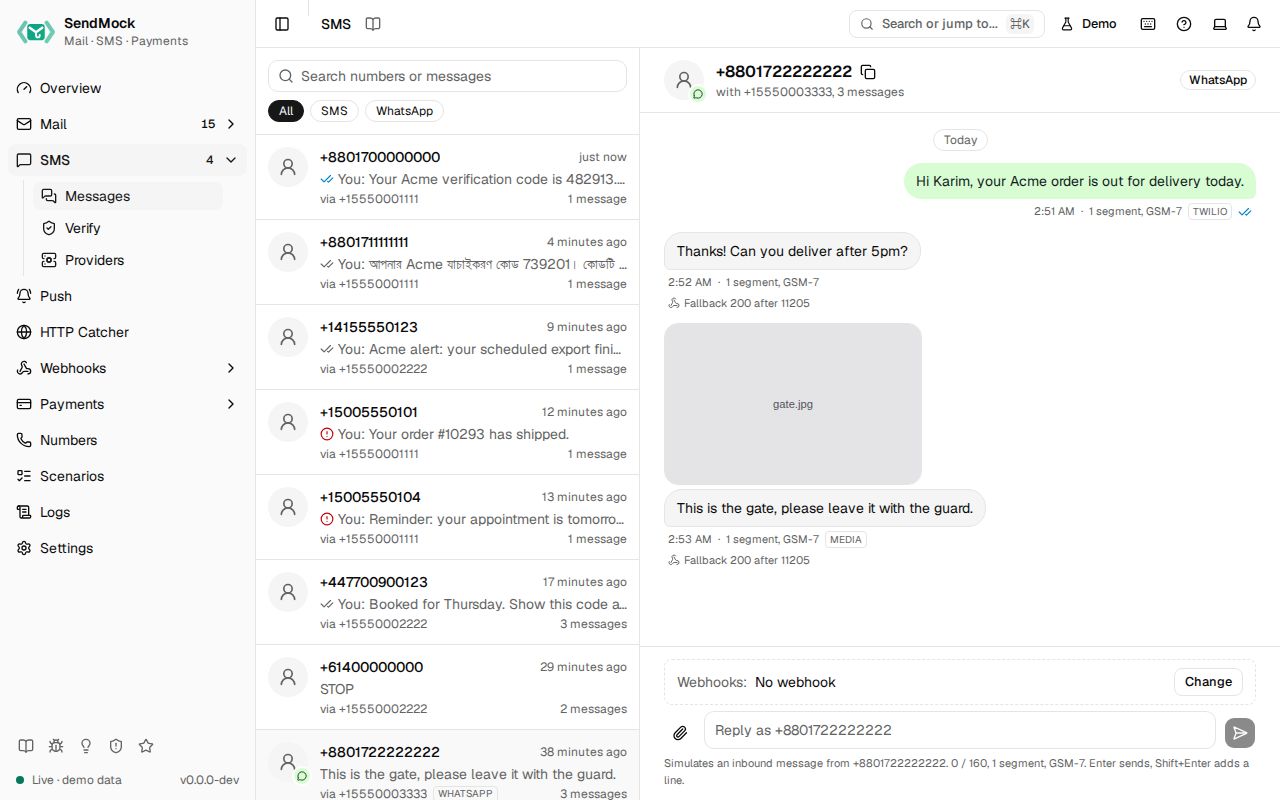
Every SMS and WhatsApp message your app sends lands in SMS > Messages, grouped into conversations like a phone shows them. Nothing reaches a real phone. SMS opens the messages; SMS > Verify and SMS > Providers sit under it.
What it solves
- OTP and alert SMS without a phone or provider credits. Read the code on screen or from the CLI. See Recipe: read a code.
- Failures with real error codes. Twilio's official test numbers fail exactly as on Twilio. See Recipe: failed SMS.
- Status callbacks. Your app's handler for sent, delivered and failed is called the way the provider calls it. See Delivery and test numbers.
- Two-way SMS: STOP, YES, support chats. Reply as the contact and your app's webhook is called. See Recipe: two-way SMS.
- Cost surprises: each bubble shows its segment count and encoding, so a stray emoji that doubles the price is visible.
How it connects
| Gets from | Sends to |
|---|---|
your app over POST /api/v1/sms, the Twilio Messages API or the Vonage SMS API | sms.sent, sms.status, sms.opened and sms.inbound events to Webhooks > Rules |
| Settings > SMS: profile, failure rate, magic and custom outcome numbers | each message's status callback, with every attempt in Message details |
| replies you type in a conversation | the number's reply webhook, set in Numbers, and TwiML answers back into the conversation |
| Verify: codes go out as SMS | the API request to Logs > API requests |
| Settings > OTP patterns | Send to webhook: one message to any endpoint, by hand |
Use it
- Open SMS > Messages (
G S). - Point your app's SMS provider base URL at
http://127.0.0.1:8026(Twilio and Vonage SDKs keep working), or press Send a sample SMS on the empty screen. - Send an SMS from your app. The conversation for that number pair moves to the top.
- Open it. Watch the ticks go from sent to delivered, and copy the code if the message has one.
- Type "YES" in Reply as recipient at the bottom and send. The contact's reply appears on the left, and the number's reply webhook is called.
Everything on this screen
Sending to SendMock
- Native API:
POST /api/v1/smswithfrom,toandbody, plus optionalstatus_callback,media_urlsor inlinemedia. - Twilio (Messages API, Messaging Services, WhatsApp with
whatsapp:addresses) and Vonage at their real paths on port8026. - Any
fromis accepted. Numbers only matter for replies and sender pools (Numbers).
Twilio SDKs
Twilio's official SDKs have no base URL setting, so give each one a small custom HTTP client (the SDK's own extension point) that sends the request to http://127.0.0.1:8026 with the same path and query. Messages and Verify then work unchanged, status callbacks included.
| SDK | Extension point |
|---|---|
| Node | a twilio.RequestClient subclass passed as httpClient |
| Python | a TwilioHttpClient subclass passed as http_client |
| PHP | a Twilio\Http\CurlClient subclass passed as the client's fifth argument |
| Go | an http.Client with a custom Transport on twilioclient.Client, in twilio.ClientParams |
| Java | a com.twilio.http.HttpClient subclass passed to TwilioRestClient.Builder.httpClient |
| C# | a DelegatingHandler in the System.Net.Http.HttpClient given to SystemNetHttpClient |
| Ruby | a Twilio::HTTP::Client subclass passed as the client's fifth argument |
Each one is a complete, tested example in examples/sms.
The conversation list
One row per contact and number pair, with the last message, time and a channel badge (SMS or WhatsApp). Search finds numbers and message text.
The conversation
- Bubbles: your app's messages on the right, the contact's on the left, WhatsApp styling for that channel.
- Ticks: queued, sent, delivered, read (blue, after
sms.opened) or failed, with the error code on hover. - Badges: segments and encoding (GSM-7 or UCS-2), the API used (native, twilio, vonage), the Messaging Service, MMS or media.
- Under an incoming message: the reply webhook's result, for example "Reply webhook 200", "Fallback 200 after 11205" or "Rules only". See Replies and WhatsApp.
- Reply as recipient at the bottom, with Attach files for media.
Message actions
Each bubble's menu has Message details, Simulate read, Send to webhook, Copy text, Copy message ID and delete.
Message details drawer
Facts (id, from, to, API, channel, segments, Messaging Service), the status history, the original request JSON (with a link to the API request log), each callback attempt, the media list, and Set status (Delivered, Undelivered or Failed with an error code) to move a message by hand. Incoming messages also get a Reply webhook tab.
Every control and text, one by one: SMS messages in depth.
Customize
- Make your own numbers fail, arrive late or be read: Advanced: SMS outcome numbers.
- Choose how every message is delivered (instantly, realistically, or only when you click): Settings > SMS.
- Give numbers a reply webhook and sender pools: Advanced: numbers and Messaging Services.
From your code
Send an SMS with the native API and read how it was encoded.
The examples call SendMock's REST API with each language's usual HTTP client and test framework. JavaScript, Go, Java, Rust, Ruby and C# use the small call helper shown under Test helper on their page in Connect your app.
sms=$(sendmock sms send --from +15550001111 --to +8801700000000 --body 'Your code is 482913' --json)

jq -e '.segments == 1' <<<"$sms" >/dev/null
jq -e '.encoding == "GSM-7"' <<<"$sms" >/dev/null
From the CLI, API and AI
| Do this | CLI | API | MCP tool |
|---|---|---|---|
| send | sendmock sms send | POST /api/v1/sms | sendmock_sms_send |
| list | sendmock sms list | GET /api/v1/sms | sendmock_sms_list |
| conversations | sendmock sms threads | GET /api/v1/sms/threads | sendmock_sms_threads |
| one message with its history | sendmock sms show <smsId> | GET /api/v1/sms/{smsId} | sendmock_sms_get |
| wait in a test | sendmock sms wait | GET /api/v1/wait/sms | sendmock_sms_wait |
| read the latest code | sendmock otp --to <recipient> | GET /api/v1/otp | sendmock_otp_get |
| set a status | sendmock sms status <smsId> <status> | POST /api/v1/sms/{smsId}/status | sendmock_sms_set_status |
| reply as the contact | sendmock sms inbound | POST /api/v1/sms/inbound | sendmock_sms_simulate_inbound |
| delete one | sendmock sms delete <smsId> | DELETE /api/v1/sms/{smsId} | sendmock_sms_delete |
| delete everything | sendmock sms delete-all --yes | DELETE /api/v1/sms | sendmock_sms_delete_all |