SMS messages in depth
Every control and text of SMS > Messages, a conversation and a message's details.
Every control and text this screen shows, in screen order. The list is read from the demo by a crawl, and CI fails when the screen changes without its entry here.
SMS > Messages groups every SMS, MMS and WhatsApp message into conversations by phone number, and simulates the other side's replies.
The screen as a whole: SMS.
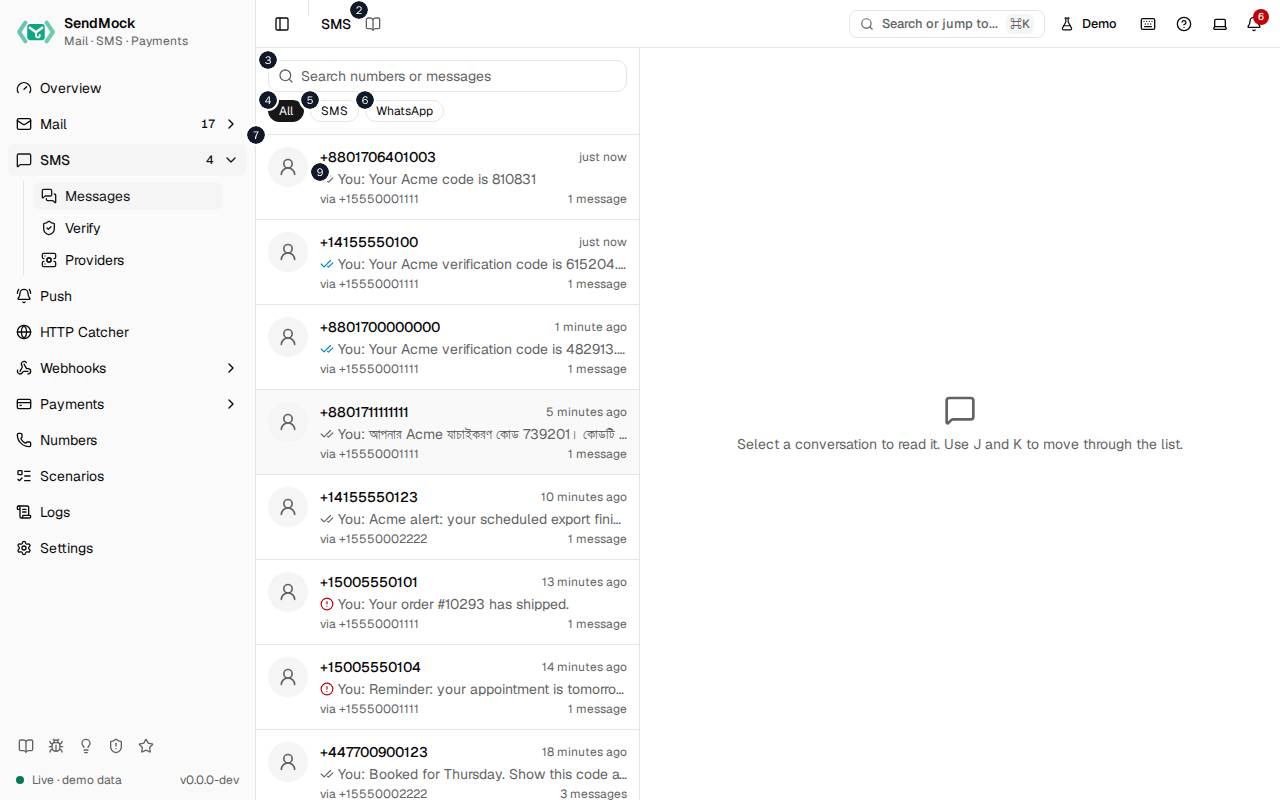
The numbers match the entries below. The picture shows the first screenful; controls further down, and texts, have no marker.
On the screen
1. SMS
Heading.
- What it does: Names the open screen in the header.
2. Read the SMS guide
Link.
- What it does: Opens this screen's page in the user guide, in a new tab.
- Links to: SMS.
3. Search conversations
Field.
- What it does: Filters the conversations by phone number or message text as you type.
- Same action elsewhere: REST
GET /api/v1/sms/threads, CLIsendmock sms threads, MCPsendmock_sms_threads
4. All
Button.
- What it does: Shows every conversation.
5. SMS
Button.
- What it does: Shows only SMS and MMS conversations.
6. WhatsApp
Button.
- What it does: Shows only WhatsApp conversations (messages sent with
whatsapp:addresses).
7. +# …
Link, in each row.
- What it does: Opens the conversation with that number: the other side's number, the last message and when it was sent.
JandKopen the next and previous one. - Same action elsewhere: REST
GET /api/v1/sms/threads, CLIsendmock sms threads, MCPsendmock_sms_threads
8. Delivered
Badge, in each row.
- What it does: The last message's status as ticks: sent, delivered or read; a red mark for undelivered or failed.
- Where its text comes from: The message's status, moved on by the delivery simulation or Set status.
9. …
Badge, in each row.
- What it does: Other markers a conversation can show, such as an unread inbound message or media.
10. Select a conversation to read it. Use J and K to move through the list.
Text.
- What it does: Shown until a conversation is open.
A conversation is open
11. +#
Heading.
- What it does: The other side's phone number.
12. Copy phone number
Button.
- What it does: Copies that number.
13. with +#, # message
Text.
- What it does: Your app's number in the conversation and how many messages it holds.
14. Today
Heading.
- What it does: A day separator; messages are grouped by the day they were sent.
15. #:#
Link.
- What it does: The time a message was sent; opens its Message details.
16. Undelivered: # Unreachable destination handset
Badge.
- What it does: The message's status, with the error code and its meaning when it was undelivered or failed (here Twilio's 30003).
- Where its text comes from: A magic number, your outcome rules, the delivery profile or Set status.
- Links to: Magic numbers and addresses.
17. Message actions
Button.
- What it does: Opens the message's menu: details, Simulate read, Send to webhook, copy and delete.
18. Change
Button.
- What it does: In the Webhooks row: the endpoints the reply's
sms.inboundwill reach through your rules (or No webhook), each name opening the endpoint in a new tab with Payload beside it, and Change. Payload opens the request the webhook will send (method, URL, headers with secrets masked, and the body in the code editor), rendered with the endpoint's template; editing the body marks it Edited, Reset puts back the rendered body, and Use this payload keeps the edit for this one action. Choose webhooks lists every enabled endpoint with a search box, the endpoints your rules would pick already checked, each checked one with Payload to see and edit its request, and says how many are chosen (or that no webhook will be sent). Use these keeps the checked endpoints for this send, marked "chosen for this action", and Use the rules goes back to what the rules pick. It checks again after a pause in typing, since rules can filter on the text. - What it changes: The chosen deliveries show
chosenas their Trigger in Webhooks > Deliveries, and an edited payloadedited, sent exactly as written and signed over those bytes. Your rules stay as they are. - Links to: Webhook rules.
- Same action elsewhere: REST
POST /api/v1/webhooks/rules/match, CLIsendmock webhook rule match, MCPsendmock_webhook_rule_match - Same action elsewhere: REST
GET /api/v1/webhooks/endpoints, CLIsendmock webhook endpoint list, MCPsendmock_webhook_endpoint_list
19. Attach files
Button.
- What it does: Adds images or files to the reply, which then arrives as an MMS with
NumMediaandMediaUrl0in the reply webhook.
20. Reply as +#
Field.
- What it does: The text of a reply from the other side's phone.
Entersends,Shift+Enteradds a line.
21. Send reply
Button.
- What it does: Stores the reply as an inbound message, as if the person had answered from their phone.
- What it changes: Fires
sms.inboundand calls your app's reply webhook (the number's or Messaging Service's URL), reading its TwiML answer. - Links to: Replies and WhatsApp.
- Same action elsewhere: REST
POST /api/v1/sms/inbound, CLIsendmock sms inbound, MCPsendmock_sms_simulate_inbound
22. Simulates an inbound message from +#. # / #, # segment, GSM-#. Enter sends, Shift+Enter adds a line.
Text.
- What it does: Says who the reply comes from, the characters used out of the segment's limit, the segment count and the encoding (GSM-7 or UCS-2).
Message actions menu
23. Message details
Menu item.
- What it does: Opens the drawer with the message's status history, its original request and its callbacks or reply webhook.
- Same action elsewhere: REST
GET /api/v1/sms/{smsId}, CLIsendmock sms show, MCPsendmock_sms_get
24. Simulate read
Menu item.
- What it does: Records that the recipient read the message, as WhatsApp read receipts do. Under the label, and read out by screen readers as its description: the endpoints the event will reach through your webhook rules, or No webhook.
- What it changes: Fires
sms.openedand sends areadstatus callback. - Same action elsewhere: REST
POST /api/v1/sms/{smsId}/open, CLIsendmock sms open, MCPsendmock_sms_open
25. Choose webhooks for Simulate read
Menu item.
- What it does: Opens Choose webhooks for this one action. Choose webhooks lists every enabled endpoint with a search box, the endpoints your rules would pick already checked, each checked one with Payload to see and edit its request, and says how many are chosen (or that no webhook will be sent). Its confirm button, named after the action, runs it once and sends the event to exactly the checked endpoints; Cancel runs nothing.
- What it changes: The chosen deliveries show
chosenas their Trigger in Webhooks > Deliveries, and an edited payloadedited. Your rules stay as they are; the dialog's rules link opens them in a new tab. - Links to: Webhook rules.
- Same action elsewhere: REST
POST /api/v1/sms/{smsId}/open, CLIsendmock sms open, MCPsendmock_sms_open - Same action elsewhere: REST
POST /api/v1/webhooks/rules/match, CLIsendmock webhook rule match, MCPsendmock_webhook_rule_match
26. Send to webhook
Menu item.
- What it does: Opens the Send to webhook dialog, to deliver this message's event to an endpoint now.
- Same action elsewhere: REST
POST /api/v1/webhooks/endpoints/{endpointId}/send, CLIsendmock webhook send, MCPsendmock_webhook_send
27. Copy text
Menu item.
- What it does: Copies the message text.
28. Copy message ID
Menu item.
- What it does: Copies the message's id (Twilio's
SM...SID for Twilio messages).
29. Delete
Menu item.
- What it does: Deletes the message at once; a notice confirms it.
- Same action elsewhere: REST
DELETE /api/v1/sms/{smsId}, CLIsendmock sms delete, MCPsendmock_sms_delete
Message details, Status tab
30. Message details
Heading.
- What it does: The Message details drawer.
31. Status history, the original request and status callbacks.
Text.
- What it does: Explains what the drawer shows.
32. Your order ## has shipped.
Text.
- What it does: The message text (here the demo's shipping notice).
33. Twilio
Link.
- What it does: The API the message came through; opens SMS > Providers.
- Links to: SMS > Providers.
34. Copy message ID
Button.
- What it does: Copies the message's id.
35. Set status
Heading.
- What it does: Moves the message to a status by hand, as the carrier would report it.
36. Error code for Undelivered and Failed
Drop-down.
- What it does: The provider error code to report with Undelivered or Failed.
37. Delivered
Button.
- What it does: Sets the message delivered.
- What it changes: Fires
sms.statusand sends the status callback to your app. - Same action elsewhere: REST
POST /api/v1/sms/{smsId}/status, CLIsendmock sms status, MCPsendmock_sms_set_status
38. Undelivered
Button.
- What it does: Sets the message undelivered with the chosen error code.
- What it changes: Fires
sms.statusand sends the status callback. - Same action elsewhere: REST
POST /api/v1/sms/{smsId}/status, CLIsendmock sms status, MCPsendmock_sms_set_status
39. Failed
Button.
- What it does: Sets the message failed with the chosen error code.
- What it changes: Fires
sms.statusand sends the status callback. - Same action elsewhere: REST
POST /api/v1/sms/{smsId}/status, CLIsendmock sms status, MCPsendmock_sms_set_status
40. SMS status callbacks
Link.
- What it does: In the Webhooks row under Set status: an endpoint the
sms.statusevent of the status button under the pointer or focus will reach through your rules, named after the endpoint. The heading says which status it previews. - What it changes: Opens the endpoint in Webhooks > Endpoints in a new tab, so the drawer stays open.
- Where its text comes from: Your webhook rules for
sms.status, which can filter on the status. - Same action elsewhere: REST
POST /api/v1/webhooks/rules/match, CLIsendmock webhook rule match, MCPsendmock_webhook_rule_match
41. Payload to SMS status callbacks
Button.
- What it does: Payload opens the request the webhook will send (method, URL, headers with secrets masked, and the body in the code editor), rendered with the endpoint's template; editing the body marks it Edited, Reset puts back the rendered body, and Use this payload keeps the edit for this one action. Beside a one-click action such as Send a sample, the dialog's confirm button runs the action at once with the edited payload.
- What it changes: An edited body is sent exactly as written and signed over those bytes with the endpoint's secret; the delivery shows
editedin Webhooks > Deliveries. Without an edit, ids and times are made again when the action runs. - Links to: Webhook rules.
- Same action elsewhere: REST
POST /api/v1/webhooks/rules/match, CLIsendmock webhook rule match, MCPsendmock_webhook_rule_match - Same action elsewhere: REST
POST /api/v1/sms/{smsId}/status, CLIsendmock sms status, MCPsendmock_sms_set_status
42. Change
Button.
- What it does: In the Webhooks row: the endpoints setting that status will reach through your rules (or No webhook), each name opening the endpoint in a new tab with Payload beside it, and Change. Payload opens the request the webhook will send (method, URL, headers with secrets masked, and the body in the code editor), rendered with the endpoint's template; editing the body marks it Edited, Reset puts back the rendered body, and Use this payload keeps the edit for this one action. Choose webhooks lists every enabled endpoint with a search box, the endpoints your rules would pick already checked, each checked one with Payload to see and edit its request, and says how many are chosen (or that no webhook will be sent). Use these keeps the checked endpoints for this send, marked "chosen for this action", and Use the rules goes back to what the rules pick. The row follows the status button under the pointer or focus, since rules can filter on the status.
- What it changes: The chosen deliveries show
chosenas their Trigger in Webhooks > Deliveries, and an edited payloadedited, sent exactly as written and signed over those bytes. Your rules stay as they are. - Links to: Webhook rules.
- Same action elsewhere: REST
POST /api/v1/webhooks/rules/match, CLIsendmock webhook rule match, MCPsendmock_webhook_rule_match - Same action elsewhere: REST
GET /api/v1/webhooks/endpoints, CLIsendmock webhook endpoint list, MCPsendmock_webhook_endpoint_list
43. Status
Tab.
- What it does: Every status the message went through, with the time of each.
44. Request
Tab.
- What it does: The request your app sent to create the message, exactly as received.
45. Callbacks (#)
Tab.
- What it does: Each status callback sent to your app: the URL, the request, the answer and retries.
46. Close
Button.
- What it does: Closes the drawer or dialog.
Message details, Request tab
47. Copy request JSON
Button.
- What it does: Copies the original request.
48. Open in request log
Link.
- What it does: Opens the request in Logs > API requests.
- Links to: Logs.
Message details, Callbacks tab
49. Sent to http://localhost:#/sms/status
Text.
- What it does: The status callback URL your app gave with the message; each attempt is listed below it with the answer it got.
With no data yet
50. No SMS yet
Text.
- What it does: Shown when there is no SMS at all, with how to connect your app.
51. Send through the SendMock API, or point your Twilio or Vonage SDK at SendMock.
Text.
- What it does: Explains the ways in: the native API, or a provider SDK with its base URL changed.
52. This machine
Choice.
- What it does: Shows the addresses for an app on the same machine.
- What it changes: Shared with Settings > Connection and remembered in the browser.
- Same action elsewhere: REST
GET /api/v1/info, CLIsendmock status, MCPsendmock_status
53. Docker host
Choice.
- What it does: Shows the addresses for an app in a container reaching SendMock on the host.
54. Compose
Choice.
- What it does: Shows the addresses for an app in the same Docker Compose project.
55. Copy Native API
Button.
- What it does: Copies the native send URL,
POST /api/v1/sms.
56. Copy Twilio base URL
Button.
- What it does: Copies the base URL to give Twilio's SDK.
57. Copy Vonage base URL
Button.
- What it does: Copies the base URL to give Vonage's SDK.
58. More snippets
Link.
- What it does: Opens Settings > Connection, with the settings for every language.
- Links to: Settings.
59. Send a sample SMS
Button.
- What it does: Stores a realistic sample SMS, so you can try the screen before connecting your app.
- What it changes: Fires
sms.sentand starts the delivery simulation. - Same action elsewhere: REST
POST /api/v1/samples/{kind}, CLIsendmock sample, MCPsendmock_sample_send
60. Choose webhooks for Send a sample SMS
Button.
- What it does: Opens Choose webhooks for this one action. Choose webhooks lists every enabled endpoint with a search box, the endpoints your rules would pick already checked, each checked one with Payload to see and edit its request, and says how many are chosen (or that no webhook will be sent). Its confirm button, named after the action, runs it once and sends the event to exactly the checked endpoints; Cancel runs nothing.
- What it changes: The chosen deliveries show
chosenas their Trigger in Webhooks > Deliveries, and an edited payloadedited. Your rules stay as they are; the dialog's rules link opens them in a new tab. - Links to: Webhook rules.
- Same action elsewhere: REST
POST /api/v1/samples/{kind}, CLIsendmock sample, MCPsendmock_sample_send - Same action elsewhere: REST
POST /api/v1/webhooks/rules/match, CLIsendmock webhook rule match, MCPsendmock_webhook_rule_match
When the data cannot load
61. Could not load conversations. Try again
Message.
- What it does: Shown when the conversations could not be loaded.
- Errors: Check SendMock is running, then press Try again.
62. Could not load conversations.
Text.
- What it does: The message inside the alert.
63. Try again
Button.
- What it does: Loads the conversations again.
- Same action elsewhere: REST
GET /api/v1/sms/threads, CLIsendmock sms threads, MCPsendmock_sms_threads