SMS providers in depth
Every control and text of SMS > Providers, the provider editor and its tabs.
Every control and text this screen shows, in screen order. The list is read from the demo by a crawl, and CI fails when the screen changes without its entry here.
SMS > Providers lists the SMS APIs SendMock answers like the real provider. The editor changes how each one reads requests, what it answers and the codes it reports.
The screen as a whole: SMS > Providers.
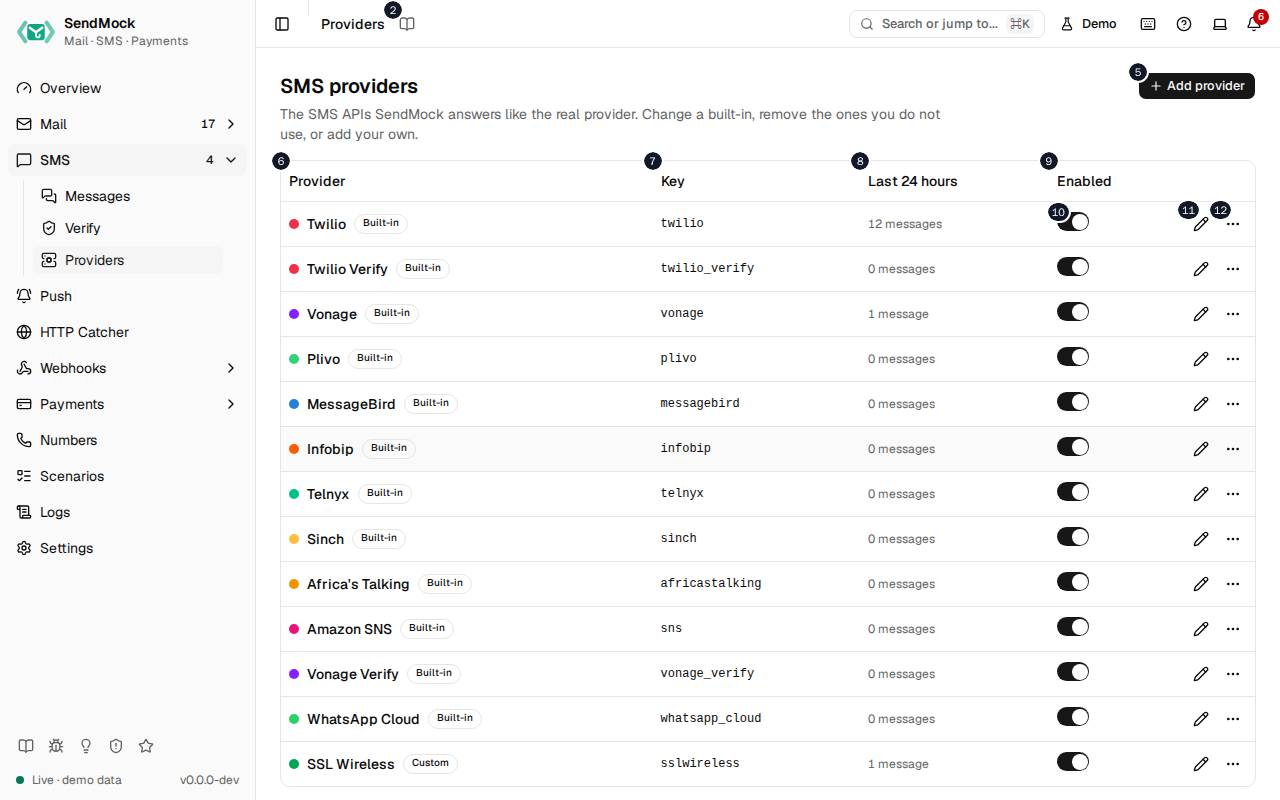
The numbers match the entries below. The picture shows the first screenful; controls further down, and texts, have no marker.
On the screen
1. Providers
Heading.
- What it does: Names the open screen in the header.
2. Read the Providers guide
Link.
- What it does: Opens this screen's page in the user guide, in a new tab.
- Links to: SMS > Providers.
3. SMS providers
Heading.
- What it does: The list of SMS APIs SendMock answers.
- Same action elsewhere: REST
GET /api/v1/sms/providers, CLIsendmock sms providers list, MCPsendmock_sms_provider_list
4. The SMS APIs SendMock answers like the real provider. Change a built-in, remove the ones you do not use, or add your own.
Text.
- What it does: Explains the screen.
5. Add provider
Button.
- What it does: Opens Add a provider, or (in the dialog) adds it and opens its editor.
- Same action elsewhere: REST
POST /api/v1/sms/providers, CLIsendmock sms providers create, MCPsendmock_sms_provider_create
6. Provider
Column.
- What it does: The provider's name and whether it is built in, modified or your own.
7. Key
Column.
- What it does: Its key: the
/providers/<key>/path and the source stored on its messages.
8. Last # hours
Column.
- What it does: How many messages it took in the last 24 hours.
9. Enabled
Column.
- What it does: Whether it answers requests.
10. … enabled
Switch, in each row.
- What it does: Turns the provider on or off at once; while off, its paths answer 404.
- Same action elsewhere: REST
PATCH /api/v1/sms/providers/{providerKey}, CLIsendmock sms providers update, MCPsendmock_sms_provider_update
11. Edit …
Button, in each row.
- What it does: Opens the provider's editor.
- Same action elsewhere: REST
GET /api/v1/sms/providers/{providerKey}, CLIsendmock sms providers show, MCPsendmock_sms_provider_get
12. More for …
Button, in each row.
- What it does: Opens a menu with Reset to default (a modified built-in), Remove (a built-in, which then answers 404 until restored from the Removed group) or Delete (your own provider), each after you confirm.
- Same action elsewhere: REST
POST /api/v1/sms/providers/{providerKey}/reset, CLIsendmock sms providers reset, MCPsendmock_sms_provider_reset - Same action elsewhere: REST
DELETE /api/v1/sms/providers/{providerKey}, CLIsendmock sms providers delete, MCPsendmock_sms_provider_delete
Add a provider dialog
13. Add a provider
Heading.
- What it does: The Add a provider dialog.
14. Answer a provider SendMock does not ship, from blank or from the closest SMS provider; you set its requests and responses next.
Text.
- What it does: Explains what adding does.
- Links to: Advanced: create an email provider.
15. Name
Field.
- What it does: The name shown in lists and on message badges.
16. Key
Field.
- What it does: The short id in its paths (
/providers/<key>/) and stored on each message as its source. It cannot change once added.
17. Its /providers/<key>/ path and the name stored on messages; fixed once added.
Text.
- What it does: Explains the key.
18. Start from
Drop-down.
- What it does: Blank, or a built-in to copy as the starting point.
19. Cancel
Button.
- What it does: Closes the dialog or editor without saving.
20. Add provider
Button.
- What it does: Opens Add a provider, or (in the dialog) adds it and opens its editor.
- Same action elsewhere: REST
POST /api/v1/sms/providers, CLIsendmock sms providers create, MCPsendmock_sms_provider_create
21. Close
Button.
- What it does: Closes the dialog or editor without saving.
Provider editor, General tab
22. Twilio
Heading.
- What it does: The provider open in the editor (here Twilio).
23. Built-in Key twilio , # messages in the last # hours.
Text.
- What it does: Says whether the provider is built in or your own, its key, and how many SMS it took in the last 24 hours.
24. General
Tab.
- What it does: Name, key, host, badge colour, whether it is on, and its credentials.
25. Requests
Tab.
- What it does: The API paths it answers, how each request's fields map to a stored SMS, and the checks a request must pass.
26. Responses
Tab.
- What it does: What it answers: the message id format, the success response and each error response, as templates.
27. Callbacks
Tab.
- What it does: The webhook template its status callbacks are sent with, and its own names for each status.
28. Preview
Tab.
- What it does: Sends a sample request through the unsaved definition and shows the stored message and the response.
29. Try it
Tab.
- What it does: The base URLs and a curl command to point your app or the provider's SDK at it.
30. Name
Field.
- What it does: The name shown in lists and on message badges.
31. Key
Field.
- What it does: The short id in its paths (
/providers/<key>/) and stored on each message as its source. It cannot change once added.
32. Its /providers/<key>/ path and the name stored on messages; fixed once added.
Text.
- What it does: Explains the key.
33. Host
Field.
- What it does: The provider's real API host, such as
api.sendgrid.com.
34. The provider's API host. On the provider port it tells apart providers that share a path.
Text.
- What it does: Explains why the host matters: on the provider port, requests are matched by host when two providers use the same path.
35. Accent colour
Field.
- What it does: Picks the badge colour with the browser's colour picker.
36. Accent
Field.
- What it does: The badge colour as a hex value, such as
#1a82e2.
37. The colour of its badge on messages.
Text.
- What it does: Explains the accent.
38. Enabled
Switch.
- What it does: Turns the provider on or off; while off, its paths answer 404.
39. What your app is configured with. Templates read them as credentials.<name> ; secrets stay masked, in the preview too.
Text.
- What it does: Explains the credentials: the API key and other values your app sends, which templates can read.
40. Credential # name
Field.
- What it does: A credential's name, such as
api_key.
41. Credential # value
Field.
- What it does: The credential's value; a secret one is masked.
42. Secret
Checkbox.
- What it does: Masks the value everywhere: the UI, API answers, logs, MCP results and seed exports.
43. Reveal account_sid
Button.
- What it does: Shows the Account SID once, after you confirm.
- Same action elsewhere: REST
GET /api/v1/sms/providers/{providerKey}/credentials/{credentialName}, CLIsendmock sms providers credential
44. Remove credential
Button.
- What it does: Removes the credential.
45. Reveal auth_token
Button.
- What it does: Shows the Auth Token once, after you confirm.
- Same action elsewhere: REST
GET /api/v1/sms/providers/{providerKey}/credentials/{credentialName}, CLIsendmock sms providers credential
46. Add credential
Button.
- What it does: Adds a credential row.
47. Check credentials
Switch.
- What it does: When on, a request without the right secret credential gets the provider's own unauthorized answer.
48. Off: any credentials pass. On: a request without a secret credential gets the provider's unauthorized answer.
Text.
- What it does: Explains Check credentials.
49. Cancel
Button.
- What it does: Closes the dialog or editor without saving.
50. Save provider
Button.
- What it does: Saves the definition; it applies to the next request, with no restart.
- Errors: A template that does not render, or a path another provider already answers, is refused with the reason.
- Same action elsewhere: REST
PATCH /api/v1/sms/providers/{providerKey}, CLIsendmock sms providers update, MCPsendmock_sms_provider_update
51. Close
Button.
- What it does: Closes the dialog or editor without saving.
Provider editor, Requests tab
52. The paths as the provider's API has them; use {name} for a part that changes, like /v#/{domain}/messages .
Text.
- What it does: Explains request paths and their
{name}parts.
53. Request # kind
Drop-down.
- What it does: What the request does: send one SMS, send a batch, or another operation the provider has.
54. Request # method
Drop-down.
- What it does: The HTTP method it answers.
55. Request # path
Field.
- What it does: The path it answers.
56. Request # format
Drop-down.
- What it does: The body format the provider's SDK sends: JSON, a form or multipart.
57. Remove request
Button.
- What it does: Removes the request.
58. Add request
Button.
- What it does: Adds a request the provider answers.
59. A JSON path ( personalizations[].to[].email ), a form field ( To ) or h:* for every field with a prefix. Anything unmapped is kept as metadata.
Text.
- What it does: Explains the field mapping sources.
60. Mapping # part
Drop-down.
- What it does: Which part of the stored SMS the field fills, such as the recipients or the subject.
61. Mapping # source
Field.
- What it does: Where in the request that part is read from.
62. Remove mapping
Button.
- What it does: Removes the mapping.
63. Map a part
Button.
- What it does: Adds a mapping.
64. Check # part
Drop-down.
- What it does: The part a request check looks at.
65. Check # kind
Drop-down.
- What it does: What the check requires, such as present or at most a length.
66. Check # max length
Number field.
- What it does: The longest value the check allows.
67. Check # error
Drop-down.
- What it does: Which error response a request failing the check gets.
68. Remove check
Button.
- What it does: Removes the check.
69. Add check
Button.
- What it does: Adds a check.
Provider editor, Responses tab
70. Templates read request , message , error and credentials ; the Preview tab lists every value with an example.
Text.
- What it does: Explains what response templates can read.
71. Message id
Field.
- What it does: The template for the provider's id of each message.
72. The provider's id for each message, e.g. SM{{ random_hex(#) }}.
Text.
- What it does: Gives an example message id template.
73. Success response
Heading.
- What it does: The answer to an accepted request.
74. Success response status
Number field.
- What it does: Its HTTP status.
75. Success response header # name
Field.
- What it does: A response header's name.
76. Success response header # value
Field.
- What it does: That header's value template.
77. Remove Success response header
Button.
- What it does: Removes the header.
78. Add header
Button.
- What it does: Adds a response header.
79. Success response body
Field.
- What it does: The body template.
80. Error response # kind
Drop-down.
- What it does: The error it answers: invalid input, unauthorized, a failed check, and so on.
81. Remove error response
Button.
- What it does: Removes the error response.
82. Error response # status
Number field.
- What it does: Its HTTP status.
83. Error response # header # name
Field.
- What it does: A header's name.
84. Error response # header # value
Field.
- What it does: That header's value template.
85. Remove Error response # header
Button.
- What it does: Removes the header.
86. Error response # body
Field.
- What it does: The error body template, in the provider's real error shape.
87. Add an error response
Button.
- What it does: Adds an error response.
Provider editor, Callbacks tab
88. Callback template
Drop-down.
- What it does: The webhook template status callbacks are sent with.
- Links to: Webhooks > Templates.
89. The webhook template its status callbacks and inbound messages are sent with; edit it in Webhooks > Templates.
Text.
- What it does: Explains the callback template.
90. The provider's name for each SendMock status, as its callbacks and fetch answers show it.
Text.
- What it does: Explains the status names below.
91. queued
Field.
- What it does: The provider's name for a message waiting to be sent, as its status callbacks show it.
92. sent
Field.
- What it does: The provider's name for a message handed to the carrier, as its status callbacks show it.
93. delivered
Field.
- What it does: The provider's name for a message delivered, as its status callbacks show it.
94. undelivered
Field.
- What it does: The provider's name for a message not delivered, as its status callbacks show it.
95. failed
Field.
- What it does: The provider's name for a message failed to send, as its status callbacks show it.
96. read
Field.
- What it does: The provider's name for a message read, as its status callbacks show it.
97. The provider's error code for each outcome, so the magic test numbers fail with its own codes. Leave one empty to use none.
Text.
- What it does: Explains the error codes below.
- Links to: Magic numbers and addresses.
98. invalid_number
Field.
- What it does: The provider's error code for an invalid number (Twilio's own is
21211).
99. cannot_route
Field.
- What it does: The provider's error code for a number it cannot route to (Twilio's own is
21612).
100. no_international_permission
Field.
- What it does: The provider's error code for no international permission (Twilio's own is
21408).
101. blocked
Field.
- What it does: The provider's error code for a blocked (opted out) number (Twilio's own is
21610).
102. cannot_receive_sms
Field.
- What it does: The provider's error code for a number that cannot receive SMS (Twilio's own is
21614).
103. invalid_from
Field.
- What it does: The provider's error code for an invalid sender (Twilio's own is
21212).
104. not_sms_capable
Field.
- What it does: The provider's error code for a sender that is not SMS capable (Twilio's own is
21606).
105. queue_full
Field.
- What it does: The provider's error code for a full message queue (Twilio's own is
21611).
106. unreachable_handset
Field.
- What it does: The provider's error code for an unreachable handset (Twilio's own is
30003).
107. landline
Field.
- What it does: The provider's error code for a landline or unreachable carrier (Twilio's own is
30006).
108. carrier_filtered
Field.
- What it does: The provider's error code for a message the carrier filtered (Twilio's own is
30007).
109. unknown_error
Field.
- What it does: The provider's error code for an unknown error (Twilio's own is
30008).
Provider editor, Preview tab
110. Sample request
Heading.
- What it does: The request the preview sends.
111. A send built from the field mapping. Edit it to try another request.
Text.
- What it does: Explains the sample.
112. Sample method
Drop-down.
- What it does: The sample's method.
113. Sample path
Field.
- What it does: The sample's path.
114. Sample body
Field.
- What it does: The sample's body.
115. Stored message
Heading.
- What it does: The SMS SendMock would store for the sample.
- Same action elsewhere: REST
POST /api/v1/sms/providers/{providerKey}/preview, CLIsendmock sms providers preview, MCPsendmock_sms_provider_preview
116. Response
Heading.
- What it does: The response the sample would get.
117. Search the reference
Field.
- What it does: Filters the template reference: the values, functions and filters templates can use.
118. Values
Heading.
- What it does: The values a template can read, with an example of each.
119. Expand …
Button, in each row.
- What it does: Shows the fields inside a value, such as the parts of
requestormessage.
120. …
Button, in each row.
- What it does: Inserts the value, function or filter into the template field you were editing.
121. Functions
Heading.
- What it does: The functions a template can call.
122. Filters
Heading.
- What it does: The filters a template can use.
- Links to: Template filters.
123. … }}
Button, in each row.
- What it does: Inserts the function into the template field you were editing.
Provider editor, Try it tab
124. Copy sdk base url (provider port)
Button.
- What it does: Copies the base URL to give the provider's SDK when the provider port is on.
125. Copy base url on the main port
Button.
- What it does: Copies the base URL under
/providers/<key>/on the main port.
126. Copy a curl command
Button.
- What it does: Copies a curl command that sends the sample request.
127. The provider port answers once it is on ( --provider-addr ). The preview shows what this request gets back: #. Settings > Connection has the snippets for each language.
Text.
- What it does: Explains where the provider port comes from and what the sample gets back.
When the data cannot load
128. Could not load the providers. Try again
Message.
- What it does: Shown when the list could not be loaded.
- Errors: Check SendMock is running, then press Try again.
129. Could not load the providers.
Text.
- What it does: The message inside the alert.
130. Try again
Button.
- What it does: Loads the list again.
- Same action elsewhere: REST
GET /api/v1/sms/providers, CLIsendmock sms providers list, MCPsendmock_sms_provider_list