DeeperPayments
Subscriptions in depth
Every control and text of Payments > Subscriptions and New subscription.
Every control and text this screen shows, in screen order. The list is read from the demo by a crawl, and CI fails when the screen changes without its entry here.
Payments > Subscriptions tests renewals, failed renewal payments and cancellations, each subscription on its own clock.
The screen as a whole: Subscriptions.
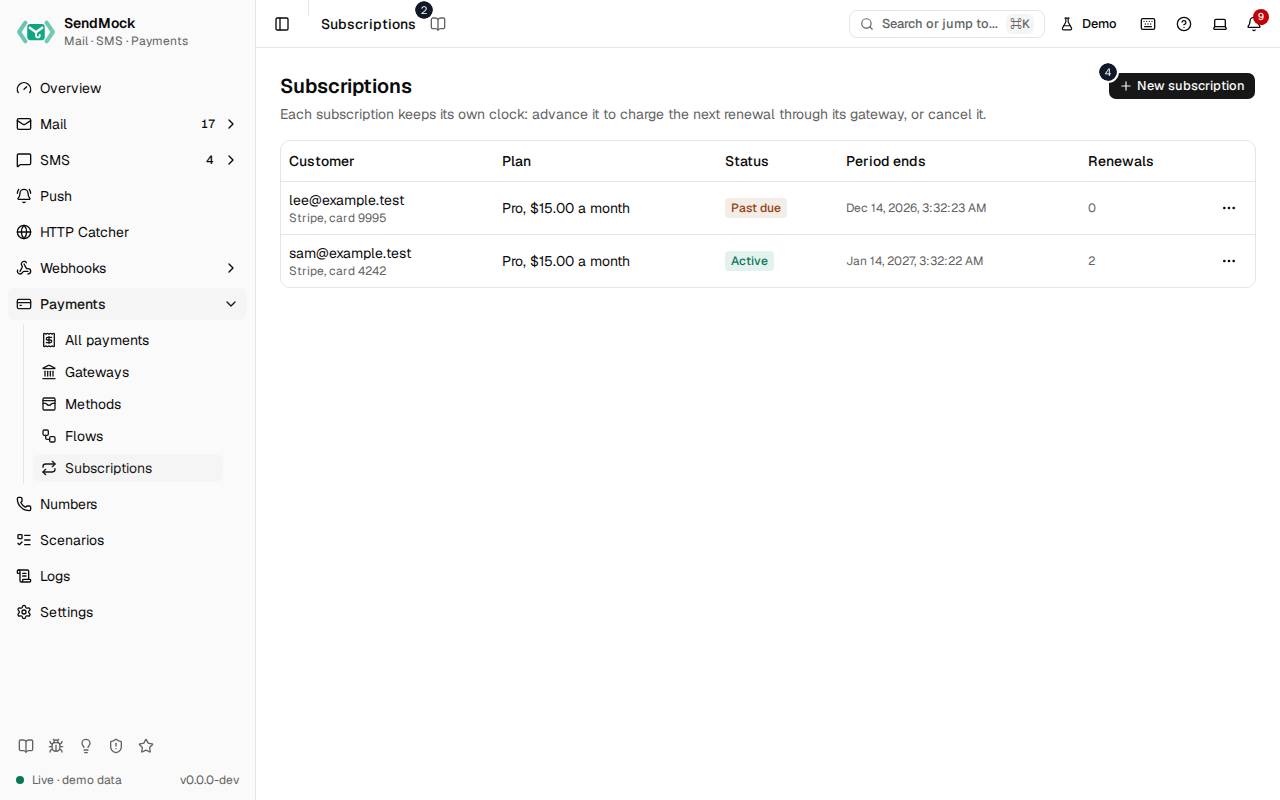
The numbers match the entries below. The picture shows the first screenful; controls further down, and texts, have no marker.
On the screen
1. Subscriptions
Heading.
- What it does: Names the screen, in the header and above the list.
2. Read the Subscriptions guide
Link.
- What it does: Opens this screen's page in the user guide, in a new tab.
- Links to: Subscriptions.
3. Each subscription keeps its own clock: advance it to charge the next renewal through its gateway, or cancel it.
Text.
- What it does: Explains the screen: renewals happen when you advance a subscription's clock, not on the calendar.
- Same action elsewhere: REST
GET /api/v1/payments/subscriptions, CLIsendmock payments subscriptions list, MCPsendmock_subscription_list
4. New subscription
Button.
- What it does: Opens New subscription.
5. No subscriptions yet
Text.
- What it does: Shown while there is none.
6. Start one with New subscription, or POST /api/v#/payments/subscriptions, to test renewals, failed payments and cancellations.
Text.
- What it does: Explains how to start one.
New subscription dialog
7. New subscription
Heading.
- What it does: The New subscription dialog.
8. Without a trial the first period is charged at once.
Text.
- What it does: Explains the first charge.
9. Gateway
Drop-down.
- What it does: The gateway renewals are charged through.
10. Interval
Drop-down.
- What it does: How often it renews: daily, weekly, monthly or yearly.
11. Customer email
Field.
- What it does: The customer's email.
12. Plan name
Field.
- What it does: The plan's name.
13. Amount
Field.
- What it does: What each period costs.
14. Currency
Field.
- What it does: The currency code.
15. Trial days
Field.
- What it does: Free days before the first charge.
16. Test card
Field.
- What it does: The test card renewals use; a declining card makes renewals fail.
17. Cancel
Button.
- What it does: Closes the dialog without doing anything.
18. Start subscription
Button.
- What it does: Starts the subscription.
- What it changes: Fires
subscription.created, and a payment for the first period when there is no trial. - Same action elsewhere: REST
POST /api/v1/payments/subscriptions, CLIsendmock payments subscriptions create, MCPsendmock_subscription_create
19. Close
Button.
- What it does: Closes the dialog.
When the data cannot load
20. Could not load the subscriptions. Try again
Message.
- What it does: Shown when the subscriptions could not be loaded.
- Errors: Check SendMock is running, then press Try again.
21. Could not load the subscriptions.
Text.
- What it does: The message inside the alert.
22. Try again
Button.
- What it does: Loads them again.
- Same action elsewhere: REST
GET /api/v1/payments/subscriptions, CLIsendmock payments subscriptions list, MCPsendmock_subscription_list