Methods in depth
Every control and text of Payments > Methods and the method editor.
Every control and text this screen shows, in screen order. The list is read from the demo by a crawl, and CI fails when the screen changes without its entry here.
Payments > Methods holds what customers pay with on test checkout pages, and the test values each accepts.
The screen as a whole: Methods.
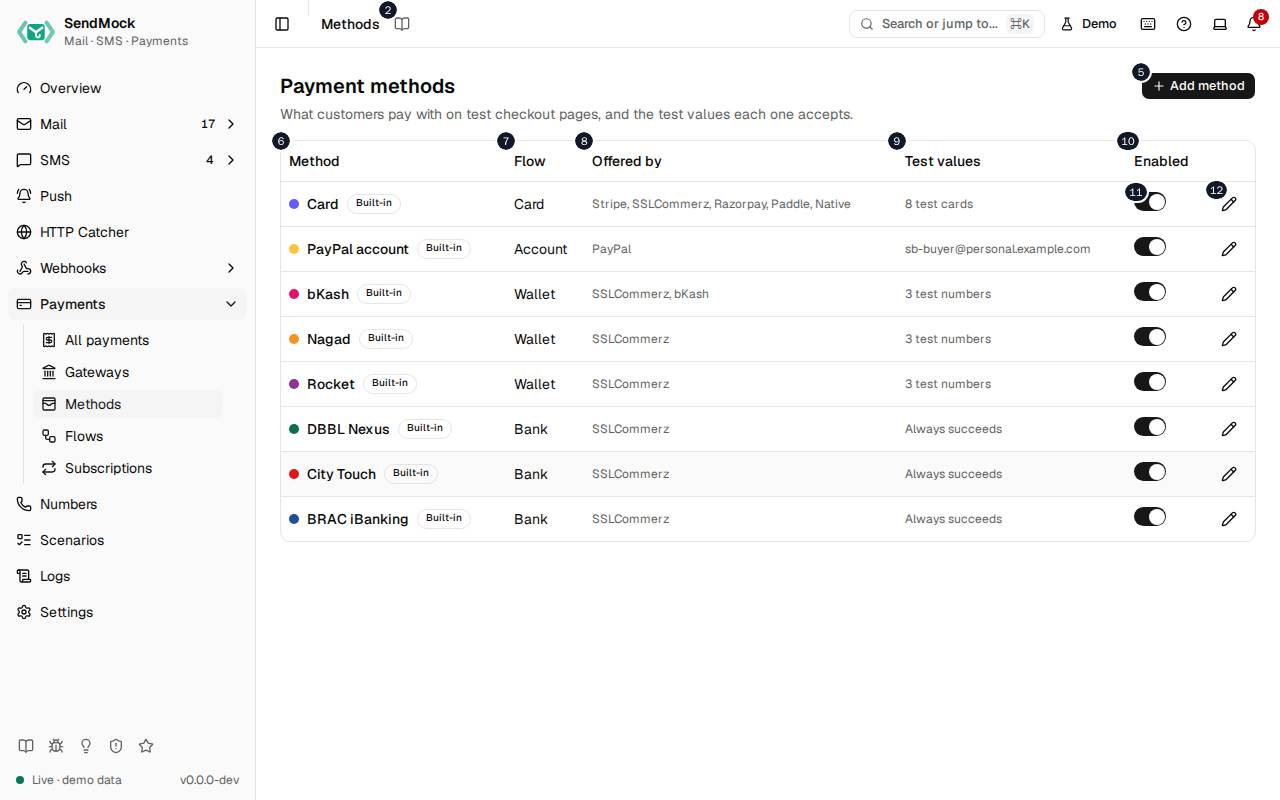
The numbers match the entries below. The picture shows the first screenful; controls further down, and texts, have no marker.
On the screen
1. Methods
Heading.
- What it does: Names the open screen in the header.
2. Read the Methods guide
Link.
- What it does: Opens this screen's page in the user guide, in a new tab.
- Links to: Methods.
3. Payment methods
Heading.
- What it does: What customers pay with.
- Same action elsewhere: REST
GET /api/v1/payments/methods, CLIsendmock payments methods list, MCPsendmock_payment_method_list
4. What customers pay with on test checkout pages, and the test values each one accepts.
Text.
- What it does: Explains the screen.
5. Add method
Button.
- What it does: Opens Add a payment method; in it, adds the method.
- Same action elsewhere: REST
POST /api/v1/payments/methods, CLIsendmock payments methods create, MCPsendmock_payment_method_create
6. Method
Column.
- What it does: The method's name.
7. Flow
Column.
- What it does: The flow the customer goes through.
8. Offered by
Column.
- What it does: The gateways that offer it.
9. Test values
Column.
- What it does: The test values it accepts, with the outcome of each.
10. Enabled
Column.
- What it does: Whether checkout pages offer it.
11. … enabled
Switch, in each row.
- What it does: Turns the method on or off at once.
- Same action elsewhere: REST
PATCH /api/v1/payments/methods/{methodKey}, CLIsendmock payments methods update, MCPsendmock_payment_method_update
12. Edit …
Button, in each row.
- What it does: Opens the method's editor.
- Same action elsewhere: REST
GET /api/v1/payments/methods/{methodKey}, CLIsendmock payments methods show, MCPsendmock_payment_method_get
Add a payment method dialog
13. Add a payment method
Heading.
- What it does: The Add a payment method dialog.
14. Pick the flow the customer goes through; you set its test values next. Flows are edited in Payments > Flows.
Text.
- What it does: Explains adding a method.
- Links to: Advanced: create a payment method.
15. Card Card form
Choice.
- What it does: The method runs this flow: a card form.
16. Wallet Account number, OTP, PIN
Choice.
- What it does: The method runs this flow: a mobile wallet: account number, then a one-time code, then a PIN.
17. Bank Confirm
Choice.
- What it does: The method runs this flow: a bank confirmation page.
18. Account Signed-in account
Choice.
- What it does: The method runs this flow: a signed-in account, as PayPal's.
19. QR QR code
Choice.
- What it does: The method runs this flow: a QR code to scan.
20. Bank transfer Reference code
Choice.
- What it does: The method runs this flow: a bank transfer with a reference code.
21. Voucher Voucher code
Choice.
- What it does: The method runs this flow: a voucher code.
22. Name
Field.
- What it does: The name.
23. Key
Field.
- What it does: The key, fixed once added.
24. Used by the API; fixed once added.
Text.
- What it does: Explains the key.
25. Cancel
Button.
- What it does: Closes the dialog or editor without saving.
26. Add method
Button.
- What it does: Opens Add a payment method; in it, adds the method.
- Same action elsewhere: REST
POST /api/v1/payments/methods, CLIsendmock payments methods create, MCPsendmock_payment_method_create
27. Close
Button.
- What it does: Closes the dialog or editor without saving.
Method editor
28. Card
Heading.
- What it does: The method or flow open in the editor (here Card).
29. Card flow, key card
Text.
- What it does: The method's flow and key.
30. Name
Field.
- What it does: The name.
31. Accent colour
Field.
- What it does: Picks the method's colour on checkout pages.
32. Accent
Field.
- What it does: The colour as a hex value.
33. Test card # number
Field.
- What it does: A test card number the method accepts.
34. Test card # outcome
Drop-down.
- What it does: What that card does: succeed, decline, ask for 3-D Secure, and so on.
35. Remove test card
Button.
- What it does: Removes the test card.
36. Add test card
Button.
- What it does: Adds a test card.
37. Reset to default
Button.
- What it does: Brings back the shipped definition, after you confirm.
38. Cancel
Button.
- What it does: Closes the dialog or editor without saving.
39. Save method
Button.
- What it does: Saves the method.
- Same action elsewhere: REST
PATCH /api/v1/payments/methods/{methodKey}, CLIsendmock payments methods update, MCPsendmock_payment_method_update
40. Close
Button.
- What it does: Closes the dialog or editor without saving.
When the data cannot load
41. Could not load the payment methods. Try again
Message.
- What it does: Shown when the methods could not be loaded.
- Errors: Check SendMock is running, then press Try again.
42. Could not load the payment methods.
Text.
- What it does: The message inside the alert.
43. Try again
Button.
- What it does: Loads them again.
- Same action elsewhere: REST
GET /api/v1/payments/methods, CLIsendmock payments methods list, MCPsendmock_payment_method_list