Payments in depth
Every control and text of Payments > All payments, a payment and its dialogs.
Every control and text this screen shows, in screen order. The list is read from the demo by a crawl, and CI fails when the screen changes without its entry here.
Payments > All payments lists every test payment, from any gateway, and lets you simulate what happens next.
The screen as a whole: Payments.
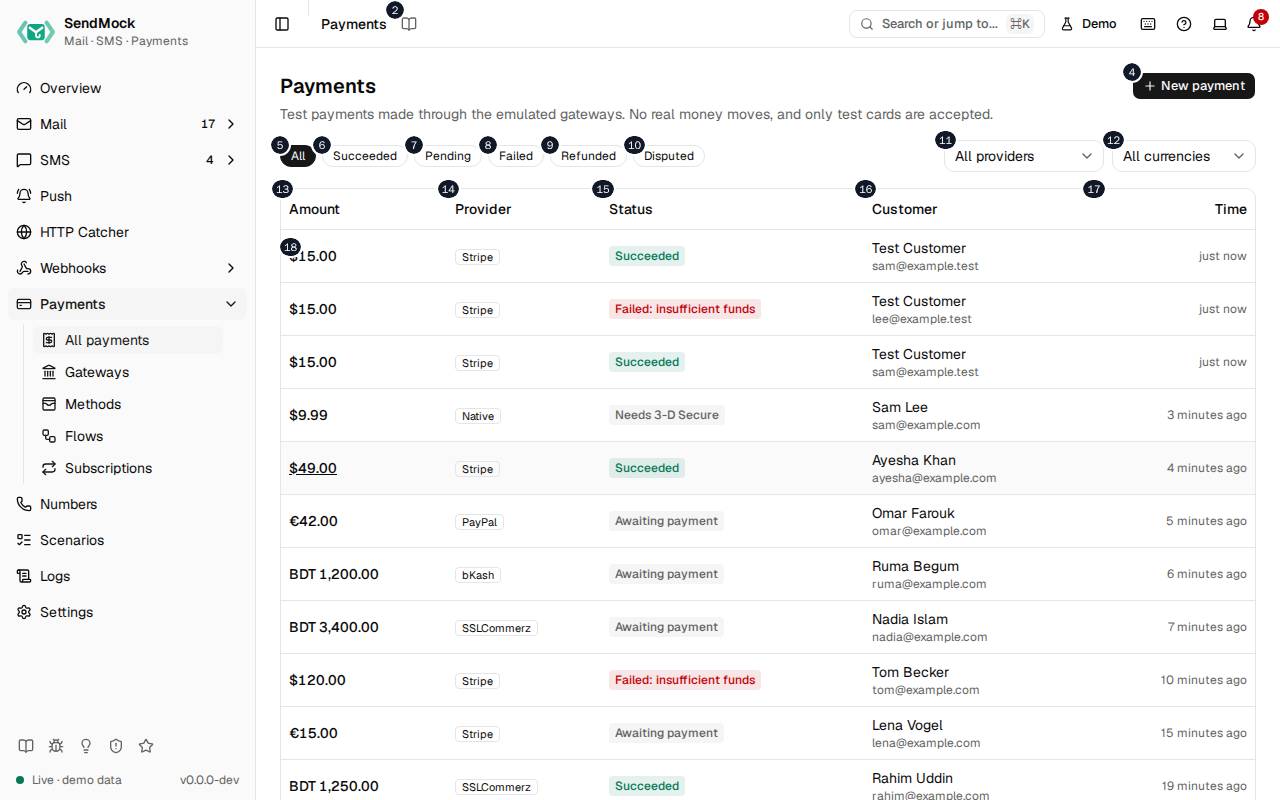
The numbers match the entries below. The picture shows the first screenful; controls further down, and texts, have no marker.
On the screen
1. Payments
Heading.
- What it does: Names the screen, in the header and above the list.
2. Read the Payments guide
Link.
- What it does: Opens this screen's page in the user guide, in a new tab.
- Links to: Payments.
3. Test payments made through the emulated gateways. No real money moves, and only test cards are accepted.
Text.
- What it does: Explains the screen and its safety rule: a real card number is refused and never stored.
- Same action elsewhere: REST
GET /api/v1/payments, CLIsendmock payments list, MCPsendmock_payment_list
4. New payment
Button.
- What it does: Opens New payment.
5. All
Button.
- What it does: Shows every payment.
6. Succeeded
Button.
- What it does: Shows payments that succeeded.
7. Pending
Button.
- What it does: Shows payments not finished yet: open checkouts, authorized but not captured, or waiting for 3-D Secure.
8. Failed
Button.
- What it does: Shows declined and failed payments.
9. Refunded
Button.
- What it does: Shows payments refunded in full or in part.
10. Disputed
Button.
- What it does: Shows payments with a dispute.
11. Provider
Drop-down.
- What it does: Shows one gateway's payments, or all.
12. Currency
Drop-down.
- What it does: Shows payments in one currency, or all.
13. Amount
Column.
- What it does: The amount and currency.
14. Provider
Column.
- What it does: The gateway it went through, such as Stripe or SSLCommerz.
15. Status
Column.
- What it does: Its status, such as succeeded, requires action or refunded.
16. Customer
Column.
- What it does: The customer's email.
17. Time
Column.
- What it does: When it was created.
18. …
Link, in each row.
- What it does: Opens the payment's drawer.
- Same action elsewhere: REST
GET /api/v1/payments/{paymentId}, CLIsendmock payments show, MCPsendmock_payment_get
New payment dialog
19. New payment
Heading.
- What it does: The New payment dialog.
20. Paid at once with the test card, as your app's server does without a checkout page. The card's outcome decides it.
Text.
- What it does: Explains a direct payment: the test card decides success, decline or 3-D Secure.
- Links to: Payments.
21. Gateway
Drop-down.
- What it does: The gateway the payment goes through.
22. Capture
Drop-down.
- What it does: Capture at once, or only authorize and capture later.
23. Amount
Field.
- What it does: The amount, in the currency's main unit.
24. Currency
Field.
- What it does: The three-letter currency code, such as
USD.
25. Test card
Field.
- What it does: A documented test card number; its outcome decides the payment.
- Errors: A real card number is refused with "use a test card" and nothing is stored.
26. Customer email
Field.
- What it does: The customer's email.
27. Cancel
Button.
- What it does: Closes the dialog without doing anything.
28. Pay
Button.
- What it does: Creates and pays the payment.
- What it changes: Fires
payment.createdand thenpayment.succeededorpayment.failed, and the gateway's notification. - Same action elsewhere: REST
POST /api/v1/payments, CLIsendmock payments create, MCPsendmock_payment_create
29. Close
Button.
- What it does: Closes the dialog or drawer.
A payment is open
30. Payment
Heading.
- What it does: The payment drawer.
31. Test payment: no real money moved.
Text.
- What it does: Reminds that nothing real happened.
32. Copy checkout_session
Button.
- What it does: Copies the provider's checkout session id.
33. Copy payment_intent
Button.
- What it does: Copies the provider's payment id (here a Stripe PaymentIntent).
34. Simulate
Button.
- What it does: Opens what can happen next to this payment: capture, void, refund, dispute, expire and more, by its status.
35. Resend notification
Button.
- What it does: Sends the gateway's notification for the payment's current status again.
- Same action elsewhere: REST
POST /api/v1/payments/{paymentId}/notify, CLIsendmock payments notify, MCPsendmock_payment_notify
36. Line items
Heading.
- What it does: What was bought.
37. Item
Column.
- What it does: The item.
38. Qty
Column.
- What it does: How many.
39. Price
Column.
- What it does: The price of one.
40. Total
Column.
- What it does: The line's total.
41. Metadata: order_id=ord_XJD#C
Text.
- What it does: The metadata your app sent (here an order id).
42. Timeline
Heading.
- What it does: Every step the payment went through, with times.
43. Redirects
Heading.
- What it does: Where the customer was sent back to, with the fields of each redirect.
44. Notifications
Heading.
- What it does: The notifications the gateway sent your app.
45. # … # minutes ago
Link, in each row.
- What it does: A notification: its status code, event and time; opens its delivery.
- Links to: Deliveries.
46. Close
Button.
- What it does: Closes the dialog or drawer.
Simulate menu
47. Refund...
Menu item.
- What it does: Opens Refund payment. Under the label, and read out by screen readers as its description: the endpoints the event will reach through your webhook rules, or No webhook.
48. Choose webhooks for Refund
Menu item.
- What it does: Opens Choose webhooks for the refund: every enabled endpoint with a search box, the endpoints your rules would pick already checked. Its Refund button opens Refund payment, and the refund then sends its event to exactly the checked endpoints.
- What it changes: The chosen deliveries show
chosenas their Trigger in Webhooks > Deliveries, and an edited payloadedited. Your rules stay as they are; the dialog's rules link opens them in a new tab. - Links to: Webhook rules.
- Same action elsewhere: REST
POST /api/v1/payments/{paymentId}/simulate, CLIsendmock payments simulate, MCPsendmock_payment_simulate - Same action elsewhere: REST
POST /api/v1/webhooks/rules/match, CLIsendmock webhook rule match, MCPsendmock_webhook_rule_match
49. Open dispute
Menu item.
- What it does: Opens a dispute on the payment, as when the customer contests it. Under the label, and read out by screen readers as its description: the endpoints the event will reach through your webhook rules, or No webhook.
- What it changes: Fires
payment.dispute_openedand the gateway's notification. - Same action elsewhere: REST
POST /api/v1/payments/{paymentId}/simulate, CLIsendmock payments simulate, MCPsendmock_payment_simulate
50. Choose webhooks for Open dispute
Menu item.
- What it does: Opens Choose webhooks for this one action. Choose webhooks lists every enabled endpoint with a search box, the endpoints your rules would pick already checked, each checked one with Payload to see and edit its request, and says how many are chosen (or that no webhook will be sent). Its confirm button, named after the action, runs it once and sends the event to exactly the checked endpoints; Cancel runs nothing.
- What it changes: The chosen deliveries show
chosenas their Trigger in Webhooks > Deliveries, and an edited payloadedited. Your rules stay as they are; the dialog's rules link opens them in a new tab. - Links to: Webhook rules.
- Same action elsewhere: REST
POST /api/v1/payments/{paymentId}/simulate, CLIsendmock payments simulate, MCPsendmock_payment_simulate - Same action elsewhere: REST
POST /api/v1/webhooks/rules/match, CLIsendmock webhook rule match, MCPsendmock_webhook_rule_match
Refund payment dialog
51. Refund payment
Heading.
- What it does: The Refund payment dialog.
52. $#.# can be refunded.
Text.
- What it does: How much is left to refund.
53. Amount (USD)
Field.
- What it does: How much to refund; less than the whole is a partial refund.
54. Cancel
Button.
- What it does: Closes the dialog without doing anything.
55. Refund
Button.
- What it does: Refunds the amount.
- What it changes: Fires
payment.refundedorpayment.partially_refundedand the gateway's notification. - Same action elsewhere: REST
POST /api/v1/payments/{paymentId}/simulate, CLIsendmock payments simulate, MCPsendmock_payment_simulate
56. Close
Button.
- What it does: Closes the dialog or drawer.
Answer dispute dialog
57. Answer dispute
Heading.
- What it does: The Answer dispute dialog.
58. The dispute goes under review until it is won or lost.
Text.
- What it does: Explains what answering does.
59. Evidence
Field.
- What it does: What you send the card network as evidence.
60. Cancel
Button.
- What it does: Closes the dialog without doing anything.
61. Send answer
Button.
- What it does: Answers the dispute; it goes under review.
- What it changes: Fires
payment.dispute_updated. - Same action elsewhere: REST
POST /api/v1/payments/{paymentId}/simulate, CLIsendmock payments simulate, MCPsendmock_payment_simulate
62. Close
Button.
- What it does: Closes the dialog or drawer.
With no data yet
63. No payments yet
Text.
- What it does: Shown when no payment was made yet.
64. Payments appear here when your app creates one through POST /api/v#/payments, a hosted checkout (POST /api/v#/payments/checkout) or an emulated provider such as Stripe or SSLCommerz.
Text.
- What it does: Explains the three ways payments arrive.
When the data cannot load
65. Could not load the payments. Try again
Message.
- What it does: Shown when the payments could not be loaded.
- Errors: Check SendMock is running, then press Try again.
66. Could not load the payments.
Text.
- What it does: The message inside the alert.
67. Try again
Button.
- What it does: Loads them again.
- Same action elsewhere: REST
GET /api/v1/payments, CLIsendmock payments list, MCPsendmock_payment_list