Email providers in depth
Every control and text of Mail > Providers, the provider editor and its tabs.
Every control and text this screen shows, in screen order. The list is read from the demo by a crawl, and CI fails when the screen changes without its entry here.
Mail > Providers lists the email APIs SendMock answers like the real provider. The editor changes how each one reads requests and what it answers.
The screen as a whole: Mail > Providers.
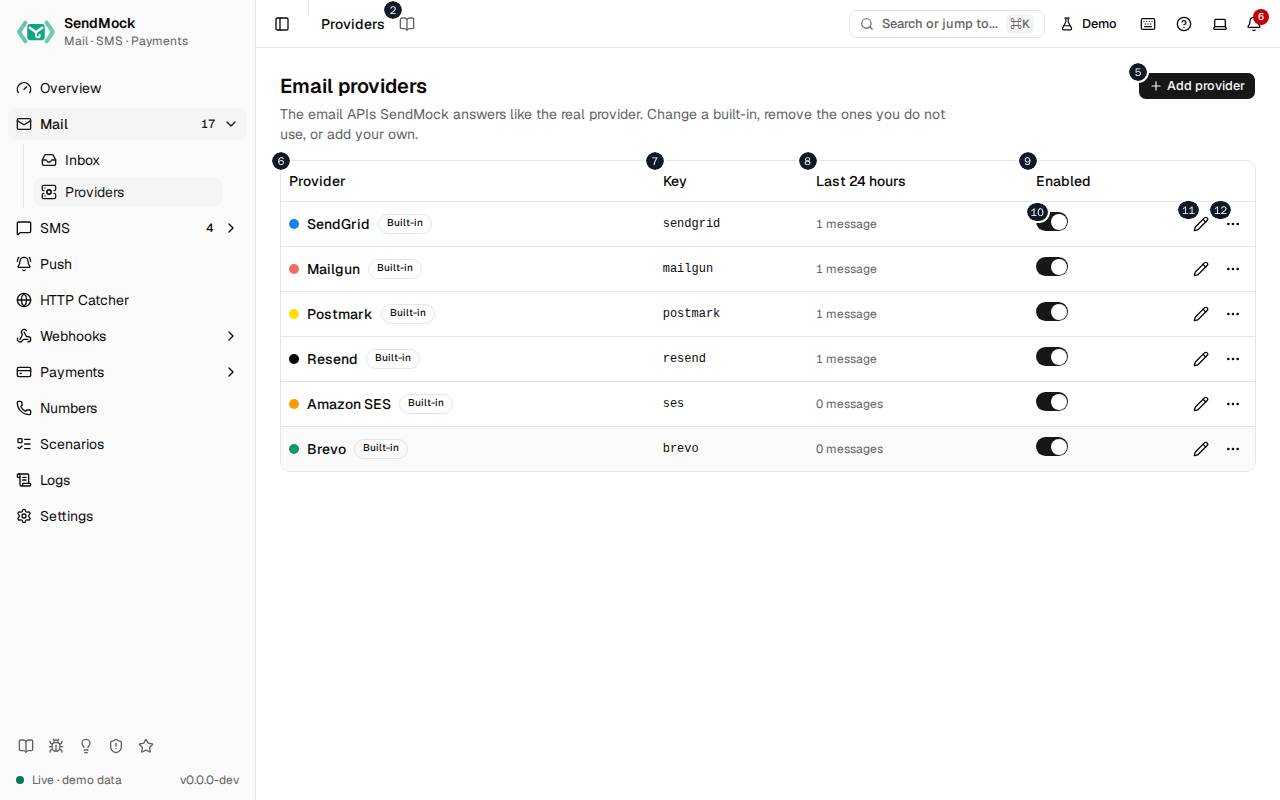
The numbers match the entries below. The picture shows the first screenful; controls further down, and texts, have no marker.
On the screen
1. Providers
Heading.
- What it does: Names the open screen in the header.
2. Read the Providers guide
Link.
- What it does: Opens this screen's page in the user guide, in a new tab.
- Links to: Mail > Providers.
3. Email providers
Heading.
- What it does: The list of email APIs SendMock answers.
- Same action elsewhere: REST
GET /api/v1/emails/providers, CLIsendmock email providers list, MCPsendmock_email_provider_list
4. The email APIs SendMock answers like the real provider. Change a built-in, remove the ones you do not use, or add your own.
Text.
- What it does: Explains the screen.
5. Add provider
Button.
- What it does: Opens Add a provider, or (in the dialog) adds it and opens its editor.
- Same action elsewhere: REST
POST /api/v1/emails/providers, CLIsendmock email providers create, MCPsendmock_email_provider_create
6. Provider
Column.
- What it does: The provider's name and whether it is built in, modified or your own.
7. Key
Column.
- What it does: Its key: the
/providers/<key>/path and the source stored on its messages.
8. Last # hours
Column.
- What it does: How many messages it took in the last 24 hours.
9. Enabled
Column.
- What it does: Whether it answers requests.
10. … enabled
Switch, in each row.
- What it does: Turns the provider on or off at once; while off, its paths answer 404.
- Same action elsewhere: REST
PATCH /api/v1/emails/providers/{providerKey}, CLIsendmock email providers update, MCPsendmock_email_provider_update
11. Edit …
Button, in each row.
- What it does: Opens the provider's editor.
- Same action elsewhere: REST
GET /api/v1/emails/providers/{providerKey}, CLIsendmock email providers show, MCPsendmock_email_provider_get
12. More for …
Button, in each row.
- What it does: Opens a menu with Reset to default (a modified built-in), Remove (a built-in, which then answers 404 until restored from the Removed group) or Delete (your own provider), each after you confirm.
- Same action elsewhere: REST
POST /api/v1/emails/providers/{providerKey}/reset, CLIsendmock email providers reset, MCPsendmock_email_provider_reset - Same action elsewhere: REST
DELETE /api/v1/emails/providers/{providerKey}, CLIsendmock email providers delete, MCPsendmock_email_provider_delete
Add a provider dialog
13. Add a provider
Heading.
- What it does: The Add a provider dialog.
14. Answer a provider SendMock does not ship, from blank or from the closest email provider; you set its requests and responses next.
Text.
- What it does: Explains what adding does.
- Links to: Advanced: create an email provider.
15. Name
Field.
- What it does: The name shown in lists and on message badges.
16. Key
Field.
- What it does: The short id in its paths (
/providers/<key>/) and stored on each message as its source. It cannot change once added.
17. Its /providers/<key>/ path and the name stored on messages; fixed once added.
Text.
- What it does: Explains the key.
18. Start from
Drop-down.
- What it does: Blank, or a built-in to copy as the starting point.
19. Cancel
Button.
- What it does: Closes the dialog or editor without saving.
20. Add provider
Button.
- What it does: Opens Add a provider, or (in the dialog) adds it and opens its editor.
- Same action elsewhere: REST
POST /api/v1/emails/providers, CLIsendmock email providers create, MCPsendmock_email_provider_create
21. Close
Button.
- What it does: Closes the dialog or editor without saving.
Provider editor, General tab
22. SendGrid
Heading.
- What it does: The provider open in the editor (here SendGrid).
23. Built-in Key sendgrid , # messages in the last # hours.
Text.
- What it does: Says whether the provider is built in or your own, its key, and how many emails it took in the last 24 hours.
24. General
Tab.
- What it does: Name, key, host, badge colour, whether it is on, and its credentials.
25. Requests
Tab.
- What it does: The API paths it answers, how each request's fields map to a stored email, and the checks a request must pass.
26. Responses
Tab.
- What it does: What it answers: the message id format, the success response and each error response, as templates.
27. Callbacks
Tab.
- What it does: The webhook template its status callbacks are sent with, and its own names for each status.
28. Preview
Tab.
- What it does: Sends a sample request through the unsaved definition and shows the stored message and the response.
29. Try it
Tab.
- What it does: The base URLs and a curl command to point your app or the provider's SDK at it.
30. Name
Field.
- What it does: The name shown in lists and on message badges.
31. Key
Field.
- What it does: The short id in its paths (
/providers/<key>/) and stored on each message as its source. It cannot change once added.
32. Its /providers/<key>/ path and the name stored on messages; fixed once added.
Text.
- What it does: Explains the key.
33. Host
Field.
- What it does: The provider's real API host, such as
api.sendgrid.com.
34. The provider's API host. On the provider port it tells apart providers that share a path.
Text.
- What it does: Explains why the host matters: on the provider port, requests are matched by host when two providers use the same path.
35. Accent colour
Field.
- What it does: Picks the badge colour with the browser's colour picker.
36. Accent
Field.
- What it does: The badge colour as a hex value, such as
#1a82e2.
37. The colour of its badge on messages.
Text.
- What it does: Explains the accent.
38. Enabled
Switch.
- What it does: Turns the provider on or off; while off, its paths answer 404.
39. What your app is configured with. Templates read them as credentials.<name> ; secrets stay masked, in the preview too.
Text.
- What it does: Explains the credentials: the API key and other values your app sends, which templates can read.
40. Credential # name
Field.
- What it does: A credential's name, such as
api_key.
41. Credential # value
Field.
- What it does: The credential's value; a secret one is masked.
42. Secret
Checkbox.
- What it does: Masks the value everywhere: the UI, API answers, logs, MCP results and seed exports.
43. Reveal api_key
Button.
- What it does: Shows the secret value once, after you confirm.
- Same action elsewhere: REST
GET /api/v1/emails/providers/{providerKey}/credentials/{credentialName}, CLIsendmock email providers credential
44. Remove credential
Button.
- What it does: Removes the credential.
45. Add credential
Button.
- What it does: Adds a credential row.
46. Check credentials
Switch.
- What it does: When on, a request without the right secret credential gets the provider's own unauthorized answer.
47. Off: any credentials pass. On: a request without a secret credential gets the provider's unauthorized answer.
Text.
- What it does: Explains Check credentials.
48. Cancel
Button.
- What it does: Closes the dialog or editor without saving.
49. Save provider
Button.
- What it does: Saves the definition; it applies to the next request, with no restart.
- Errors: A template that does not render, or a path another provider already answers, is refused with the reason.
- Same action elsewhere: REST
PATCH /api/v1/emails/providers/{providerKey}, CLIsendmock email providers update, MCPsendmock_email_provider_update
50. Close
Button.
- What it does: Closes the dialog or editor without saving.
Provider editor, Requests tab
51. The paths as the provider's API has them; use {name} for a part that changes, like /v#/{domain}/messages .
Text.
- What it does: Explains request paths and their
{name}parts.
52. Request # kind
Drop-down.
- What it does: What the request does: send one email, send a batch, or another operation the provider has.
53. Request # method
Drop-down.
- What it does: The HTTP method it answers.
54. Request # path
Field.
- What it does: The path it answers.
55. Request # format
Drop-down.
- What it does: The body format the provider's SDK sends: JSON, a form or multipart.
56. Remove request
Button.
- What it does: Removes the request.
57. Add request
Button.
- What it does: Adds a request the provider answers.
58. A JSON path ( personalizations[].to[].email ), a form field ( To ) or h:* for every field with a prefix. Anything unmapped is kept as metadata.
Text.
- What it does: Explains the field mapping sources.
59. Mapping # part
Drop-down.
- What it does: Which part of the stored email the field fills, such as the recipients or the subject.
60. Mapping # source
Field.
- What it does: Where in the request that part is read from.
61. Remove mapping
Button.
- What it does: Removes the mapping.
62. Map a part
Button.
- What it does: Adds a mapping.
63. Check # part
Drop-down.
- What it does: The part a request check looks at.
64. Check # kind
Drop-down.
- What it does: What the check requires, such as present or at most a length.
65. Check # max length
Number field.
- What it does: The longest value the check allows.
66. Check # error
Drop-down.
- What it does: Which error response a request failing the check gets.
67. Remove check
Button.
- What it does: Removes the check.
68. Add check
Button.
- What it does: Adds a check.
Provider editor, Responses tab
69. Templates read request , message , error and credentials ; the Preview tab lists every value with an example.
Text.
- What it does: Explains what response templates can read.
70. Message id
Field.
- What it does: The template for the provider's id of each message.
71. The provider's id for each message, e.g. SM{{ random_hex(#) }}.
Text.
- What it does: Gives an example message id template.
72. Success response
Heading.
- What it does: The answer to an accepted request.
73. Success response status
Number field.
- What it does: Its HTTP status.
74. Success response header # name
Field.
- What it does: A response header's name.
75. Success response header # value
Field.
- What it does: That header's value template.
76. Remove Success response header
Button.
- What it does: Removes the header.
77. Add header
Button.
- What it does: Adds a response header.
78. Success response body
Field.
- What it does: The body template.
79. Error response # kind
Drop-down.
- What it does: The error it answers: invalid input, unauthorized, a failed check, and so on.
80. Remove error response
Button.
- What it does: Removes the error response.
81. Error response # status
Number field.
- What it does: Its HTTP status.
82. Error response # header # name
Field.
- What it does: A header's name.
83. Error response # header # value
Field.
- What it does: That header's value template.
84. Remove Error response # header
Button.
- What it does: Removes the header.
85. Error response # body
Field.
- What it does: The error body template, in the provider's real error shape.
86. Add an error response
Button.
- What it does: Adds an error response.
Provider editor, Callbacks tab
87. Callback template
Drop-down.
- What it does: The webhook template status callbacks are sent with.
- Links to: Webhooks > Templates.
88. The webhook template its status callbacks and inbound messages are sent with; edit it in Webhooks > Templates.
Text.
- What it does: Explains the callback template.
89. The provider's name for each SendMock status, as its callbacks and fetch answers show it.
Text.
- What it does: Explains the status names below.
90. delivered
Field.
- What it does: The provider's name for a delivered email, as its event webhooks show it.
91. bounced
Field.
- What it does: Its name for a bounce.
92. complained
Field.
- What it does: Its name for a spam complaint.
93. opened
Field.
- What it does: Its name for an open.
Provider editor, Preview tab
94. Sample request
Heading.
- What it does: The request the preview sends.
95. A send built from the field mapping. Edit it to try another request.
Text.
- What it does: Explains the sample.
96. Sample method
Drop-down.
- What it does: The sample's method.
97. Sample path
Field.
- What it does: The sample's path.
98. Sample body
Field.
- What it does: The sample's body.
99. Stored message
Heading.
- What it does: The email SendMock would store for the sample.
- Same action elsewhere: REST
POST /api/v1/emails/providers/{providerKey}/preview, CLIsendmock email providers preview, MCPsendmock_email_provider_preview
100. Response
Heading.
- What it does: The response the sample would get.
101. Search the reference
Field.
- What it does: Filters the template reference: the values, functions and filters templates can use.
102. Values
Heading.
- What it does: The values a template can read, with an example of each.
103. Expand …
Button, in each row.
- What it does: Shows the fields inside a value, such as the parts of
requestormessage.
104. …
Button, in each row.
- What it does: Inserts the value, function or filter into the template field you were editing.
105. Functions
Heading.
- What it does: The functions a template can call.
106. Filters
Heading.
- What it does: The filters a template can use.
- Links to: Template filters.
107. … }}
Button, in each row.
- What it does: Inserts the function into the template field you were editing.
Provider editor, Try it tab
108. Copy sdk base url (provider port)
Button.
- What it does: Copies the base URL to give the provider's SDK when the provider port is on.
109. Copy base url on the main port
Button.
- What it does: Copies the base URL under
/providers/<key>/on the main port.
110. Copy a curl command
Button.
- What it does: Copies a curl command that sends the sample request.
111. The provider port answers once it is on ( --provider-addr ). The preview shows what this request gets back: #. Settings > Connection has the snippets for each language.
Text.
- What it does: Explains where the provider port comes from and what the sample gets back.
When the data cannot load
112. Could not load the providers. Try again
Message.
- What it does: Shown when the list could not be loaded.
- Errors: Check SendMock is running, then press Try again.
113. Could not load the providers.
Text.
- What it does: The message inside the alert.
114. Try again
Button.
- What it does: Loads the list again.
- Same action elsewhere: REST
GET /api/v1/emails/providers, CLIsendmock email providers list, MCPsendmock_email_provider_list