Providers
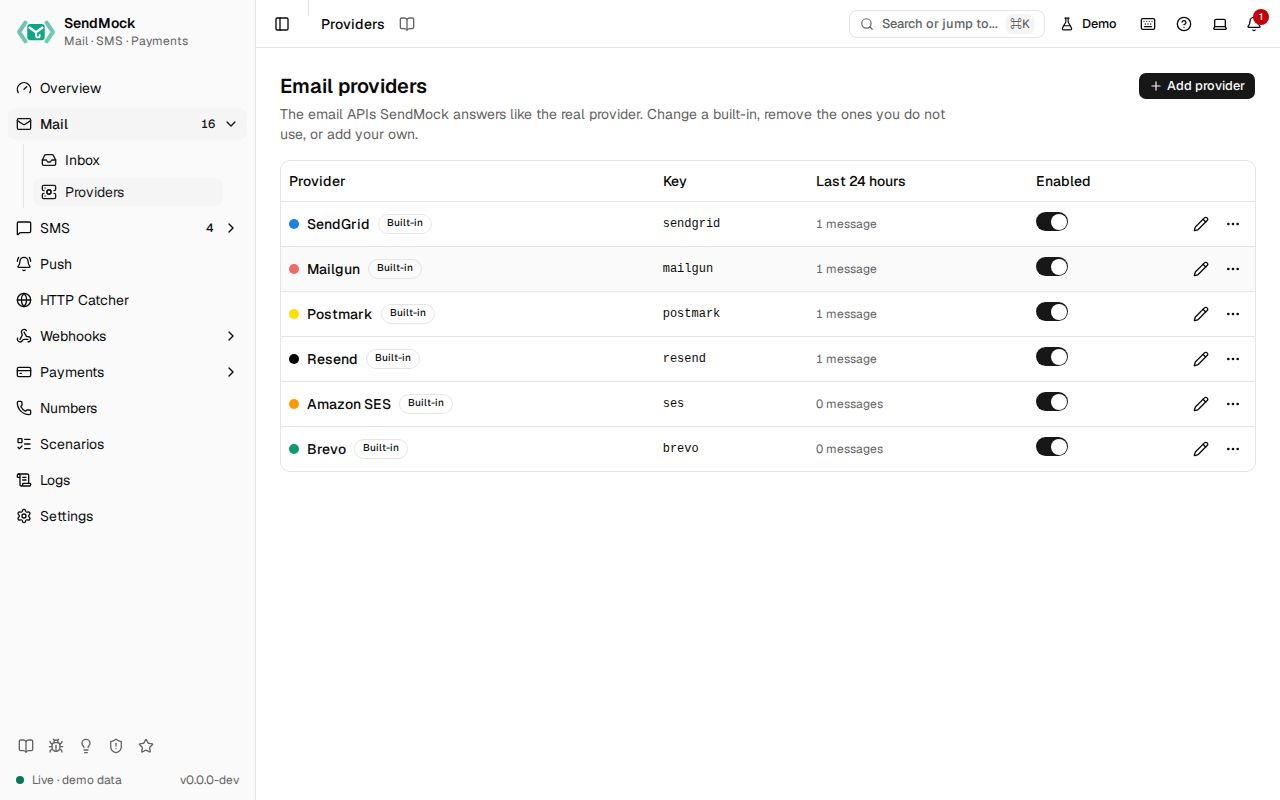
The email APIs SendMock answers like the real provider. Change a built-in, remove the ones you do not use, or add your own.
Try it in the demo.
An email provider is one API SendMock answers like the real one: SendGrid, Mailgun, Postmark, Resend, Amazon SES, Brevo, or one you add. Providers are data, not code, like payment gateways: the requests a provider answers, how SendMock reads them and what it answers are all editable, and Reset to default brings a built-in back. The full list is on Supported providers.
What it solves
- An email API SendMock does not ship. Add it from blank or from the closest built-in, with its own paths, fields and answers. See Advanced: create an email provider.
- A built-in that differs from your account: another API version, an extra required field, a message id your app checks.
- Providers you do not use clutter the filters and Settings > Connection; remove them, and restore them any time.
How it connects
| Gets from | Sends to |
|---|---|
your app's API calls at the provider's real path on port 8026, or at /providers/<key>/... | Mail: every send is stored with its provider, shown as a badge that opens this screen |
| Webhooks > Templates: the template its delivery callbacks use | your app: the provider's own answer, success or error |
| its credentials, when Check credentials is on | Settings > Connection: the base URL of every enabled provider |
Use it
- Press Edit SendGrid.
- Open Preview: the sample send is stored with
[email protected]as recipient, and SendGrid answers202. - Clear the sample body to
{}: nothing is stored, and the answer is SendGrid's own400error.
Point your provider's SDK at SendMock
Each official SDK has a setting for the address it calls. Point it at the provider port, http://127.0.0.1:8026, and keep your code as it is. CI sends with every one of these SDKs on each change (examples/email-providers/node/).
| SDK | Setting |
|---|---|
SendGrid (@sendgrid/mail) | sgMail.setClient(client) and sgMail.setApiKey(key), then client.setDefaultRequest("baseUrl", "http://127.0.0.1:8026") on @sendgrid/client (after the key, which resets it) |
Mailgun (mailgun.js) | url: "http://127.0.0.1:8026" in mailgun.client({...}) |
Postmark (postmark) | new ServerClient(token, { useHttps: false, requestHost: "127.0.0.1:8026" }) |
Resend (resend) | new Resend(key, { baseUrl: "http://127.0.0.1:8026" }) |
Amazon SES v2 (@aws-sdk/client-sesv2) | endpoint: "http://127.0.0.1:8026" in new SESv2Client({...}) |
Brevo (@getbrevo/brevo) | baseUrl: "http://127.0.0.1:8026/v3" in new BrevoClient({...}) |
Any API key works unless Check credentials is on for the provider.
Everything on this screen
The table
Name with its accent dot, Built-in or Custom, Modified once a built-in is edited, the key, messages in the last 24 hours, and an enabled switch. The row menu has Reset to default (a modified built-in), Remove (a built-in) and Delete (a custom provider), each asking first. Add provider asks for a name, a key and Start from (blank, or a copy of another provider).
Removed
Built-ins you removed are listed here. Requests to their paths get a 404 until you press Restore; their messages stay.
The provider sheet
| Tab | Holds |
|---|---|
| General | name, key (fixed after creation), host (tells apart providers that share a path), accent, enabled, credentials (secrets masked, reveal asks first) and Check credentials |
| Requests | the requests it answers (kind, method, path with {name} parts, format), the field mapping (where to, from, subject, text, html and the rest are read from) and the checks on a send |
| Responses | the message id template, the success response and one response per error kind (missing field, invalid value, unauthorized, not found, rate limited) |
| Callbacks | the webhook template for its delivery callbacks and the provider's name for each status |
| Preview | a sample request, the message SendMock would store, the answer it would give, the problems, and what templates can read |
| Try it | the base URLs and a curl command for this provider |
A provider with template errors cannot be saved, and a path that another enabled provider answers is refused with its name.
Every control and text, one by one: Email providers in depth.
Customize
The full walkthrough, from the provider's API docs to a working provider: Advanced: create an email provider.