Checkout page
The hosted test checkout page your customer is sent to, its methods and steps, the test controls, and where it sends the browser after.
Try it in the demo.
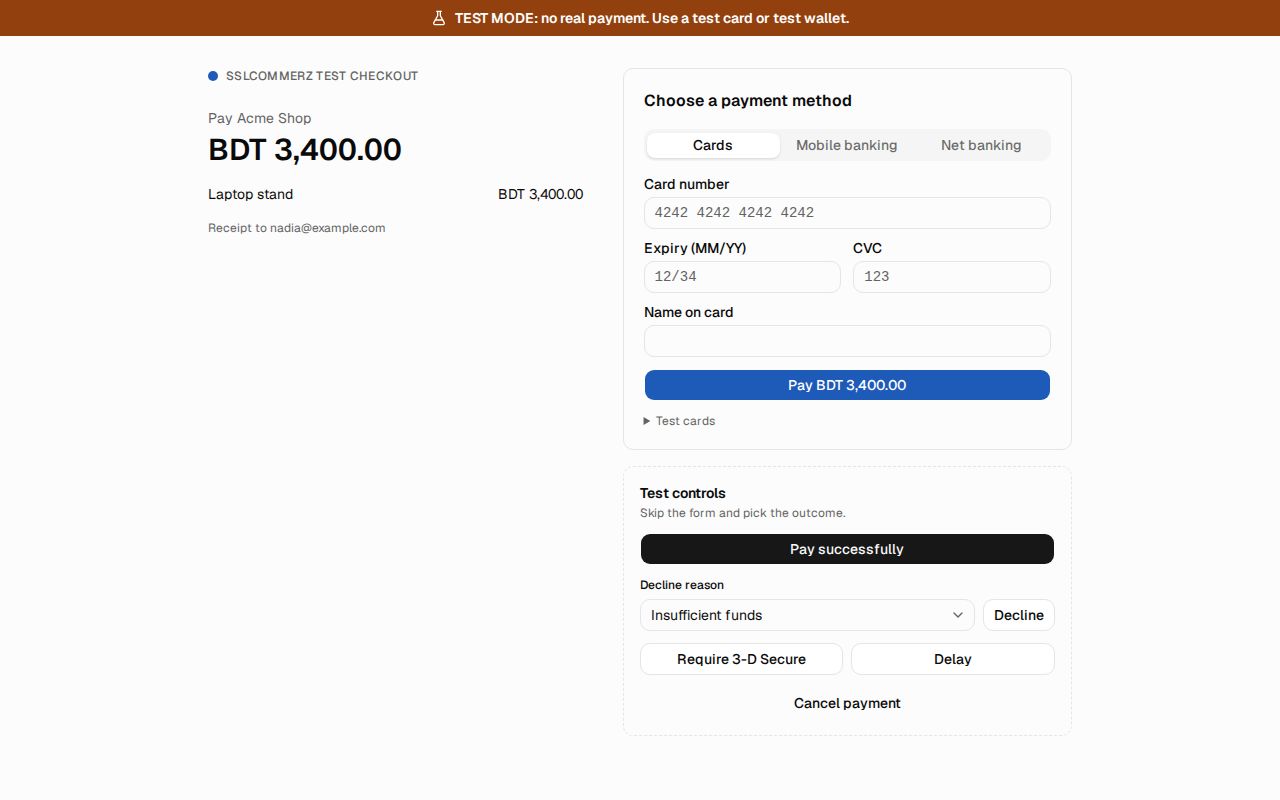
When your app creates a hosted checkout, the gateway's answer points the browser at SendMock's test checkout page, http://127.0.0.1:8025/pay/<sessionId>. It looks like a gateway's page, uses the gateway's accent colour, and always says TEST MODE: no real payment.
What it solves
- Clicking through your whole checkout locally: your page, the gateway's page, back to your success page.
- Producing any outcome on demand, including 3-D Secure, cancel and a payment that stays pending.
What the page shows
- The TEST MODE banner, the merchant name (Settings > Payments), the order summary (line items, total) and the customer's email.
- The gateway's methods. One method shows its steps directly; several show a picker grouped into tabs by each method's flow (Cards, Mobile banking, Net banking, Accounts, ...).
- The method's flow, step by step, with its own labels:
| Flow | The customer |
|---|---|
| Card | fills card number, expiry, CVC and name; the test card decides the outcome |
| Wallet | enters the wallet number, then the OTP, then the PIN (test values shown on the page) |
| Bank | picks the bank and confirms |
| Account | signs in as the test account and approves (PayPal) |
| QR | scans a test QR code and presses I have paid |
| Bank transfer | gets a reference code to pay with and presses I have paid |
| Voucher | enters a voucher code |
With the built-in setup: a card form for Stripe and Native, PayPal's approve for PayPal, the method picker for SSLCommerz, and the wallet steps for bKash.
Test controls
Beside the payment form, Test controls settle the payment without filling it in: Pay successfully, Decline (with a Decline reason), Cancel payment, Require 3-D Secure (cards only; opens a challenge with Approve and Fail) and Delay (leaves it pending, to settle later with Simulate).
After paying
The result shows what SendMock does next: the URL it sends the browser to (success, fail or cancel), the method (GET or POST) and the fields, and a Return to merchant button (a link, or a form for gateways that POST back). At the same time, the gateway's notification goes to its notification endpoint.
A completed, failed, canceled or expired session shows that it is closed and cannot be paid again.
Safety
Only test values are accepted. A card number that passes the Luhn check but is not a test card is refused with "Use a test card" and is never stored or logged, not even masked. A wallet number that is not a test number is refused the same way.
Keyboard
Every control is reachable with Tab in order, and Enter submits the current step.
From the CLI, API and AI
| Do this | CLI | API | MCP tool |
|---|---|---|---|
| what the page shows | sendmock payments checkout show <sessionId> | GET /api/v1/checkout-sessions/{sessionId} | sendmock_checkout_get |
| pay, decline or cancel | sendmock payments checkout complete <sessionId> <action> | POST /api/v1/checkout-sessions/{sessionId}/complete | sendmock_checkout_complete |