Rules in depth
Every control and text of Webhooks > Rules and the rule editor.
Every control and text this screen shows, in screen order. The list is read from the demo by a crawl, and CI fails when the screen changes without its entry here.
Webhooks > Rules decides which events go to which endpoint: each rule picks events and, optionally, a filter on their fields.
The screen as a whole: Rules.
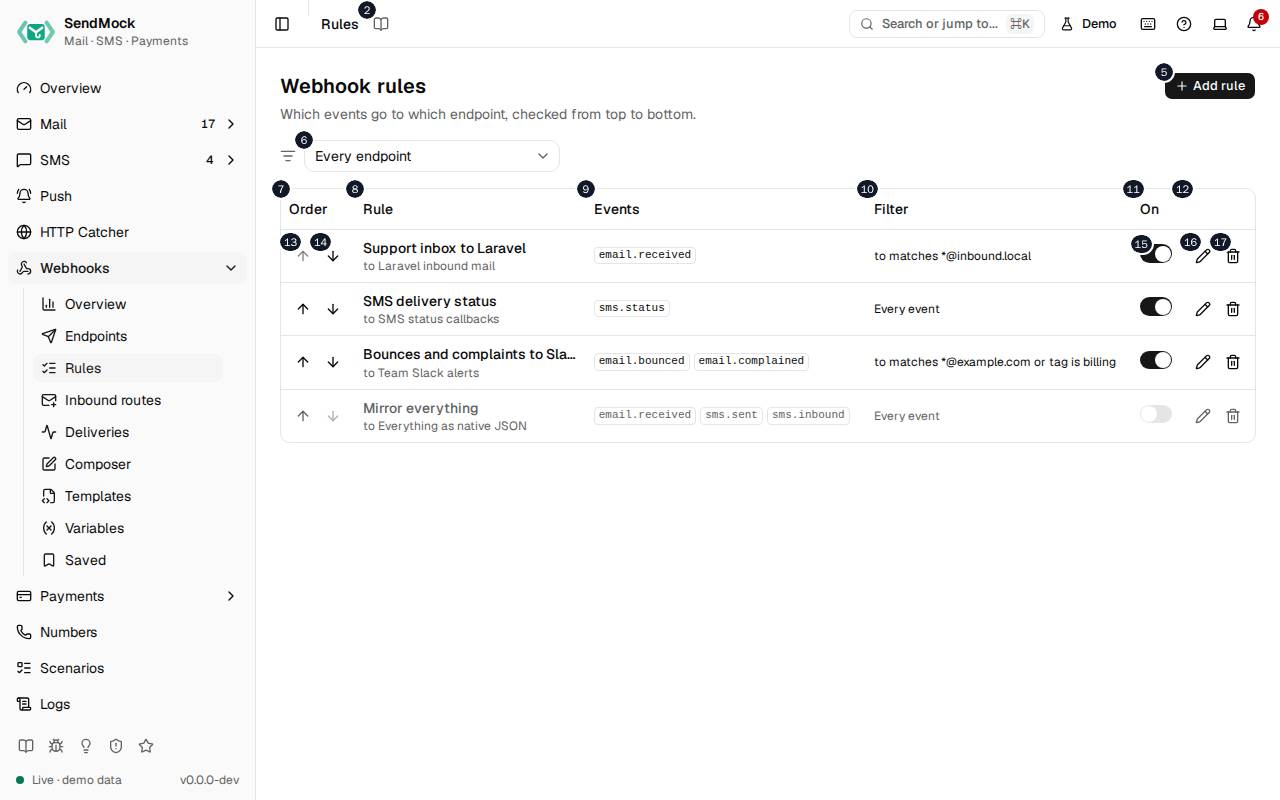
The numbers match the entries below. The picture shows the first screenful; controls further down, and texts, have no marker.
On the screen
1. Rules
Heading.
- What it does: Names the open screen in the header.
2. Read the Rules guide
Link.
- What it does: Opens this screen's page in the user guide, in a new tab.
- Links to: Rules.
3. Webhook rules
Heading.
- What it does: The rules that decide which events go to which endpoint.
- Same action elsewhere: REST
GET /api/v1/webhooks/rules, CLIsendmock webhook rule list, MCPsendmock_webhook_rule_list
4. Which events go to which endpoint, checked from top to bottom.
Text.
- What it does: Explains the screen: every matching rule delivers, in this order.
5. Add rule
Button.
- What it does: Opens the new rule editor; in it, adds the rule.
- Same action elsewhere: REST
POST /api/v1/webhooks/rules, CLIsendmock webhook rule create, MCPsendmock_webhook_rule_create
6. Endpoint filter
Drop-down.
- What it does: Shows the rules of every endpoint, or of one.
7. Order
Column.
- What it does: The rule's place, with buttons to move it.
8. Rule
Column.
- What it does: The rule's name and endpoint.
9. Events
Column.
- What it does: The events it sends.
10. Filter
Column.
- What it does: Its filter, in words.
11. On
Column.
- What it does: Whether it is on.
12. Actions
Column.
- What it does: Edit and Delete.
13. Move … up
Button, in each row.
- What it does: Moves the rule one place up.
- Same action elsewhere: REST
POST /api/v1/webhooks/rules/{ruleId}/move, CLIsendmock webhook rule move, MCPsendmock_webhook_rule_move
14. Move … down
Button, in each row.
- What it does: Moves the rule one place down.
- Same action elsewhere: REST
POST /api/v1/webhooks/rules/{ruleId}/move, CLIsendmock webhook rule move, MCPsendmock_webhook_rule_move
15. … enabled
Switch, in each row.
- What it does: Turns the rule on or off at once.
- Same action elsewhere: REST
PATCH /api/v1/webhooks/rules/{ruleId}, CLIsendmock webhook rule update, MCPsendmock_webhook_rule_update
16. Edit …
Button, in each row.
- What it does: Opens the rule's editor.
- Same action elsewhere: REST
GET /api/v1/webhooks/rules/{ruleId}, CLIsendmock webhook rule show, MCPsendmock_webhook_rule_get
17. Delete …
Button, in each row.
- What it does: Asks for confirmation, then deletes the rule.
New rule editor
18. Add a rule
Heading.
- What it does: The new rule editor.
19. Which events go to the endpoint, and only when the filter matches.
Text.
- What it does: Explains the editor.
20. Name
Field.
- What it does: The rule's name.
21. Endpoint
Drop-down.
- What it does: The endpoint matching events are delivered to.
- Links to: Endpoints.
22. Events
Heading.
- What it does: The events the rule sends; tick one or more.
23. email.received
Checkbox.
- What it does: Sends
email.received, fired when an email your app sent arrives (SMTP, a provider API, sendmail or the native API).
24. email.inbound
Checkbox.
- What it does: Sends
email.inbound, fired when an incoming email arrives: a simulated reply or forward, or mail to an inbound domain.
25. email.opened
Checkbox.
- What it does: Sends
email.opened, fired when an email is opened.
26. email.clicked
Checkbox.
- What it does: Sends
email.clicked, fired when a link of an email is clicked.
27. email.delivered
Checkbox.
- What it does: Sends
email.delivered, fired when an email is marked delivered.
28. email.deferred
Checkbox.
- What it does: Sends
email.deferred, fired when an email's delivery is deferred.
29. email.bounced
Checkbox.
- What it does: Sends
email.bounced, fired when an email bounces.
30. email.complained
Checkbox.
- What it does: Sends
email.complained, fired when a spam complaint is recorded.
31. email.unsubscribed
Checkbox.
- What it does: Sends
email.unsubscribed, fired when an unsubscribe is recorded.
32. email.released
Checkbox.
- What it does: Sends
email.released, fired when an email is released to a real inbox.
33. email.deleted
Checkbox.
- What it does: Sends
email.deleted, fired when an email is deleted.
34. sms.sent
Checkbox.
- What it does: Sends
sms.sent, fired when your app sends an SMS.
35. sms.status
Checkbox.
- What it does: Sends
sms.status, fired when an SMS changes status.
36. sms.opened
Checkbox.
- What it does: Sends
sms.opened, fired when an SMS is read.
37. sms.inbound
Checkbox.
- What it does: Sends
sms.inbound, fired when an inbound SMS arrives.
38. verify.started
Checkbox.
- What it does: Sends
verify.started, fired when a verification starts.
39. verify.checked
Checkbox.
- What it does: Sends
verify.checked, fired when a code is checked, or a verification is approved, canceled or runs out of attempts.
40. verify.expired
Checkbox.
- What it does: Sends
verify.expired, fired when a verification expires.
41. push.sent
Checkbox.
- What it does: Sends
push.sent, fired when your app sends a push notification through FCM, Expo or OneSignal.
42. push.failed
Checkbox.
- What it does: Sends
push.failed, fired when a push notification is refused, as a magic device token asks.
43. http.captured
Checkbox.
- What it does: Sends
http.captured, fired when the HTTP catcher captures a request.
44. payment.created
Checkbox.
- What it does: Sends
payment.created, fired when a payment is created.
45. payment.authorized
Checkbox.
- What it does: Sends
payment.authorized, fired when a payment is authorized.
46. payment.succeeded
Checkbox.
- What it does: Sends
payment.succeeded, fired when a payment succeeds.
47. payment.failed
Checkbox.
- What it does: Sends
payment.failed, fired when a payment fails.
48. payment.canceled
Checkbox.
- What it does: Sends
payment.canceled, fired when a payment is canceled or voided.
49. payment.refunded
Checkbox.
- What it does: Sends
payment.refunded, fired when a payment is refunded in full.
50. payment.partially_refunded
Checkbox.
- What it does: Sends
payment.partially_refunded, fired when part of a payment is refunded.
51. payment.dispute_opened
Checkbox.
- What it does: Sends
payment.dispute_opened, fired when a dispute is opened.
52. payment.dispute_updated
Checkbox.
- What it does: Sends
payment.dispute_updated, fired when a dispute is answered or changes.
53. payment.dispute_closed
Checkbox.
- What it does: Sends
payment.dispute_closed, fired when a dispute is closed.
54. checkout.completed
Checkbox.
- What it does: Sends
checkout.completed, fired when a checkout is completed.
55. checkout.expired
Checkbox.
- What it does: Sends
checkout.expired, fired when a checkout expires.
56. subscription.created
Checkbox.
- What it does: Sends
subscription.created, fired when a subscription is created.
57. subscription.renewed
Checkbox.
- What it does: Sends
subscription.renewed, fired when a subscription renews.
58. subscription.payment_failed
Checkbox.
- What it does: Sends
subscription.payment_failed, fired when a subscription's renewal payment fails.
59. subscription.canceled
Checkbox.
- What it does: Sends
subscription.canceled, fired when a subscription is canceled.
60. webhook.failed
Checkbox.
- What it does: Sends
webhook.failed, fired when a webhook delivery fails for good.
61. test.ping
Checkbox.
- What it does: Sends
test.ping, fired when an endpoint test is sent.
62. Filter
Heading.
- What it does: Conditions on the event's fields; with none, every selected event is sent.
- Links to: Advanced: rules and filters.
63. Negate filter
Button.
- What it does: Sends the events that do not match the filter instead.
64. Filter combinator
Drop-down.
- What it does: Whether all conditions must match, or any one.
65. No conditions: every selected event fires.
Text.
- What it does: Shown while the filter is empty.
66. Add condition
Button.
- What it does: Adds a condition.
67. Add group
Button.
- What it does: Adds a group of conditions with its own all or any.
68. Preview
Heading.
- What it does: Tries the rule on recent real messages before you save it.
- Same action elsewhere: REST
POST /api/v1/webhooks/rules/preview, CLIsendmock webhook rule preview, MCPsendmock_webhook_rule_preview
69. Matches # of the last # messages
Text.
- What it does: How many recent messages the rule would send.
70. Show non-matching
Switch.
- What it does: Lists the recent messages that would not be sent too, with the condition that failed.
71. Matches
Badge.
- What it does: Marks a recent message the rule matches.
72. Cancel
Button.
- What it does: Closes the editor without saving.
73. Add rule
Button.
- What it does: Adds the rule; it applies to the next event.
- Same action elsewhere: REST
POST /api/v1/webhooks/rules, CLIsendmock webhook rule create, MCPsendmock_webhook_rule_create
74. Close
Button.
- What it does: Closes the editor without saving.
Rule editor
75. Support inbox to Laravel
Heading.
- What it does: The rule open in the editor (here a demo rule).
76. Which events go to the endpoint, and only when the filter matches.
Text.
- What it does: Explains the editor.
77. Name
Field.
- What it does: The rule's name.
78. Endpoint
Drop-down.
- What it does: The endpoint matching events are delivered to.
- Links to: Endpoints.
79. Events
Heading.
- What it does: The events the rule sends; tick one or more.
80. email.received
Checkbox.
- What it does: Sends
email.received, fired when an email your app sent arrives (SMTP, a provider API, sendmail or the native API).
81. email.inbound
Checkbox.
- What it does: Sends
email.inbound, fired when an incoming email arrives: a simulated reply or forward, or mail to an inbound domain.
82. email.opened
Checkbox.
- What it does: Sends
email.opened, fired when an email is opened.
83. email.clicked
Checkbox.
- What it does: Sends
email.clicked, fired when a link of an email is clicked.
84. email.delivered
Checkbox.
- What it does: Sends
email.delivered, fired when an email is marked delivered.
85. email.deferred
Checkbox.
- What it does: Sends
email.deferred, fired when an email's delivery is deferred.
86. email.bounced
Checkbox.
- What it does: Sends
email.bounced, fired when an email bounces.
87. email.complained
Checkbox.
- What it does: Sends
email.complained, fired when a spam complaint is recorded.
88. email.unsubscribed
Checkbox.
- What it does: Sends
email.unsubscribed, fired when an unsubscribe is recorded.
89. email.released
Checkbox.
- What it does: Sends
email.released, fired when an email is released to a real inbox.
90. email.deleted
Checkbox.
- What it does: Sends
email.deleted, fired when an email is deleted.
91. sms.sent
Checkbox.
- What it does: Sends
sms.sent, fired when your app sends an SMS.
92. sms.status
Checkbox.
- What it does: Sends
sms.status, fired when an SMS changes status.
93. sms.opened
Checkbox.
- What it does: Sends
sms.opened, fired when an SMS is read.
94. sms.inbound
Checkbox.
- What it does: Sends
sms.inbound, fired when an inbound SMS arrives.
95. verify.started
Checkbox.
- What it does: Sends
verify.started, fired when a verification starts.
96. verify.checked
Checkbox.
- What it does: Sends
verify.checked, fired when a code is checked, or a verification is approved, canceled or runs out of attempts.
97. verify.expired
Checkbox.
- What it does: Sends
verify.expired, fired when a verification expires.
98. push.sent
Checkbox.
- What it does: Sends
push.sent, fired when your app sends a push notification through FCM, Expo or OneSignal.
99. push.failed
Checkbox.
- What it does: Sends
push.failed, fired when a push notification is refused, as a magic device token asks.
100. http.captured
Checkbox.
- What it does: Sends
http.captured, fired when the HTTP catcher captures a request.
101. payment.created
Checkbox.
- What it does: Sends
payment.created, fired when a payment is created.
102. payment.authorized
Checkbox.
- What it does: Sends
payment.authorized, fired when a payment is authorized.
103. payment.succeeded
Checkbox.
- What it does: Sends
payment.succeeded, fired when a payment succeeds.
104. payment.failed
Checkbox.
- What it does: Sends
payment.failed, fired when a payment fails.
105. payment.canceled
Checkbox.
- What it does: Sends
payment.canceled, fired when a payment is canceled or voided.
106. payment.refunded
Checkbox.
- What it does: Sends
payment.refunded, fired when a payment is refunded in full.
107. payment.partially_refunded
Checkbox.
- What it does: Sends
payment.partially_refunded, fired when part of a payment is refunded.
108. payment.dispute_opened
Checkbox.
- What it does: Sends
payment.dispute_opened, fired when a dispute is opened.
109. payment.dispute_updated
Checkbox.
- What it does: Sends
payment.dispute_updated, fired when a dispute is answered or changes.
110. payment.dispute_closed
Checkbox.
- What it does: Sends
payment.dispute_closed, fired when a dispute is closed.
111. checkout.completed
Checkbox.
- What it does: Sends
checkout.completed, fired when a checkout is completed.
112. checkout.expired
Checkbox.
- What it does: Sends
checkout.expired, fired when a checkout expires.
113. subscription.created
Checkbox.
- What it does: Sends
subscription.created, fired when a subscription is created.
114. subscription.renewed
Checkbox.
- What it does: Sends
subscription.renewed, fired when a subscription renews.
115. subscription.payment_failed
Checkbox.
- What it does: Sends
subscription.payment_failed, fired when a subscription's renewal payment fails.
116. subscription.canceled
Checkbox.
- What it does: Sends
subscription.canceled, fired when a subscription is canceled.
117. webhook.failed
Checkbox.
- What it does: Sends
webhook.failed, fired when a webhook delivery fails for good.
118. test.ping
Checkbox.
- What it does: Sends
test.ping, fired when an endpoint test is sent.
119. Filter
Heading.
- What it does: Conditions on the event's fields; with none, every selected event is sent.
- Links to: Advanced: rules and filters.
120. Negate filter
Button.
- What it does: Sends the events that do not match the filter instead.
121. Filter combinator
Drop-down.
- What it does: Whether all conditions must match, or any one.
122. Negate condition
Button.
- What it does: Turns that one condition around.
123. Field
Drop-down.
- What it does: The event field the condition reads, such as
data.to[0].addressordata.subject.
124. Remove condition
Button.
- What it does: Removes the condition.
125. Operator
Drop-down.
- What it does: How the field is compared: equals, contains, matches a pattern, is in a list, and so on.
126. Value
Field.
- What it does: What the field is compared with.
127. Add condition
Button.
- What it does: Adds a condition.
128. Add group
Button.
- What it does: Adds a group of conditions with its own all or any.
129. Preview
Heading.
- What it does: Tries the rule on recent real messages before you save it.
- Same action elsewhere: REST
POST /api/v1/webhooks/rules/preview, CLIsendmock webhook rule preview, MCPsendmock_webhook_rule_preview
130. Matches # of the last # messages
Text.
- What it does: How many recent messages the rule would send.
131. Show non-matching
Switch.
- What it does: Lists the recent messages that would not be sent too, with the condition that failed.
132. No recent message matches.
Text.
- What it does: Shown when none of the recent messages would be sent.
133. Cancel
Button.
- What it does: Closes the editor without saving.
134. Save changes
Button.
- What it does: Saves the rule; it applies to the next event.
- Same action elsewhere: REST
PATCH /api/v1/webhooks/rules/{ruleId}, CLIsendmock webhook rule update, MCPsendmock_webhook_rule_update
135. Close
Button.
- What it does: Closes the editor without saving.
Delete rule dialog
136. Delete Support inbox to Laravel?
Heading.
- What it does: The confirmation before deleting a rule (here a demo rule).
137. Its events stop going to the endpoint. Past deliveries stay in the log.
Text.
- What it does: Says what deleting changes.
138. Keep it
Button.
- What it does: Closes the confirmation without deleting.
139. Delete
Button.
- What it does: Deletes the rule.
- Same action elsewhere: REST
DELETE /api/v1/webhooks/rules/{ruleId}, CLIsendmock webhook rule delete, MCPsendmock_webhook_rule_delete
When the data cannot load
140. Could not load the rules. Try again
Message.
- What it does: Shown when the rules could not be loaded.
- Errors: Check SendMock is running, then press Try again.
141. Could not load the rules.
Text.
- What it does: The message inside the alert.
142. Try again
Button.
- What it does: Loads the rules again.
- Same action elsewhere: REST
GET /api/v1/webhooks/rules, CLIsendmock webhook rule list, MCPsendmock_webhook_rule_list