Endpoints in depth
Every control and text of Webhooks > Endpoints and the endpoint editor's tabs.
Every control and text this screen shows, in screen order. The list is read from the demo by a crawl, and CI fails when the screen changes without its entry here.
Webhooks > Endpoints lists the URLs SendMock delivers webhooks to, each with its format, signing secret and retry policy.
The screen as a whole: Endpoints.
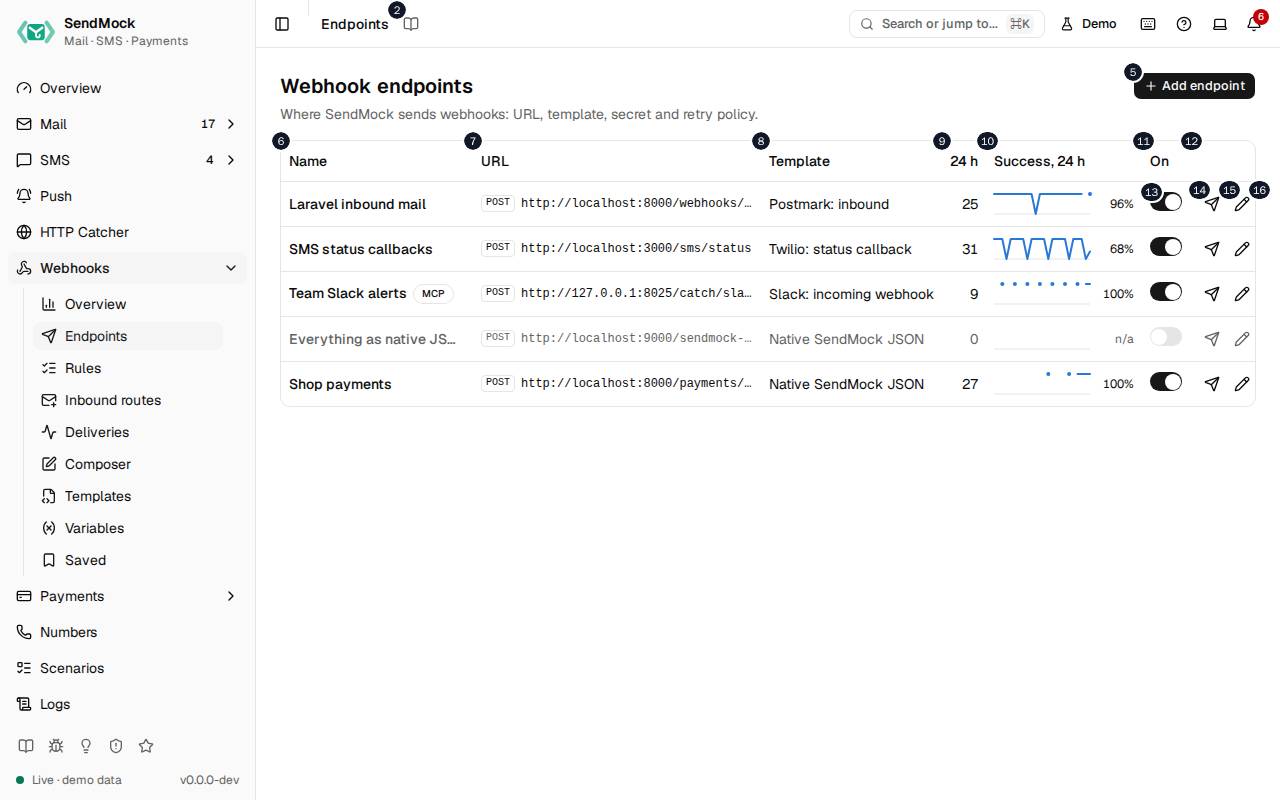
The numbers match the entries below. The picture shows the first screenful; controls further down, and texts, have no marker.
On the screen
1. Endpoints
Heading.
- What it does: Names the open screen in the header.
2. Read the Endpoints guide
Link.
- What it does: Opens this screen's page in the user guide, in a new tab.
- Links to: Endpoints.
3. Webhook endpoints
Heading.
- What it does: The list of URLs SendMock delivers webhooks to.
- Same action elsewhere: REST
GET /api/v1/webhooks/endpoints, CLIsendmock webhook endpoint list, MCPsendmock_webhook_endpoint_list
4. Where SendMock sends webhooks: URL, template, secret and retry policy.
Text.
- What it does: Explains the screen.
5. Add endpoint
Button.
- What it does: Opens the new endpoint editor; in it, adds the endpoint.
- Same action elsewhere: REST
POST /api/v1/webhooks/endpoints, CLIsendmock webhook endpoint create, MCPsendmock_webhook_endpoint_create
6. Name
Column.
- What it does: The endpoint's name.
7. URL
Column.
- What it does: Where its requests go.
8. Template
Column.
- What it does: The format its requests are sent in.
9. # h
Column.
- What it does: Its deliveries over the last 24 hours, as a sparkline.
10. Success, # h
Column.
- What it does: The share of those deliveries answered 2xx.
11. On
Column.
- What it does: Whether it receives anything.
12. Actions
Column.
- What it does: Send test, Edit and Delete.
13. … enabled
Switch, in each row.
- What it does: Turns the endpoint on or off at once. While off, its rules stay but nothing is sent to it.
- Same action elsewhere: REST
PATCH /api/v1/webhooks/endpoints/{endpointId}, CLIsendmock webhook endpoint update, MCPsendmock_webhook_endpoint_update
14. Send test to …
Button, in each row.
- What it does: Sends a signed
test.pingevent to the endpoint now and shows what it answered. - Same action elsewhere: REST
POST /api/v1/webhooks/endpoints/{endpointId}/test, CLIsendmock webhook endpoint test, MCPsendmock_webhook_endpoint_test
15. Edit …
Button, in each row.
- What it does: Opens the endpoint's editor.
- Same action elsewhere: REST
GET /api/v1/webhooks/endpoints/{endpointId}, CLIsendmock webhook endpoint show, MCPsendmock_webhook_endpoint_get
16. Delete …
Button, in each row.
- What it does: Asks for confirmation, then deletes the endpoint.
New endpoint editor
17. Add an endpoint
Heading.
- What it does: The new endpoint editor.
18. Where SendMock sends webhooks, in which format, and how it retries.
Text.
- What it does: Explains the editor.
19. General
Tab.
- What it does: Name, method, URL, timeout and whether it is on.
20. Request
Tab.
- What it does: Query parameters, headers and the body: a template, fields, raw text or none.
21. Security
Tab.
- What it does: The signing secret and its rotation; open once the endpoint is added.
22. Retries
Tab.
- What it does: How many attempts, how far apart, and what retries.
23. Variables
Tab.
- What it does: Variables only this endpoint reads; open once the endpoint is added.
24. The signing secret and variables can be set once the endpoint is added.
Text.
- What it does: Explains why Security and Variables wait.
25. Name
Field.
- What it does: The endpoint's name in lists, rules and deliveries.
26. Method
Drop-down.
- What it does: The HTTP method of its requests, POST by default.
27. URL
Field.
- What it does: Where requests go; it may hold
{{ }}templates, rendered for each delivery. - Errors: A URL that is not http or https is refused.
28. Timeout (seconds)
Field.
- What it does: How long SendMock waits for an answer.
29. # to # seconds. A slower answer counts as a timeout and is retried.
Text.
- What it does: The allowed range and what a timeout does.
30. A disabled endpoint keeps its rules but receives nothing.
Text.
- What it does: Explains Enabled.
31. Enabled
Switch.
- What it does: Whether the endpoint receives deliveries.
32. Cancel
Button.
- What it does: Closes the editor without saving.
33. Add endpoint
Button.
- What it does: Adds the endpoint and opens its other tabs.
- Same action elsewhere: REST
POST /api/v1/webhooks/endpoints, CLIsendmock webhook endpoint create, MCPsendmock_webhook_endpoint_create
34. Close
Button.
- What it does: Closes the dialog or editor.
Endpoint editor, General tab
35. Laravel inbound mail
Heading.
- What it does: The endpoint open in the editor (here the demo's Laravel endpoint).
36. Where SendMock sends webhooks, in which format, and how it retries.
Text.
- What it does: Explains the editor.
37. General
Tab.
- What it does: Name, method, URL, timeout and whether it is on.
38. Request
Tab.
- What it does: Query parameters, headers and the body: a template, fields, raw text or none.
39. Security
Tab.
- What it does: The signing secret and its rotation; open once the endpoint is added.
40. Retries
Tab.
- What it does: How many attempts, how far apart, and what retries.
41. Variables
Tab.
- What it does: Variables only this endpoint reads; open once the endpoint is added.
42. Name
Field.
- What it does: The endpoint's name in lists, rules and deliveries.
43. Method
Drop-down.
- What it does: The HTTP method of its requests, POST by default.
44. URL
Field.
- What it does: Where requests go; it may hold
{{ }}templates, rendered for each delivery. - Errors: A URL that is not http or https is refused.
45. Timeout (seconds)
Field.
- What it does: How long SendMock waits for an answer.
46. # to # seconds. A slower answer counts as a timeout and is retried.
Text.
- What it does: The allowed range and what a timeout does.
47. A disabled endpoint keeps its rules but receives nothing.
Text.
- What it does: Explains Enabled.
48. Enabled
Switch.
- What it does: Whether the endpoint receives deliveries.
49. Send test
Button.
- What it does: Sends a signed
test.pingto the endpoint as last saved, and shows what it answered. - Same action elsewhere: REST
POST /api/v1/webhooks/endpoints/{endpointId}/test, CLIsendmock webhook endpoint test, MCPsendmock_webhook_endpoint_test
50. Close
Button.
- What it does: Closes the dialog or editor.
51. Save changes
Button.
- What it does: Saves the endpoint; the next delivery uses it.
- Same action elsewhere: REST
PATCH /api/v1/webhooks/endpoints/{endpointId}, CLIsendmock webhook endpoint update, MCPsendmock_webhook_endpoint_update
Endpoint editor, Request tab
52. None. Added to the URL, URL-encoded.
Text.
- What it does: The query parameters; none yet.
53. Add query param
Button.
- What it does: Adds a query parameter, whose value may be a template.
54. None besides Content-Type and the signature headers.
Text.
- What it does: The extra headers; none yet.
55. Add header
Button.
- What it does: Adds a header, whose value may be a template.
56. Template
Choice.
- What it does: The body comes from a webhook template.
57. Fields
Choice.
- What it does: The body is built from name and value fields, as JSON, a form or multipart.
58. Raw
Choice.
- What it does: The body is text you write, with templates inside.
59. None
Choice.
- What it does: No body.
60. Template
Drop-down.
- What it does: The template the body comes from, such as native JSON or a provider's format.
- Links to: Templates.
61. Postmark: inbound payload, matching the provider's documented format.
Text.
- What it does: Describes the chosen template (here Postmark's inbound format).
62. Based on Postmark: inbound rev #. Built-in templates are always linked: edit them on the Templates screen, or clone one for a separate copy.
Text.
- What it does: Names the template revision the endpoint uses and how built-ins stay linked.
63. Linked Follows template updates; overrides go on top.
Choice.
- What it does: The endpoint follows the template as it changes, with its own field overrides on top.
64. Detached A private copy that never changes on its own.
Choice.
- What it does: The endpoint keeps its own copy of the template.
65. None. Added to what the template sends; values accept {{ }} templates.
Text.
- What it does: The extra body fields; none yet.
66. Add field
Button.
- What it does: Adds a body field on top of the template.
67. Keep this endpoint's template and overrides, as last saved, as a template of your own.
Text.
- What it does: Explains Save as template.
68. Save as template
Button.
- What it does: Saves the endpoint's request as a new custom template.
- Same action elsewhere: REST
POST /api/v1/webhooks/endpoints/{endpointId}/save-as-template, CLIsendmock webhook endpoint save-as-template, MCPsendmock_webhook_endpoint_save_as_template
69. Strict An undefined value stops the delivery as render failed.
Choice.
- What it does: A template value that is not defined stops the delivery with
render_failed.
70. Lenient An undefined value renders empty, with a warning.
Choice.
- What it does: A value that is not defined renders empty and the delivery goes on.
71. Preview with
Drop-down.
- What it does: The event the preview renders with: a sample, or a recent real message.
- Same action elsewhere: REST
POST /api/v1/webhooks/endpoints/preview, CLIsendmock webhook render, MCPsendmock_webhook_render
72. Copy rendered URL
Button.
- What it does: Copies the URL as rendered for the preview event.
73. Rendered headers
Heading.
- What it does: The headers a delivery would carry, signature included.
74. Rendered body
Heading.
- What it does: The body a delivery would carry.
75. Copy rendered body
Button.
- What it does: Copies the rendered body.
Endpoint editor, Security tab
76. Reveal
Button.
- What it does: Shows the signing secret (
whsec_...) once, after you confirm. - Same action elsewhere: REST
GET /api/v1/webhooks/endpoints/{endpointId}/secret, CLIsendmock webhook endpoint secret
77. Overlap after rotating
Drop-down.
- What it does: How long the previous secret keeps signing beside the new one after a rotation.
78. Both secrets sign during the overlap, so you can test a rolling update.
Text.
- What it does: Explains the overlap: each request carries both signatures.
79. Rotate secret
Button.
- What it does: Makes a new signing secret.
- Links to: Endpoints.
- Same action elsewhere: REST
POST /api/v1/webhooks/endpoints/{endpointId}/rotate-secret, CLIsendmock webhook endpoint rotate-secret, MCPsendmock_webhook_endpoint_rotate_secret
Endpoint editor, Retries tab
80. Max attempts
Field.
- What it does: How many tries in all, counting the first.
81. # to #, counting the first try.
Text.
- What it does: The allowed range.
82. # second to # hours, used in order; the last one repeats.
Text.
- What it does: Explains the retry delays.
83. Remove retry delay
Button, in each row.
- What it does: Removes that delay.
84. Delay before each retry
Field.
- What it does: A delay to add, such as
30sor5m.
85. Add delay
Button.
- What it does: Adds the delay to the schedule.
86. #xx answers, timeouts and connection errors always retry.
Text.
- What it does: What always retries.
87. Retry on #xx
Switch.
- What it does: Also retries 4xx answers, which by default end the delivery at once.
88. Attempts at # s, # s, # s, # s, # m # s.
Text.
- What it does: When each attempt would happen, from the settings above.
Endpoint editor, Variables tab
89. Endpoint variables
Heading.
- What it does: Variables only this endpoint reads.
90. Add variable
Button.
- What it does: Adds a text or secret variable for this endpoint.
- Same action elsewhere: REST
POST /api/v1/webhooks/variables, CLIsendmock webhook var set, MCPsendmock_webhook_variable_set
91. Used as {{ vars.name }} by this endpoint only; they win over global variables of the same name. Number, JSON, Dynamic, Random and the other kinds are on the Variables screen .
Text.
- What it does: Explains endpoint variables.
92. Variables screen
Link.
- What it does: Opens Webhooks > Variables.
- Links to: Variables.
93. No endpoint variables.
Text.
- What it does: Shown while it has none.
Test sent dialog
94. Test sent to Laravel inbound mail
Heading.
- What it does: The result of a test send (here to the demo's Laravel endpoint).
95. A test.ping event, signed like a real delivery.
Text.
- What it does: Explains what was sent.
96. Signed headers
Heading.
- What it does: The headers sent, signature included, so you can check your verification code.
97. Response body
Heading.
- What it does: What the endpoint answered, with its status and time.
98. Open delivery
Link.
- What it does: Opens the test's delivery in Webhooks > Deliveries.
- Links to: Deliveries.
99. Done
Button.
- What it does: Closes the result.
100. Close
Button.
- What it does: Closes the dialog or editor.
Delete endpoint dialog
101. Delete Laravel inbound mail?
Heading.
- What it does: The confirmation before deleting an endpoint.
102. Its # rule and its variables go with it. Past deliveries stay in the log.
Text.
- What it does: Says what is deleted with it and what stays.
103. Keep it
Button.
- What it does: Closes the confirmation without deleting.
104. Delete
Button.
- What it does: Deletes the endpoint, its rules and its variables.
- Same action elsewhere: REST
DELETE /api/v1/webhooks/endpoints/{endpointId}, CLIsendmock webhook endpoint delete, MCPsendmock_webhook_endpoint_delete
When the data cannot load
105. Could not load the endpoints. Try again
Message.
- What it does: Shown when the endpoints could not be loaded.
- Errors: Check SendMock is running, then press Try again.
106. Could not load the endpoints.
Text.
- What it does: The message inside the alert.
107. Try again
Button.
- What it does: Loads the endpoints again.
- Same action elsewhere: REST
GET /api/v1/webhooks/endpoints, CLIsendmock webhook endpoint list, MCPsendmock_webhook_endpoint_list