Variables in depth
Every control and text of Webhooks > Variables and the variable editor.
Every control and text this screen shows, in screen order. The list is read from the demo by a crawl, and CI fails when the screen changes without its entry here.
Webhooks > Variables holds the values templates read as {{ vars.name }}.
The screen as a whole: Variables.
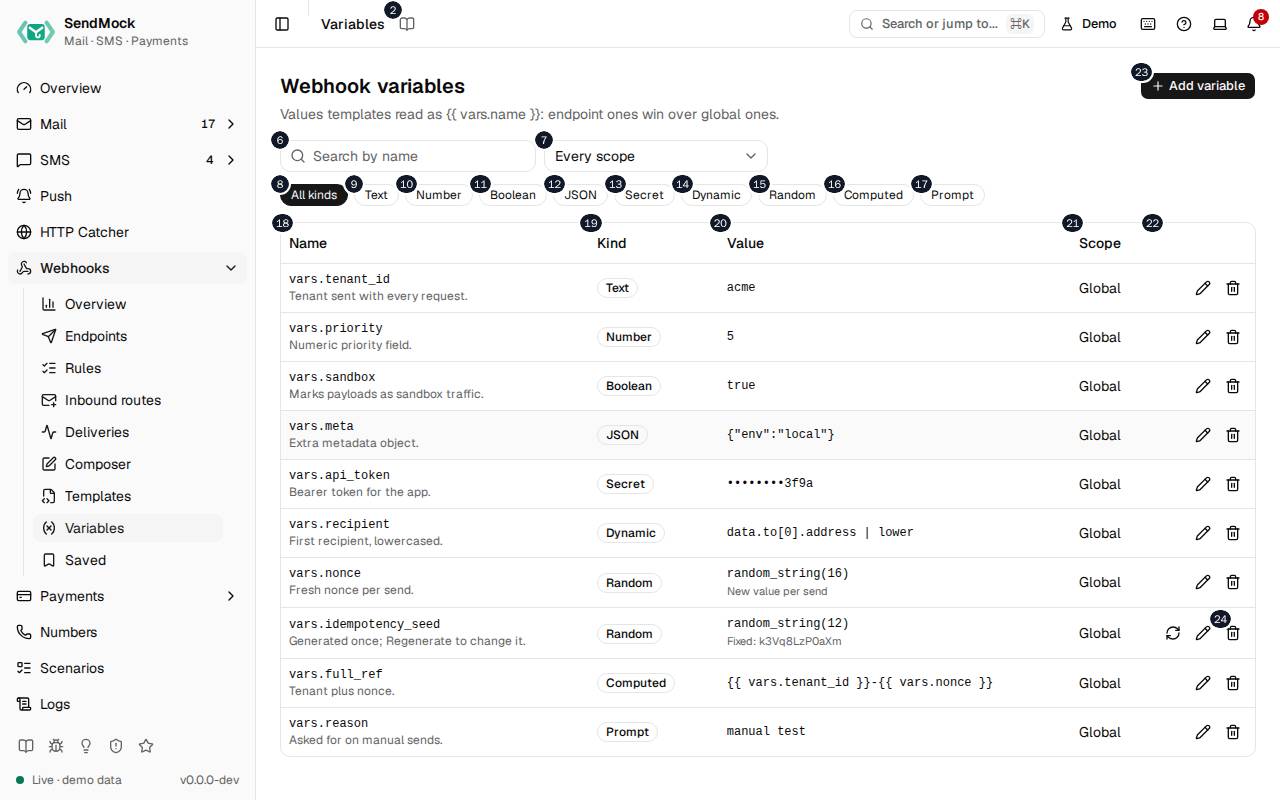
The numbers match the entries below. The picture shows the first screenful; controls further down, and texts, have no marker.
On the screen
1. Variables
Heading.
- What it does: Names the open screen in the header.
2. Read the Variables guide
Link.
- What it does: Opens this screen's page in the user guide, in a new tab.
- Links to: Variables.
3. Webhook variables
Heading.
- What it does: Values templates read as
{{ vars.name }}. - Same action elsewhere: REST
GET /api/v1/webhooks/variables, CLIsendmock webhook var list, MCPsendmock_webhook_variable_list
4. Values templates read as {{ vars.name }}: endpoint ones win over global ones.
Text.
- What it does: Explains the screen and which value wins.
5. Add variable
Button.
- What it does: Opens the variable editor; in it, adds the variable.
- Same action elsewhere: REST
POST /api/v1/webhooks/variables, CLIsendmock webhook var set, MCPsendmock_webhook_variable_set
6. Search variables
Field.
- What it does: Filters by name.
7. Scope filter
Drop-down.
- What it does: Shows global variables, one endpoint's, or all.
8. All kinds
Button.
- What it does: Shows every kind.
9. Text
Button.
- What it does: Shows only Text variables.
10. Number
Button.
- What it does: Shows only Number variables.
11. Boolean
Button.
- What it does: Shows only Boolean variables.
12. JSON
Button.
- What it does: Shows only JSON variables.
13. Secret
Button.
- What it does: Shows only Secret variables.
14. Dynamic
Button.
- What it does: Shows only Dynamic variables.
15. Random
Button.
- What it does: Shows only Random variables.
16. Computed
Button.
- What it does: Shows only Computed variables.
17. Prompt
Button.
- What it does: Shows only Prompt variables.
18. Name
Column.
- What it does: The variable's name.
19. Kind
Column.
- What it does: Its kind.
20. Value
Column.
- What it does: Its value, or a sample of what it resolves to; secrets are masked.
21. Scope
Column.
- What it does: Global, or the endpoint it belongs to.
22. Actions
Column.
- What it does: Edit and Delete.
23. …
Button, in each row.
- What it does: Opens the variable's editor.
24. Delete idempotency_seed
Button, in each row.
- What it does: Deletes the variable after you confirm (here a demo variable).
- Same action elsewhere: REST
DELETE /api/v1/webhooks/variables/{variableId}, CLIsendmock webhook var unset, MCPsendmock_webhook_variable_unset
New variable editor
25. Add a variable
Heading.
- What it does: The new variable editor.
26. A value templates read as {{ vars.name }}.
Text.
- What it does: Explains the editor.
27. Name
Field.
- What it does: The name templates use after
vars..
28. Used as {{ vars.name }}.
Text.
- What it does: How a template reads it.
29. Scope
Drop-down.
- What it does: Global, or one endpoint; an endpoint's wins over a global one of the same name.
30. Text A fixed piece of text, e.g. a tenant id.
Choice.
- What it does: A fixed text value.
31. Number A fixed number, sent unquoted in fields.
Choice.
- What it does: A fixed number.
32. Boolean true or false.
Choice.
- What it does:
trueorfalse.
33. JSON A fixed object or list.
Choice.
- What it does: A fixed JSON object or list.
34. Secret A token or key: masked everywhere, never shown again.
Choice.
- What it does: A secret, masked in the UI, the API, logs, MCP and seed exports.
35. Dynamic Read from the event, e.g. data.to[#].address | lower.
Choice.
- What it does: An expression on the event, such as the first recipient in lower case.
36. Random Generated per send or once, e.g. random_string(#).
Choice.
- What it does: A random value, new for each send or made once.
37. Computed A template made of other variables.
Choice.
- What it does: A template that combines other variables.
38. Prompt Asked for on manual sends; the default is used otherwise.
Choice.
- What it does: Asked for when you send by hand; the default is used for rule deliveries.
39. Value
Field.
- What it does: The value, expression or template, by kind.
40. Resolves to, with the sample email
Heading.
- What it does: What the variable gives for the sample email.
- Same action elsewhere: REST
POST /api/v1/webhooks/variables/preview, CLIsendmock webhook var preview, MCPsendmock_webhook_variable_preview
41. Description
Field.
- What it does: A note on what the variable is for.
42. Cancel
Button.
- What it does: Closes the editor without saving.
43. Add variable
Button.
- What it does: Adds the variable.
- Same action elsewhere: REST
POST /api/v1/webhooks/variables, CLIsendmock webhook var set, MCPsendmock_webhook_variable_set
44. Close
Button.
- What it does: Closes the editor without saving.
Variable editor
45. vars.tenant_id
Heading.
- What it does: The variable open in the editor (here a demo variable).
46. A value templates read as {{ vars.name }}.
Text.
- What it does: Explains the editor.
47. Name
Field.
- What it does: The name templates use after
vars..
48. Used as {{ vars.name }}.
Text.
- What it does: How a template reads it.
49. Scope
Drop-down.
- What it does: Global, or one endpoint; an endpoint's wins over a global one of the same name.
50. Text A fixed piece of text, e.g. a tenant id.
Choice.
- What it does: A fixed text value.
51. Number A fixed number, sent unquoted in fields.
Choice.
- What it does: A fixed number.
52. Boolean true or false.
Choice.
- What it does:
trueorfalse.
53. JSON A fixed object or list.
Choice.
- What it does: A fixed JSON object or list.
54. Secret A token or key: masked everywhere, never shown again.
Choice.
- What it does: A secret, masked in the UI, the API, logs, MCP and seed exports.
55. Dynamic Read from the event, e.g. data.to[#].address | lower.
Choice.
- What it does: An expression on the event, such as the first recipient in lower case.
56. Random Generated per send or once, e.g. random_string(#).
Choice.
- What it does: A random value, new for each send or made once.
57. Computed A template made of other variables.
Choice.
- What it does: A template that combines other variables.
58. Prompt Asked for on manual sends; the default is used otherwise.
Choice.
- What it does: Asked for when you send by hand; the default is used for rule deliveries.
59. Value
Field.
- What it does: The value, expression or template, by kind.
60. Resolves to, with the sample email
Heading.
- What it does: What the variable gives for the sample email.
- Same action elsewhere: REST
POST /api/v1/webhooks/variables/preview, CLIsendmock webhook var preview, MCPsendmock_webhook_variable_preview
61. Description
Field.
- What it does: A note on what the variable is for.
62. Cancel
Button.
- What it does: Closes the editor without saving.
63. Save changes
Button.
- What it does: Saves the variable.
- Same action elsewhere: REST
PATCH /api/v1/webhooks/variables/{variableId}, CLIsendmock webhook var update, MCPsendmock_webhook_variable_update
64. Close
Button.
- What it does: Closes the editor without saving.
When the data cannot load
65. Could not load the variables. Try again
Message.
- What it does: Shown when the variables could not be loaded.
- Errors: Check SendMock is running, then press Try again.
66. Could not load the variables.
Text.
- What it does: The message inside the alert.
67. Try again
Button.
- What it does: Loads them again.
- Same action elsewhere: REST
GET /api/v1/webhooks/variables, CLIsendmock webhook var list, MCPsendmock_webhook_variable_list