DeeperWebhooks
Composer in depth
Every control and text of Webhooks > Composer.
Every control and text this screen shows, in screen order. The list is read from the demo by a crawl, and CI fails when the screen changes without its entry here.
Webhooks > Composer writes a webhook request by hand, or from any template, and sends it to an endpoint.
The screen as a whole: Composer and saved deliveries.
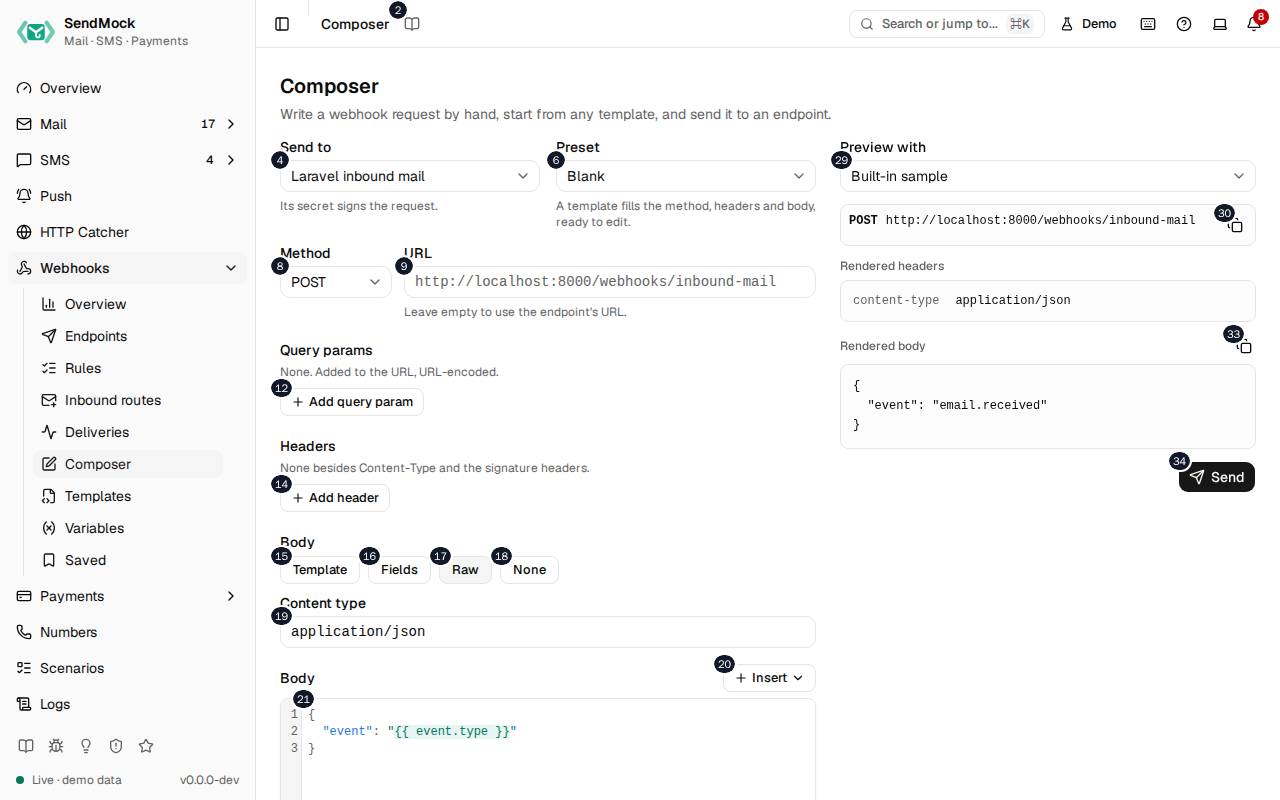
The numbers match the entries below. The picture shows the first screenful; controls further down, and texts, have no marker.
On the screen
1. Composer
Heading.
- What it does: Names the screen, in the header and above the form.
2. Read the Composer guide
Link.
- What it does: Opens this screen's page in the user guide, in a new tab.
- Links to: Composer and saved deliveries.
3. Write a webhook request by hand, start from any template, and send it to an endpoint.
Text.
- What it does: Explains the screen.
4. Send to
Drop-down.
- What it does: The endpoint the request goes to.
- Links to: Endpoints.
5. Its secret signs the request.
Text.
- What it does: Explains that the endpoint's secret signs it.
6. Preset
Drop-down.
- What it does: A template to start from: it fills the method, headers and body, which you can then change.
7. A template fills the method, headers and body, ready to edit.
Text.
- What it does: Explains Preset.
8. Method
Drop-down.
- What it does: The HTTP method.
9. URL
Field.
- What it does: A URL for this request only; it may hold
{{ }}templates.
10. Leave empty to use the endpoint's URL.
Text.
- What it does: Explains the URL field.
11. None. Added to the URL, URL-encoded.
Text.
- What it does: The query parameters; none yet.
12. Add query param
Button.
- What it does: Adds a query parameter.
13. None besides Content-Type and the signature headers.
Text.
- What it does: The extra headers; none yet.
14. Add header
Button.
- What it does: Adds a header.
15. Template
Choice.
- What it does: The body comes from a webhook template.
16. Fields
Choice.
- What it does: The body is built from name and value fields.
17. Raw
Choice.
- What it does: The body is text you write, with templates inside.
18. None
Choice.
- What it does: No body.
19. Content type
Drop-down.
- What it does: The raw body's
Content-Type.
20. Insert
Button.
- What it does: Inserts a value, function or filter at the cursor, from the template reference.
21. Raw body
Field.
- What it does: The body, in the template language.
22. Type {{ to see what you can use; hover a value to see an example.
Text.
- What it does: Explains the template suggestions.
- Links to: Template filters.
23. Strict An undefined value stops the delivery as render failed.
Choice.
- What it does: A value that is not defined stops the send.
24. Lenient An undefined value renders empty, with a warning.
Choice.
- What it does: A value that is not defined renders empty.
25. vars.reason
Field.
- What it does: A variable the template asks for on manual sends (here
reason). - Links to: Variables.
26. Asked for on manual sends.
Text.
- What it does: Explains why the variable is asked for.
27. None. A value here wins over the endpoint and global value of that name, for this send only.
Text.
- What it does: The variable overrides for this send; none yet.
28. Add override
Button.
- What it does: Adds a variable value for this send only.
29. Preview with
Drop-down.
- What it does: The event the preview renders with: a sample, or a recent real message.
- Same action elsewhere: REST
POST /api/v1/webhooks/endpoints/preview, CLIsendmock webhook render, MCPsendmock_webhook_render
30. Copy rendered URL
Button.
- What it does: Copies the URL as rendered.
31. Rendered headers
Heading.
- What it does: The headers the request will carry, signature included.
32. Rendered body
Heading.
- What it does: The body the request will carry.
33. Copy rendered body
Button.
- What it does: Copies the rendered body.
34. Send
Button.
- What it does: Sends the request now and shows the delivery it made, which you can then save.
- What it changes: Records a manual delivery in Webhooks > Deliveries.
- Errors: A template that does not render is refused with the reason.
- Same action elsewhere: REST
POST /api/v1/webhooks/endpoints/{endpointId}/send, CLIsendmock webhook send, MCPsendmock_webhook_send
When the data cannot load
35. Could not load the endpoints to send to. Try again
Message.
- What it does: Shown when the endpoints could not be loaded.
- Errors: Check SendMock is running, then press Try again.
36. Could not load the endpoints to send to.
Text.
- What it does: The message inside the alert.
37. Try again
Button.
- What it does: Loads the endpoints again.
- Same action elsewhere: REST
GET /api/v1/webhooks/endpoints, CLIsendmock webhook endpoint list, MCPsendmock_webhook_endpoint_list