DeeperWebhooks
Saved deliveries in depth
Every control and text of Webhooks > Saved and its Send dialog.
Every control and text this screen shows, in screen order. The list is read from the demo by a crawl, and CI fails when the screen changes without its entry here.
Webhooks > Saved keeps the requests you bookmarked, through pruning and reset, to send to any endpoint again.
The screen as a whole: Composer and saved deliveries.
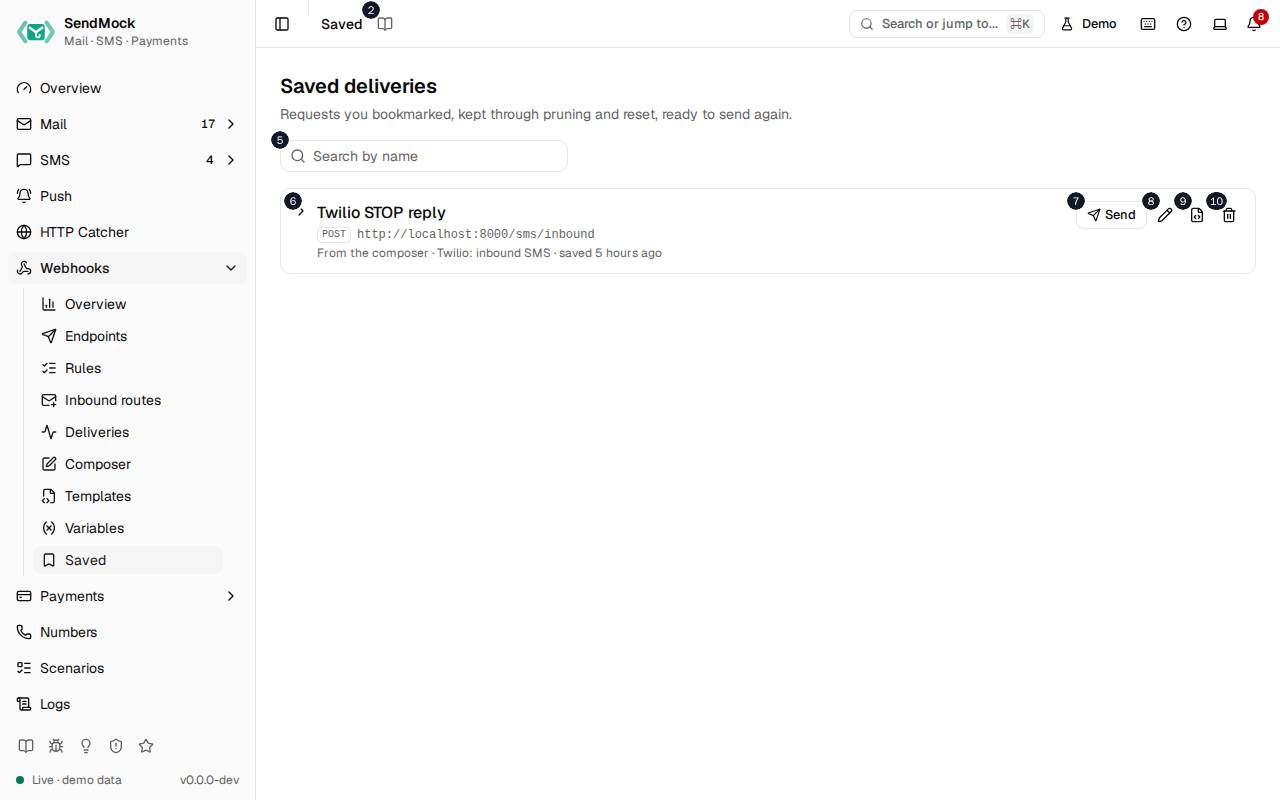
The numbers match the entries below. The picture shows the first screenful; controls further down, and texts, have no marker.
On the screen
1. Saved
Heading.
- What it does: Names the open screen in the header.
2. Read the Saved guide
Link.
- What it does: Opens this screen's page in the user guide, in a new tab.
- Links to: Composer and saved deliveries.
3. Saved deliveries
Heading.
- What it does: Requests you bookmarked, from a delivery or the composer.
- Same action elsewhere: REST
GET /api/v1/webhooks/saved, CLIsendmock webhook saved list, MCPsendmock_webhook_saved_list
4. Requests you bookmarked, kept through pruning and reset, ready to send again.
Text.
- What it does: Explains the screen.
5. Search saved deliveries
Field.
- What it does: Filters by name, URL or template.
6. Twilio STOP reply POST http://localhost:#/sms/inbound From the composer · Twilio: inbound SMS · saved # hours ago
Button.
- What it does: A saved delivery (here the demo's Twilio STOP reply): its name, method, URL, where it came from, its template and when it was saved. Shows or hides its stored request.
7. Send Twilio STOP reply
Button.
- What it does: Opens the Send dialog for it.
8. Rename Twilio STOP reply
Button.
- What it does: Renames it.
- Same action elsewhere: REST
PATCH /api/v1/webhooks/saved/{savedId}, CLIsendmock webhook saved rename, MCPsendmock_webhook_saved_update
9. Save as template Twilio STOP reply
Button.
- What it does: Turns it into a custom template.
- Links to: Templates.
- Same action elsewhere: REST
POST /api/v1/webhooks/saved/{savedId}/template, CLIsendmock webhook saved save-as-template, MCPsendmock_webhook_saved_save_as_template
10. Delete Twilio STOP reply
Button.
- What it does: Deletes it after you confirm.
- Same action elsewhere: REST
DELETE /api/v1/webhooks/saved/{savedId}, CLIsendmock webhook saved delete, MCPsendmock_webhook_saved_delete
Send a saved delivery dialog
11. Send "Twilio STOP reply"
Heading.
- What it does: The Send dialog of a saved delivery.
12. The stored body goes to the endpoint's URL with its method.
Text.
- What it does: Explains what is sent.
13. Endpoint
Drop-down.
- What it does: The endpoint to send it to; any endpoint works.
14. Re-render with fresh values
Checkbox.
- What it does: Renders the template again instead of sending the stored body as it was.
15. New timestamp, signature and random values, as a fresh event would get.
Text.
- What it does: Explains what re-rendering changes.
16. Cancel
Button.
- What it does: Closes the dialog without sending.
17. Send
Button.
- What it does: Sends it now as a new delivery.
- Same action elsewhere: REST
POST /api/v1/webhooks/saved/{savedId}/send, CLIsendmock webhook saved send, MCPsendmock_webhook_saved_send
18. Close
Button.
- What it does: Closes the dialog without sending.
When the data cannot load
19. Could not load the saved deliveries. Try again
Message.
- What it does: Shown when the saved deliveries could not be loaded.
- Errors: Check SendMock is running, then press Try again.
20. Could not load the saved deliveries.
Text.
- What it does: The message inside the alert.
21. Try again
Button.
- What it does: Loads them again.
- Same action elsewhere: REST
GET /api/v1/webhooks/saved, CLIsendmock webhook saved list, MCPsendmock_webhook_saved_list