Webhooks
How SendMock talks back to your app. The six parts of a webhook, how they fit, and the Webhooks overview screen.
Try it in the demo.
Real services call your app back: Postmark posts inbound email, Twilio posts delivery receipts and incoming SMS, SendGrid posts bounces, Stripe posts payment events. Locally they cannot reach you without a tunnel, and you cannot make them send what you need when you need it. SendMock sends those requests itself, shaped like the provider's and signed the way it signs them.
What it solves
- Testing webhook handlers without a public URL or tunnel, and without waiting for the provider.
- Your production handler, unchanged: the request has the provider's fields, content type and signature.
- Failures you can fix and replay: every request and your app's answer are logged; replay after the fix. See Recipe: replay a failed webhook.
- Signature checks: each endpoint has its own secret, which you can rotate to test your verification.
- Team alerts: send events to Slack, Discord or Teams.
The six parts
| Part | Is | Page |
|---|---|---|
| Event | something that happened: email.received, sms.status, payment.succeeded, ... | Events below |
| Rule | "send these events, when they match this filter, to this endpoint" | Rules |
| Endpoint | where to send (URL, method), how to shape it (template), how to sign it (secret), and retries | Endpoints |
| Template | the request's shape: the provider's fields, headers and signature | Templates |
| Variable | a value a template reads: an auth token, a tenant id, a random id | Variables |
| Delivery | one request SendMock sent, with your app's answer, retries and replay | Deliveries |
event ──► rule (filter) ──► endpoint ──► template + variables + secret ──► request ──► your app
                                                                               │
                                                             delivery log ◄────┘ (answer, retries, replay)
Some deliveries skip the rule, because the real provider would send them anyway: an SMS's status callback, a number's reply webhook (Numbers), an incoming email's inbound route, and a gateway's payment notification (Gateways). They all land in the same delivery log.
You can also send by hand: Send to webhook on any email, SMS or captured request, or the Composer.
How it connects
| Gets from | Sends to |
|---|---|
| events from Mail, SMS, Verify, HTTP Catcher and Payments | requests to your app |
| simulations: Simulate, Reply as recipient, Verify force, payment Simulate | Deliveries, the Overview and the bell |
Use it
- In Endpoints, press Add endpoint, name it, set the URL of your app's handler (for example
http://localhost:8000/webhooks/mail), and in the Request tab pick the template your app expects. - Press Send test on the endpoint to check your app answers 2xx.
- In Rules, press Add rule, pick the endpoint and the events, and save.
- Make the event happen (send an email, an SMS, a payment). The request shows in Deliveries with your app's answer.
Events
| Event | Fires when |
|---|---|
email.received | your app sent an email to SendMock |
email.inbound | an incoming email arrived (a simulated reply or forward, or mail to an inbound domain) |
email.opened | an email was opened in the UI, or an open was simulated |
email.clicked | a link of an email was clicked in the preview, or a click was simulated |
email.delivered, email.deferred, email.bounced, email.complained, email.unsubscribed | a delivery outcome was simulated (Outcomes) |
email.released | an email was released to a real SMTP relay |
sms.sent | your app sent an SMS or WhatsApp message |
sms.status | a message's status changed |
sms.opened | an SMS was viewed in the UI, or a read was simulated |
sms.inbound | the contact replied |
verify.started, verify.checked, verify.expired | Twilio Verify activity |
push.sent, push.failed | your app sent a push notification through FCM, Expo or OneSignal, or the provider refused it (Push) |
http.captured | the HTTP Catcher recorded a request |
payment.*, checkout.* | payments were created, succeeded, failed, refunded, disputed; checkouts completed or expired |
webhook.failed | a delivery used up its retries (useful for alerts) |
test.ping | Send test on an endpoint |
Everything on this screen
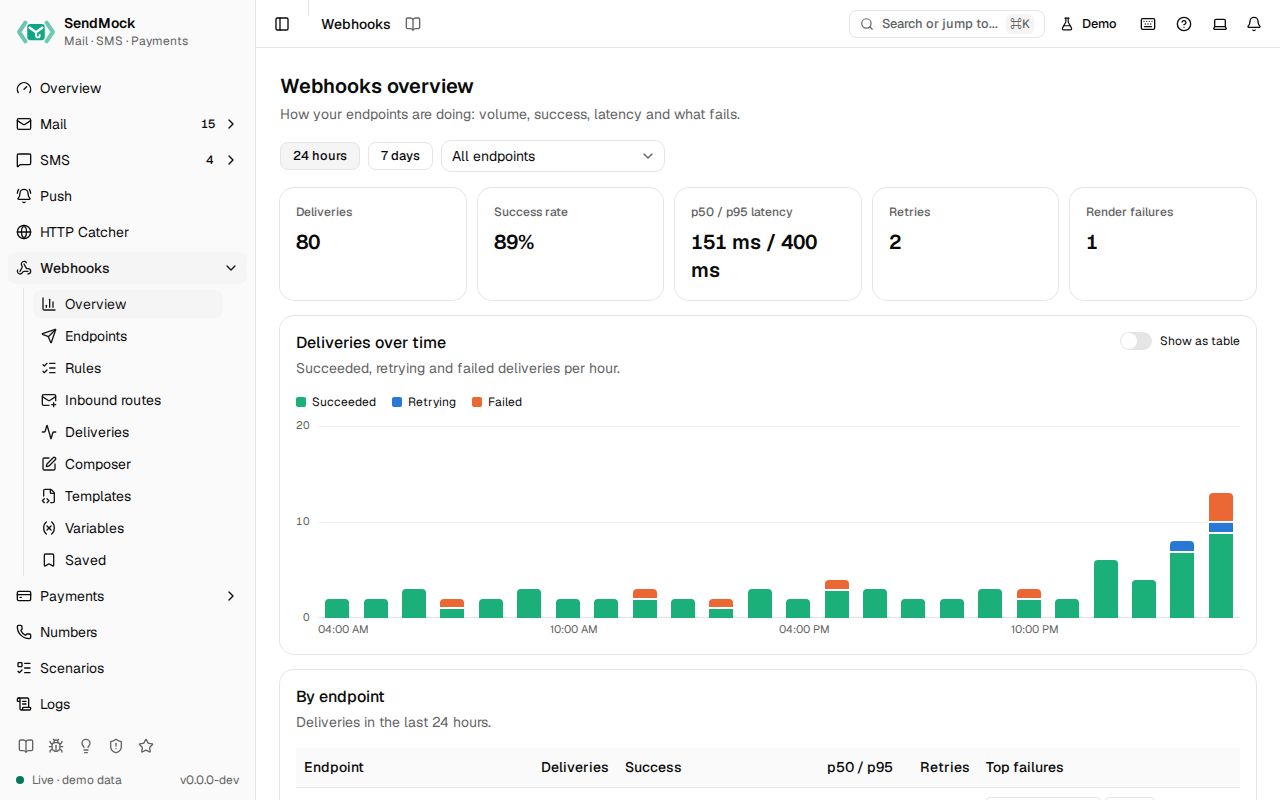
The Webhooks overview screen
The first Webhooks screen shows how deliveries are going, live.
- Range: 24 hours (hourly) or 7 days (daily), and All endpoints or one endpoint. Both are kept in the URL.
- Stat tiles: deliveries, success rate, p50 and p95 latency, retries and render failures.
- Deliveries over time: stacked columns for succeeded, retrying and failed, with a tooltip (hover or arrow keys) that adds p50 and p95 latency, and Show as table.
- By endpoint: deliveries, success-rate meter, latency, retries and top failure codes per endpoint; click a row to narrow the screen to it.
- Top failure codes: each code or error with its count and share, linking to the failed deliveries.
- Recent failures: each linking to its delivery.
Signing
SendMock's own JSON follows Standard Webhooks: webhook-id, webhook-timestamp and webhook-signature headers with the endpoint's whsec_ secret, so the official libraries verify it. Runnable examples for the Node, Python, PHP and Go libraries are in examples/webhooks. Provider templates sign the provider's way (X-Twilio-Signature, Mailgun's signature field, Stripe-Signature, ...).
Every control and text, one by one: Webhooks overview in depth.
Customize
- Shape requests for any service: Advanced: templates and Advanced: request editor.
- Values that change per send or come from the message: Advanced: variables.
- Exact filters: Advanced: rules and filters.
From your code
Wait for the delivery an email triggers and check your handler accepted it.
The examples call SendMock's REST API with each language's usual HTTP client and test framework. JavaScript, Go, Java, Rust, Ruby and C# use the small call helper shown under Test helper on their page in Connect your app.
# In your app: email the order confirmation

delivery=$(sendmock webhook deliveries wait --event email.received --timeout 10s --json)

jq -e '.status == "succeeded"' <<<"$delivery" >/dev/null
From the CLI, API and AI
| Do this | CLI | API | MCP tool |
|---|---|---|---|
| health | sendmock webhook metrics | GET /api/v1/webhooks/metrics | sendmock_webhook_metrics |
| recent events | sendmock events tail | GET /api/v1/events/recent | sendmock_events_recent |
| wait for a delivery | sendmock webhook deliveries wait | GET /api/v1/wait/webhook | sendmock_webhook_delivery_wait |