
Webhooks
Providers call your app back after they send something: Mailgun reports a mail as delivered or opened, Twilio reports an SMS as sent and delivered. When Peep catches the mail or SMS instead, the webhook simulator makes those calls, signed the way the provider signs them, so your webhook code runs and its signature check passes.
Open the Webhooks tab.
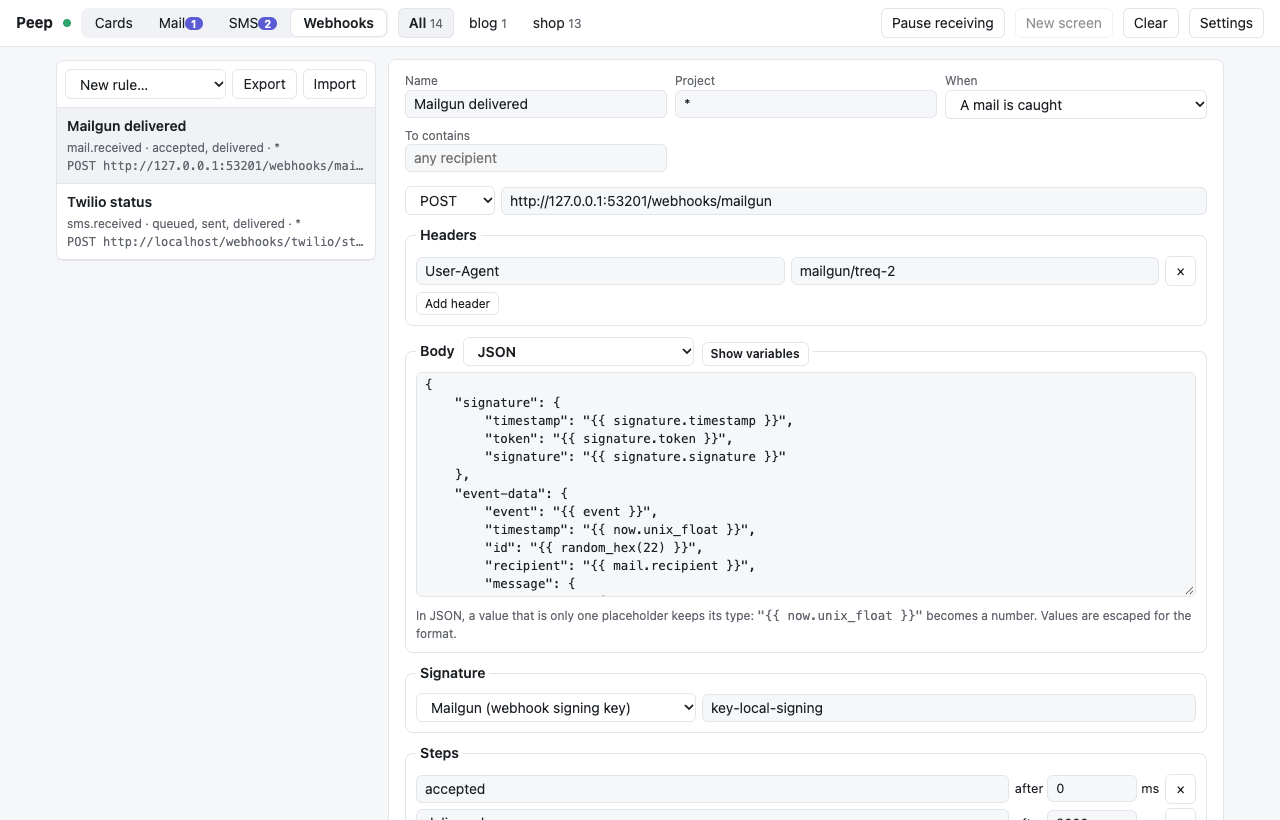
A first rule
- Choose New rule… → Mailgun events.
- Set the URL to your app's webhook route, e.g.
http://shop.test/webhooks/mailgun. - Set the signature secret to your local webhook signing key (what your app checks against, e.g.
MAILGUN_WEBHOOK_SIGNING_KEY). - Save, then Test: a call with sample data goes out, and the delivery log shows the request and your app's answer.
From now on, every mail the viewer catches gets an accepted call at once and a delivered call two seconds later. Change the steps to simulate other paths, e.g. accepted, then failed.
Twilio status callbacks
New rule… → Twilio status callback, with your Twilio auth token as the secret. When the app sends an SMS with a StatusCallback URL, the calls go to that URL (only if its host is localhost, 127.0.0.1, *.test or *.localhost); otherwise to the rule's URL. Each call carries X-Twilio-Signature, computed over the exact URL called, so Twilio's RequestValidator accepts it.
Sending by hand
Open a mail or SMS in its inbox, pick a rule and an event (for example opened or undelivered) and click Send webhook. Rules with the trigger "Only when sent by hand" appear only there.
Writing the body
The body is a template. Placeholders are written {{ ... }}:
{
  "event": "{{ event }}",
  "message_id": "{{ mail.message_id }}",
  "recipient": "{{ mail.recipient }}",
  "timestamp": "{{ now.unix_float }}",
  "id": "{{ uuid() }}",
  "check": "{{ hmac_sha256(vars.secret, now.unix ~ event) }}"
}- In JSON, a value that is only one placeholder keeps its type:
"{{ now.unix_float }}"is sent as a number. Everything is escaped for you. - A form body is written as a JSON object of fields; each value is rendered and URL-encoded.
- XML bodies have every inserted value escaped; raw bodies are sent as written.
~joins text. Functions:uuid(),random_hex(n),random_int(a, b),hmac_sha256(key, data),hmac_sha1,sha1,sha256,md5,base64,url_encode,date('Y-m-d'),upper,lower,json.- Show variables in the editor lists every variable (
mail.*,sms.*,now.*,vars.*and more). Unknown names become empty and are listed as warnings in the delivery log.
For a signature of your own, choose Custom header and write it as a template; the rendered body is available as body:
X-Signature: {{ hmac_sha256(vars.secret, body) }}With an AI agent
An AI coding agent can send your rules too, to test the app's webhook handler while it fixes it: vendor/bin/peep send-webhook --rule="Mailgun events" --event=failed --mail=last sends one call now and shows the app's answer, and peep webhooks lists the rules and the delivery log. The MCP tools are peep_webhooks and peep_send_webhook. The agent never sees a rule's secret and cannot create or change rules. See AI agents.
Delivery log, retries, sharing rules
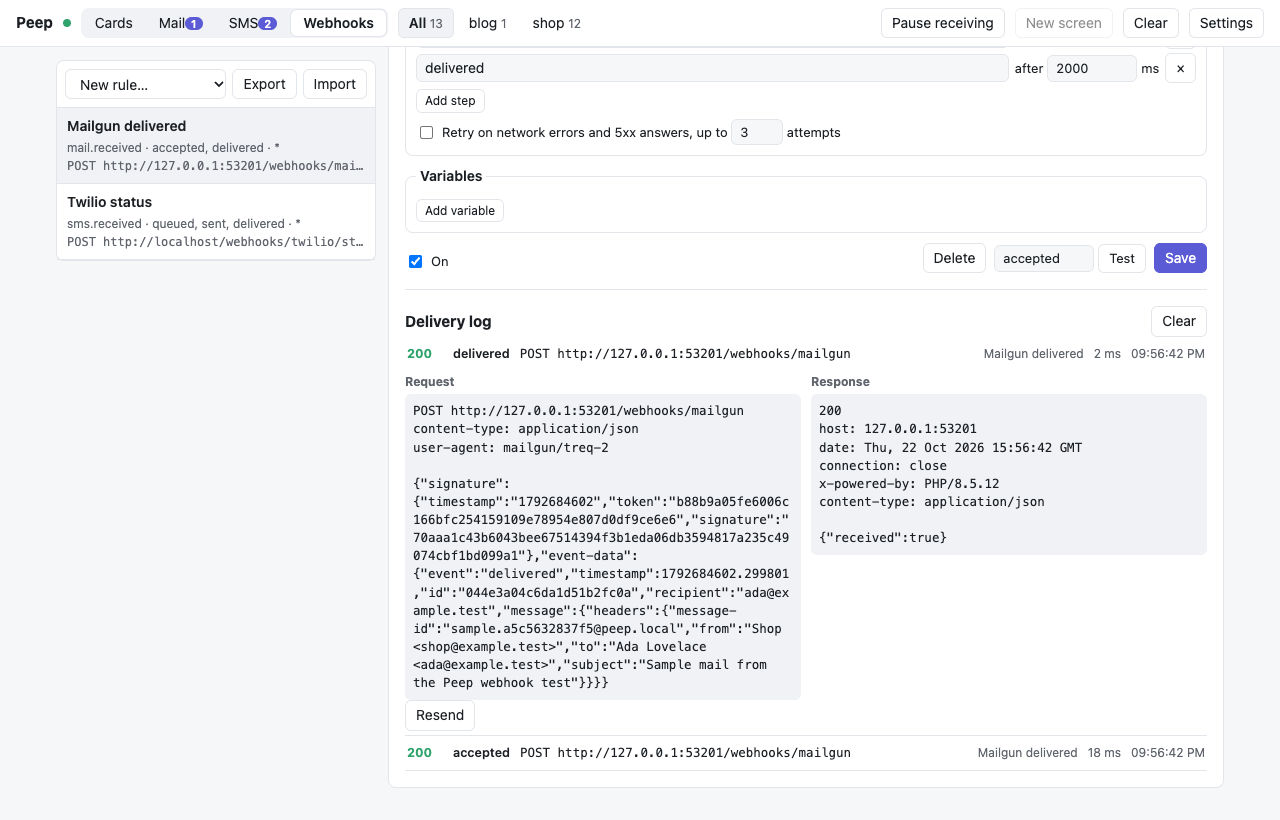
- Each call is logged with its request, the response (up to 64 KB), the time it took and any template warnings. Resend sends the same request again.
- Turn on Retry to repeat calls that failed with a network error or a 5xx answer, after 1, 2, 4... seconds.
- Rules are saved in the viewer's
settings.json. Export downloads them as JSON and Import adds rules from such a file, so a team can share them.
The viewer never follows redirects and gives each call 10 seconds.