My Laravel app sends email through Mailgun. Sending is the easy part. The harder part is what comes back: Mailgun telling the app that an email was delivered, that it bounced, or that someone marked it as spam.
Mailgun reports those as webhooks. On my laptop they never arrive, because Mailgun cannot reach localhost. So the webhook handler usually runs for the first time on a real server.
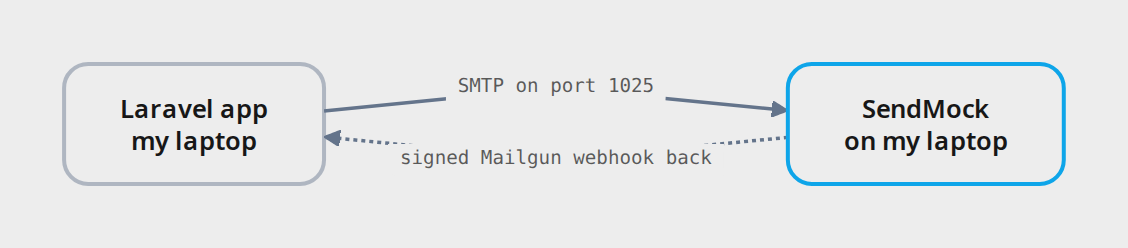
I built SendMock for this. The app sends its email to SendMock, SendMock shows it in a web UI, and then it sends the webhooks back to the app the same way Mailgun would, signature included.
Here is the difference. Switch between the two scenarios, or open the interactive view and step through each hop:
title: Testing a Mailgun webhook handler, with and without SendMock

scenario "With SendMock"
> The email goes to SendMock, and the webhook comes straight back to the app, like a real Mailgun server would send it. A handler fix is tested in seconds, and Replay sends the same webhook again without a new email.

Laravel app [my laptop]
> Sends the email, and has the /webhooks/mailgun route that receives Mailgun's events.

SendMock [on my laptop] {allowed}
> Catches every email over SMTP, shows it in a web UI, and posts Mailgun's webhook back to the app, signed with the same key, like the real Mailgun would.

Mailgun [the real service]
> Sends the real email, then posts the event webhook to a public URL set in its dashboard.

Real inbox [a real person] {blocked}
> Test emails reach real addresses. A bounce needs an address that really does not exist.

Laptop unreachable [webhook never arrives] {blocked}
> Mailgun only posts to public URLs. My laptop is not one, so the webhook meant for my local handler is simply lost.

Staging server [deploy every fix to test]
> The first place the webhook can actually arrive, so every fix to the handler has to be committed and deployed before I can see if it works.

Laravel app --> SendMock (SMTP on port 1025) {allowed}
> Only .env changes: MAIL_MAILER=smtp, MAIL_HOST=127.0.0.1, MAIL_PORT=1025.

SendMock --> Laravel app (signed Mailgun webhook back) {allowed}
> Delivered, failed or complained, in Mailgun's format and signed with the signing key, posted back to the app's /webhooks/mailgun route on localhost.

scenario "Without SendMock"
> Mailgun cannot reach my laptop, so every change to the webhook handler means a deploy and a real email, then waiting for Mailgun. Minutes per try, and a bounce is hard to make on demand.

Laravel app --> Mailgun (send the email)
> Through the Mailgun API, with the real key.

Mailgun --> Real inbox (a real email goes out) {blocked}
> Someone actually receives it, even though it is only a test.

Mailgun --> Laptop unreachable (webhook to localhost) {blocked}
> This never arrives. The handler on my laptop never sees it.

Mailgun --> Staging server (webhook, after a deploy)
> Minutes later. If the handler has a bug, the whole loop starts again.
Start SendMock
Install it once. On macOS:
brew install shibbirweb/tap/sendmockOther systems, Docker and npx are on the install page. Then start it:
sendmockThe web UI is at http://127.0.0.1:8025, and SMTP listens on port 1025.
Sending: plain SMTP is enough
To send, I do not need the Mailgun API locally. Laravel's SMTP mailer does the job, so the local .env points it at SendMock:
MAIL_MAILER=smtp
MAIL_HOST=127.0.0.1
MAIL_PORT=1025
Production keeps MAIL_MAILER=mailgun. No code changes.
Trigger anything that sends an email, like a password reset. It shows up in SendMock's Mail screen in a second, with the HTML, the text version, the headers, and any link or code pulled out with a copy button.
A webhook route that checks Mailgun's signature
Every Mailgun webhook has a signature block with a timestamp, a token and a signature. The app proves the request came from Mailgun by computing an HMAC SHA-256 of the timestamp and token with the webhook signing key, and comparing.
The route:
use App\Http\Controllers\Webhooks\MailgunWebhookController;

Route::post('/webhooks/mailgun', MailgunWebhookController::class)->name('webhooks.mailgun');
Webhooks do not carry a CSRF token, so the webhook routes skip that check:
->withMiddleware(function (Middleware $middleware): void {
    $middleware->validateCsrfTokens(except: [
        'webhooks/*',
    ]);
})
The controller:
<?php

namespace App\Http\Controllers\Webhooks;

use Illuminate\Http\Request;
use Illuminate\Support\Facades\Log;

class MailgunWebhookController
{
    public function __invoke(Request $request)
    {
        $timestamp = $request->input('signature.timestamp');
        $token = $request->input('signature.token');
        $expectedSignature = hash_hmac('sha256', $timestamp.$token, config('services.mailgun.webhook_signing_key'));

        if (! hash_equals($expectedSignature, (string) $request->input('signature.signature'))) {
            abort(403, 'Invalid Mailgun signature');
        }

        $event = $request->input('event-data.event');
        $recipient = $request->input('event-data.recipient');

        Log::info("Mailgun: {$event} for {$recipient}");

        return response()->noContent();
    }
}
In a real app, this is where a failed event would mark the address as bounced. The signing key comes from config/services.php:
'mailgun' => [
    'domain' => env('MAILGUN_DOMAIN'),
    'secret' => env('MAILGUN_SECRET'),
    'webhook_signing_key' => env('MAILGUN_WEBHOOK_SIGNING_KEY'),
],
In production it is the key from the Mailgun dashboard. Locally it can be any string, as long as SendMock uses the same one:
MAILGUN_WEBHOOK_SIGNING_KEY=local-signing-keyPointing SendMock's webhooks at the app
Three small steps in the SendMock UI (Webhooks explains every option):
- Webhooks > Variables: add a Secret variable named
mailgun_signing_keywith the valuelocal-signing-key. SendMock signs every Mailgun webhook with it. - Webhooks > Endpoints: press Add endpoint. Set the URL to
http://127.0.0.1:8000/webhooks/mailgun, and under Request pick the template Mailgun: event webhooks. The request body now looks exactly like Mailgun's. - Webhooks > Rules: press Add rule, pick that endpoint, and tick
email.delivered,email.bouncedandemail.complained.
Making an email bounce on purpose
Send email to these addresses and SendMock picks the outcome by itself (all of them are on Outcomes):
[email protected]: delivered.[email protected]: a hard bounce (550 5.1.1 user unknown).[email protected]: delivered, then reported as spam.
Any email already in the list works too: open it, press Simulate, and pick an outcome. After sending to the first two addresses, my Laravel log shows:
Mailgun: delivered for [email protected]
Mailgun: failed for [email protected]
The bounce arrives as failed, the same event name Mailgun uses, and both requests passed the signature check.
Every webhook SendMock sends is listed in Webhooks > Deliveries, with the request and my app's response. If the handler throws, I fix it and press Replay. No need to send the email again.
Note: To get a
deliveredevent for every email, not only fordelivered@, set the delivery profile to Auto-delivered in Settings > Email.
Mailgun is only one of the services it stands in for
I started with Mailgun because that is what my app uses. SendMock is not tied to it, or to Laravel. It speaks plain SMTP and HTTP, so any framework or language can use it, and the docs have the connection settings for PHP, Node.js, Python, Go, Java, Rust, Ruby and .NET. Email is one part of it (the full list is on Supported providers):
- Email providers: Mailgun, SendGrid, Postmark, Resend, Amazon SES and Brevo, each answered at its real API paths.
- SMS: Twilio, Vonage and more, with delivery status and replies. The next part covers Twilio.
- Push notifications: FCM, Expo and OneSignal.
- Payments: Stripe, PayPal, Razorpay, Paddle, bKash and SSLCommerz, with a test checkout page and the gateway's own webhooks.
- HTTP catcher: point any HTTP call at a catcher bin, see the full request, and send back the response you choose.
Adding a service it does not ship
Providers, payment gateways and webhook templates are data, not code. A missing email provider, a regional SMS vendor, a local payment gateway or another service's webhook format can be added from the UI: start blank or copy the closest built-in, then set its paths, fields and responses. No fork and no rebuild. Advanced walks through each one.
Or let an AI agent do it
SendMock is AI first. Every feature is one operation shared by the web UI, the REST API, the CLI and an MCP server, so anything I can click, a coding agent can do too. One command connects it:
sendmock ai install --target claude-codeCodex, Cursor, Gemini CLI and VS Code have their own targets. After that I can ask the agent for the whole setup in this article: point the app's mail at SendMock, add the Mailgun endpoint, signing key and rule, send to [email protected], and check that the handler marked the address. When a webhook fails, it reads the delivery, explains the error, fixes the handler and replays it. It can even build something SendMock does not ship, like a payment gateway from the provider's API docs. Secret values stay hidden from agents.
What changes in production
Only .env:
MAIL_MAILER:smtp(withMAIL_HOST=127.0.0.1andMAIL_PORT=1025) locally,mailgunin production.MAILGUN_WEBHOOK_SIGNING_KEY: any string locally, the real key from the Mailgun dashboard in production.
The webhook controller is the same code in both places, so by the time it reaches production it has already handled delivered, bounced and spam events on my machine. The next part does the same for Twilio SMS: delivery status and replies.
Explore SendMock
Everything in this article is a small part of SendMock. If you want to dig further:
- Documentation: every screen, recipe and provider, step by step.
- Live demo: the full UI with sample data, in the browser, nothing to install.
- GitHub: the source, releases and issues.